أتمتة دعم العملاء باستخدام الوكيل الافتراضي لـ JSM: دليل شامل

أتمتة دعم العملاء باستخدام الوكيل الافتراضي لـ JSM: دليل شامل
تواجه الشركات اليوم ضغوطاً متزايدة لتقديم دعم عملاء سريع وموثوق مع التحكم في التكاليف. يقدم الوكيل الافتراضي من Atlassian حلاً قوياً: روبوت محادثة يعمل بالذكاء الاصطناعي ومدمج مباشرة في Jira Service Management لأتمتة مهام الدعم الشائعة، وتقليل حجم التذاكر، وتمكين الخدمة الذاتية.
وفقاً لمعايير الصناعة الحديثة، يمكن للمؤسسات التي تنشر وكلاء افتراضيين حل ما يصل إلى **85%**من استفسارات الدعم من المستوى الأول دون تدخل بشري، مما يقلص متوسط أوقات المعالجة بأكثر من 60%.
في هذا الدليل الشامل، سنستكشف كيفية عمل الوكيل الافتراضي لـ JSM، وفوائده الرئيسية، وأفضل ممارسات التنفيذ، وبيانات الأداء الواقعية لمساعدتك في تحديد ما إذا كان الخيار المناسب لفريقك.
ما هو الوكيل الافتراضي في دعم العملاء؟
الوكيل الافتراضي هو روبوت محادثة يعمل بالذكاء الاصطناعي ويتفاعل مع المستخدمين بلغة طبيعية لحل المشكلات، والإجابة على الأسئلة، وتنفيذ المهام تلقائياً. على عكس روبوتات القواعد البسيطة، تستخدم الوكلاء الافتراضيون الحديثة التعلم الآلي لفهم النية، والحفاظ على السياق، والتعلم من التفاعلات.
عند دمجه مع منصة مكتب الخدمة، يصبح الوكيل الافتراضي خط الدعم الأول، حيث يتعامل مع إعادة تعيين كلمات المرور، وفتحها، والبحث في قاعدة المعرفة، وإنشاء التذاكر، وتحديث الحالة دون الحاجة إلى وكيل بشري.
لماذا اختارت Jira Service Management وكيلاً افتراضياً
صممت Atlassian وكيلها الافتراضي بشكل أصلي في Jira Service Management لسد الفجوة بين توقعات المستخدمين وسعة مكتب خدمة تكنولوجيا المعلومات. الهدف هو تحويل التذاكر، وليس مجرد جمعها. من خلال أتمتة مهام المستوى الأول والمستوى الثاني، يحرر الوكيل الافتراضي الوكلاء البشريين للتركيز على العمل المعقد وعالي القيمة.
How JSM Virtual Agent Automates Support Workflows
JSM Virtual Agent works by combining natural language understanding with the powerful automation rules of Jira Service Management. Here is how it functions:

-Intent Recognition: The agent analyzes user messages to identify what the user wants (e.g., reset password, check ticket status).
- Conversation Design: Pre-built flows guide users through resolution steps without human handoff.
- Knowledge Base Integration: It searches Confluence or JSM Knowledge Base for relevant articles and presents them inline.
- Ticket Automation: Based on user input, the agent can create, update, or resolve tickets using custom fields and workflows.
- Approvals and Notifications: It triggers approval requests and sends updates to users and agents.
Step-by-Step Automation Example: Password Reset
- User types "I forgot my password" in the virtual agent chat.
- The agent confirms identity via linked account or security question.
- Agent executes an automated script to reset the password.
- User receives the new password via secure channel.
- A ticket is automatically created with resolution details for audit.
Implementation Best Practices
1. Start with High-Volume, Low-Complexity Tasks
Identify the top 5–10 request types in your current service desk. These are ideal candidates for automation. Common examples:
- Password resets
- Knowledge base searches
- Ticket status inquiries
- Leave requests
- Software license requests
2. Design Conversational Flows Naturally
Use a conversational tone. Avoid technical jargon. Test with actual users to refine intent recognition.
3. Integrate with Knowledge Base
Ensure your Confluence or JSM Knowledge Base is well-maintained. The virtual agent's ability to find answers depends on quality content.
4. Monitor and Optimize Regularly
Track metrics such as deflection rate, escalation rate, and user satisfaction. Use insights to update conversation flows.
5. Plan for Escalation to Human Agents
Not every issue can be automated. Design a seamless handoff where the bot provides context to the human agent.
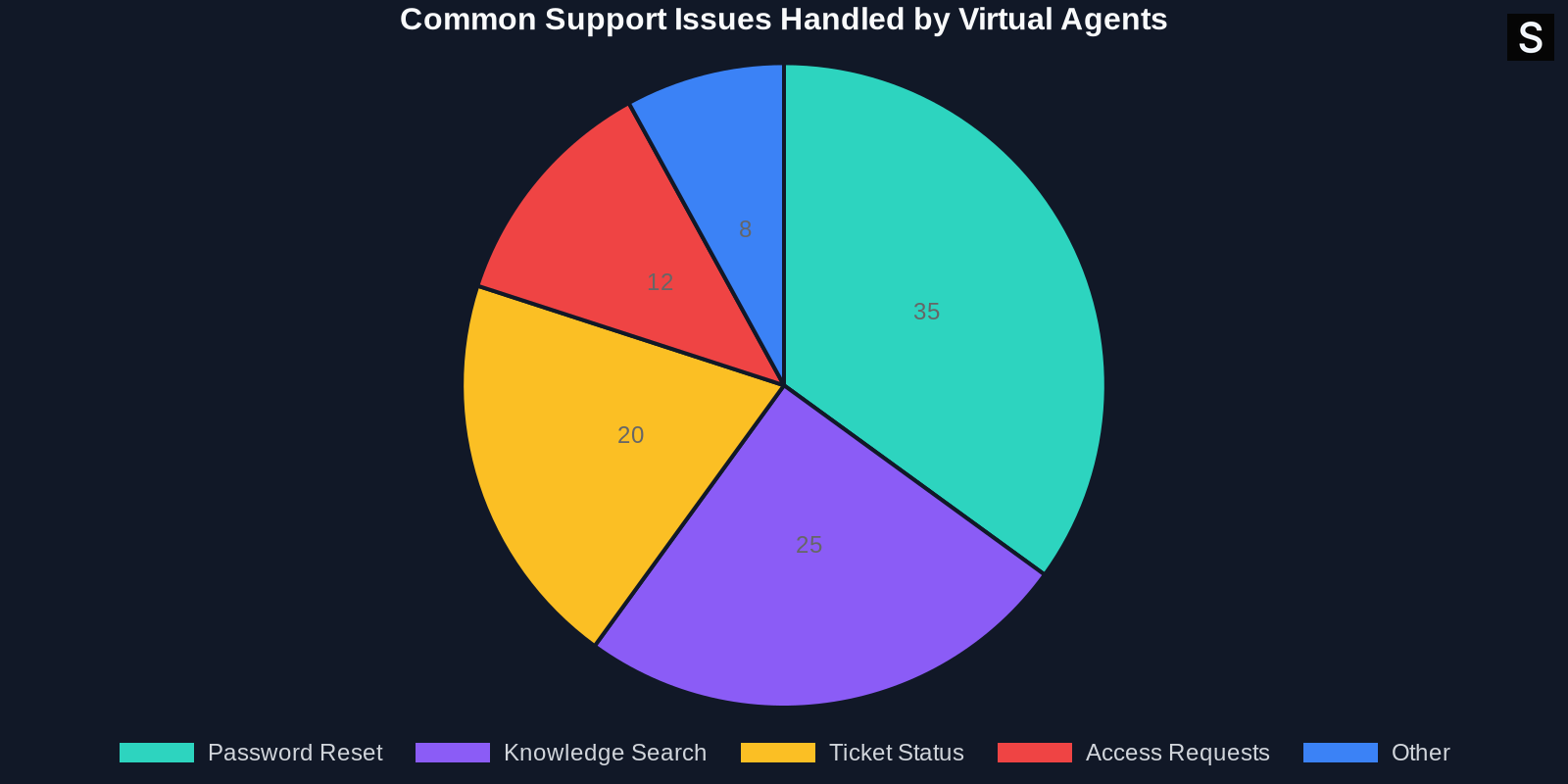
Common Pain Points Solved by Virtual Agents
Below is a breakdown of issues that virtual agents handle effectively:

- Password resets: Fully automated with identity verification.
- Account unlock: Instant resolution without IT involvement.
- Knowledge retrieval: Pulls relevant articles from Confluence.
- Device requests: Routes to approval flow with user info.
- Status updates: Users can check ticket status without creating a new request.
Measuring Success: Key Metrics to Track
To validate your investment, track these KPIs:
- Deflection Rate: Percentage of queries resolved without human agent
- First Contact Resolution (FCR): Solved in first interaction
- Average Handle Time (AHT): Time from user input to resolution
- User Satisfaction (CSAT): Post-interaction survey rating
- Escalation Rate: How often does the bot hand off to a human
- Cost Per Ticket: Total support cost divided by ticket count
الخاتمة
أتمتة دعم العملاء باستخدام الوكيل الافتراضي لـ JSM ليست مجرد اتجاه - إنها ضرورة استراتيجية لفرق تكنولوجيا المعلومات التي تهدف إلى تقديم خدمة عالية الجودة بموارد محدودة. من خلال تحويل التذاكر الروتينية، يقلل الوكيل الافتراضي التكاليف، ويسرع الحل، ويحسن رضا الوكلاء والمستخدمين على حد سواء.
مع نهج التنفيذ الصحيح والتحسين المستمر، يمكن للمؤسسات تحقيق معدل تحويل يزيد عن 80%، وخفض حجم التذاكر إلى النصف، وتحرير الوكلاء البشريين لحل المشكلات الأكثر أهمية.
إذا لم تكن قد استكشفت الوكيل الافتراضي لـ JSM بعد، فقد حان الوقت. ابدأ صغيراً، وقياس بلا كلل، وتوسع بسرعة. سيشكرك مستخدموك - ووكلاؤك - على ذلك.
تم إلهام هذه المقالة أصلاً من عمل فريق هندسة Atlassian. لمزيد من التفاصيل التقنية، تفضل بزيارة official Atlassian blog post حول أتمتة دعم العملاء.