
Threads Live Chats: How New Co-Host & Translation Features Drive Customer Engagement
Meta’s Threads is doubling down on real-time community interaction. According to TechCrunch, the platform recently added translation support, co-hosting options, and moderation tools to its Live Chats feature, while expanding access to a broader user base. For customer support teams and community managers, this update signals a shift, live conversations are no longer just for social media influencers; they’re becoming a critical channel for brand engagement, customer retention, and revenue growth.
But why does this matter for your support team? Consider this: 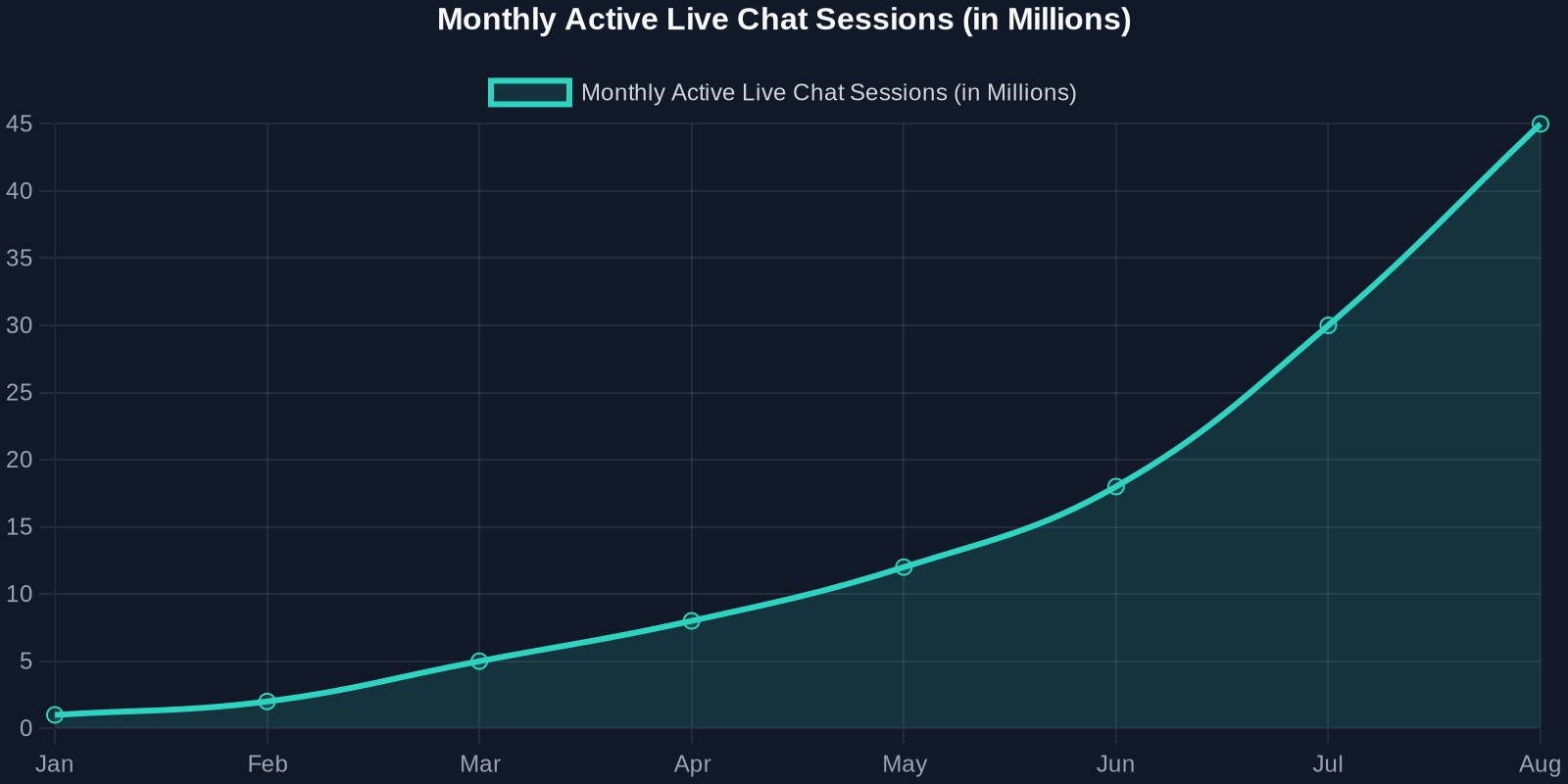 shows the explosive growth in live chat sessions across social platforms since Threads introduced its first batch of engagement features. The trend line is clear, customers want instant, personalized help without leaving the app.
Breaking Down Threads’ New Live Chat Features
1. Translation Support: Breaking Language Barriers
One of the most impactful additions is native translation support. Previously, global brands had to rely on third-party tools or manually respond to multilingual chats. Now, with automatic translation, a single live chat can serve customers from Tokyo, Berlin, and São Paulo simultaneously.
What Successly’s AI Brings to the Table
- Automated ticket deflection: AI can answer up to 70% of common queries before a human sees them.
- Smart routing: If a query needs escalation, Successly sends it to the right co-host with context attached.
- Real-time translation: Beyond Threads’ native support, Successly integrates with your existing CRM to maintain conversation history across channels.
- Moderation assistance: AI flags hate speech, spam, or emotionally charged messages, freeing your human agents to focus on complex cases.
Real-World Impact: Before vs. After AI-Enabled Live Chats
Let’s look at a hypothetical but typical scenario: a fast-growing B2B SaaS company with 5 support agents handling 500 live chat sessions per week across Threads and their website.
Best Practices for Combining Threads Live Chats with AI Support
1. Define Clear Escalation Paths
Not all chats need a human. Use ai to classify intents, billing questions, technical issues, general inquiries, and route only complex ones to co-hosts. This reduces agent burnout.
2. Leverage Translation for Global Reach
Successly’s AI can detect a customer’s language preference and respond in kind, but also maintain a single thread for your team. No more switching between tabs or losing context.
3. Use Moderation AI to Keep Conversations Safe
Threads’ moderation tools are a good start, but AI can identify patterns, like a customer becoming frustrated, and suggest a human handoff before the conversation escalates.
The Future of Live Chats: AI + Human Collaboration
Threads’ update is a wake-up call for customer support leaders: live chats are no longer optional. But to truly excel, you need more than just features, you need a strategy that combines the best of human empathy with AI efficiency.
As the data shows, companies that adopt AI-powered live chat see a 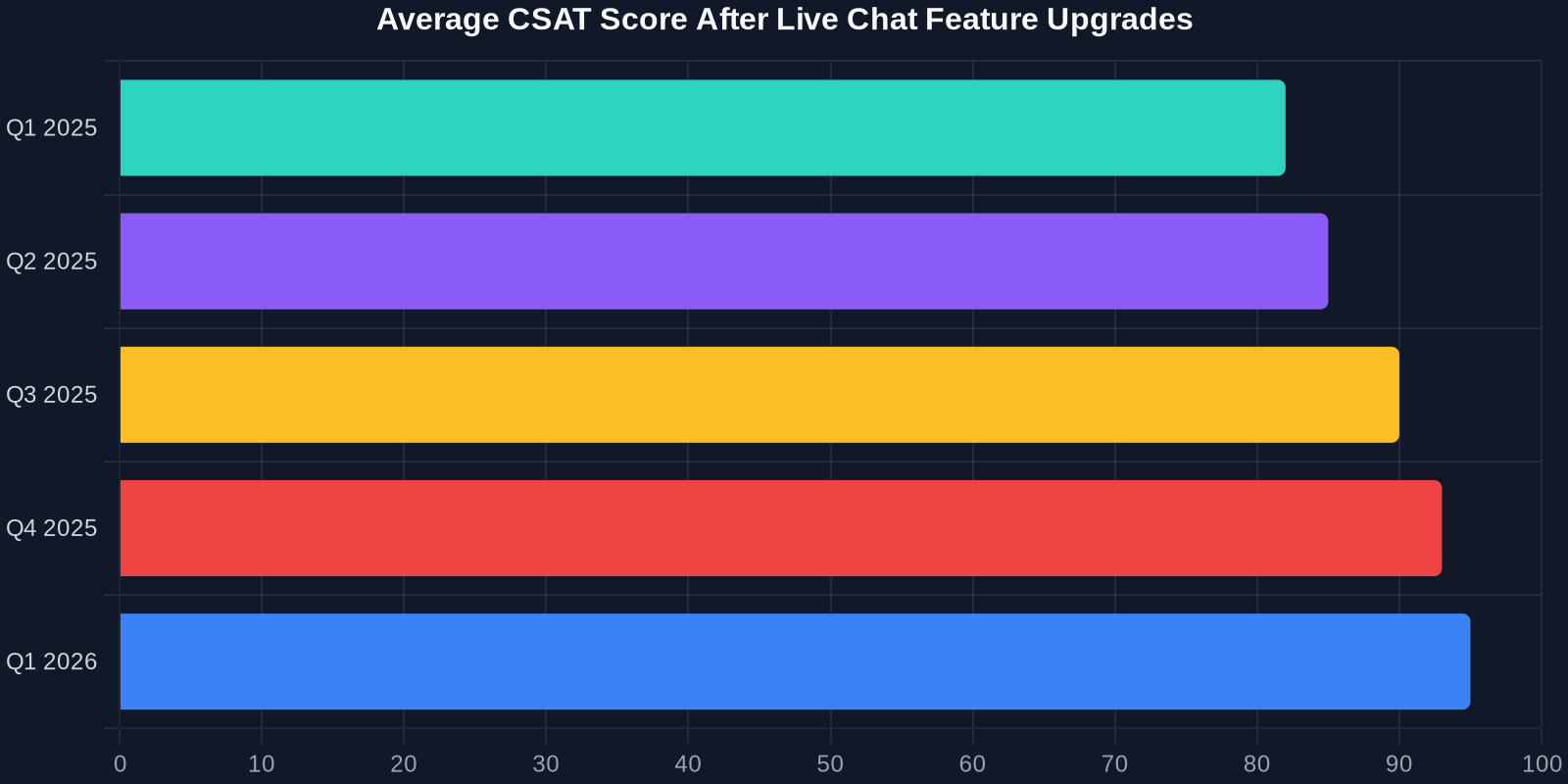 sustained increase in CSAT scores over multiple quarters. The trend is unmistakable.
Ready to Transform Your Live Chat Support?
Threads has opened the door. Now, it’s up to you to walk through it with the right tools. Successly’s AI-powered automation platform integrates seamlessly with Threads’ Live Chats, giving you translation, moderation, routing, and deflection capabilities that scale with your business.
Request a demo today and see how Successly can turn your Threads Live Chats into a customer retention powerhouse.