
Wie KI-gestützte Support-Automatisierung Tickets um 43 % reduziert und die Kundenzufriedenheit um 25 % steigert: Ein datengetriebenes Playbook für SaaS-Teams
Der Kundensupport ist das Rückgrat jedes SaaS-Unternehmens. Doch mit wachsender Nutzerbasis steigt auch die Anzahl sich wiederholender Fragen, Passwortzurücksetzungen und Funktionsanfragen. Die Folge: überforderte Agenten, steigende Kosten und frustrierte Kunden. Was aber, wenn Sie fast die Hälfte dieser Tickets abwehren könnten, bevor sie je einen Menschen erreichen? Das ist das Versprechen der KI-gestützten Support-Automatisierung.
In diesem Leitfaden zeigen wir Ihnen genau, wie führende SaaS-Teams mit Tools wie Successly das Ticketvolumen um 43 % senken, die Kundenzufriedenheit um 25 % steigern und ihre Support-Teams entlasten, damit sie sich auf hochwertige Gespräche konzentrieren können. Sie erhalten ein Schritt-für-Schritt-Playbook, reale Benchmarks und die Daten, die Sie brauchen, um den Fall für die Automatisierung zu untermauern.
Die Support-Skalierungskrise: Warum traditionelle Ansätze scheitern
Jeder SaaS-Gründer kennt das Muster: Sie starten, gewinnen erste Kunden, und innerhalb von Monaten verwandelt sich Ihr Support-Posteingang von überschaubar in chaotisch. Die typische Reaktion ist, mehr Agenten einzustellen. Aber lineare Einstellung skaliert nicht, vor allem wenn 60 % der Tickets Level-0-Probleme sind (Passwort zurücksetzen, Rechnung prüfen, Funktion finden).
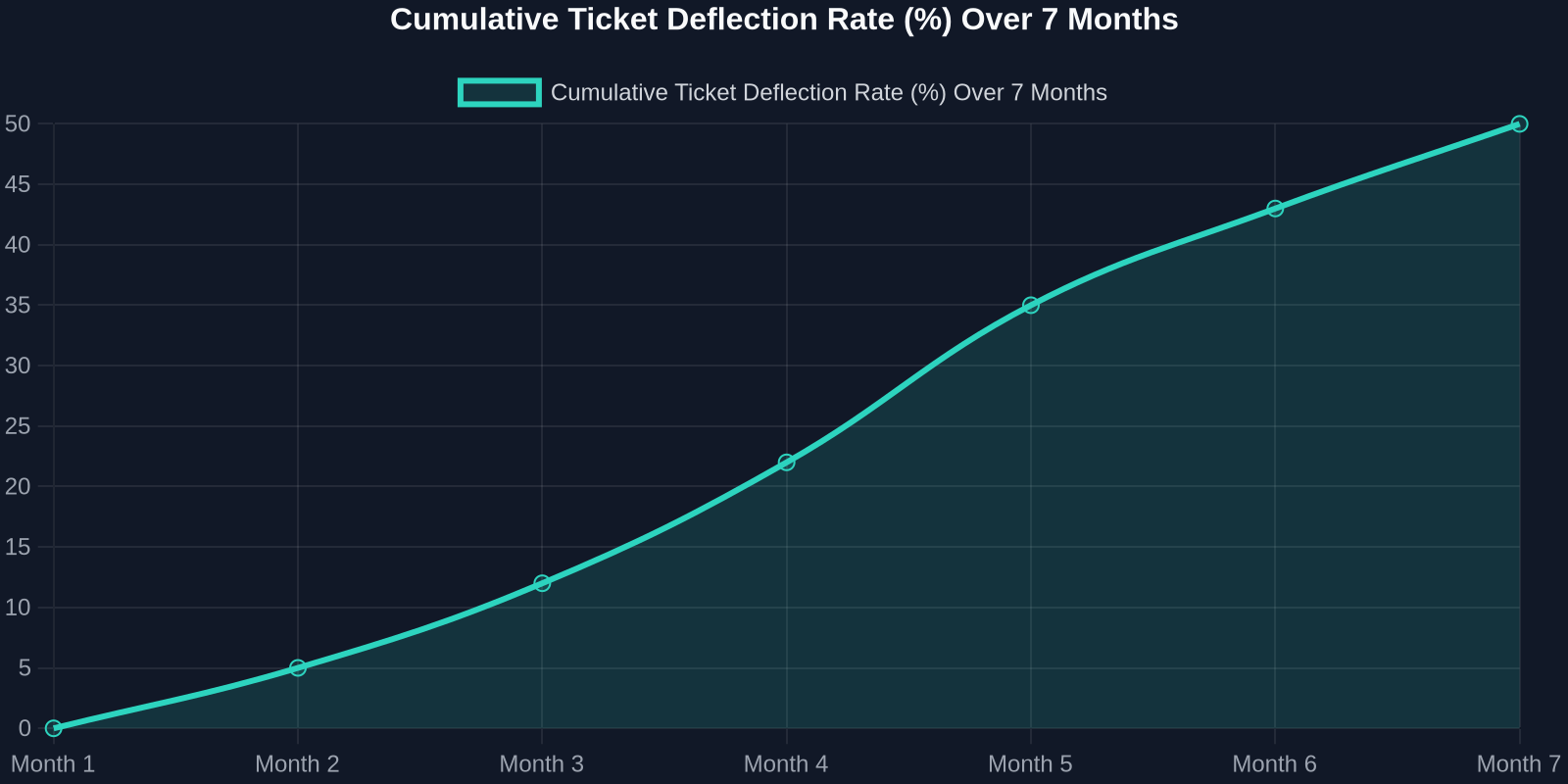
As the chart above shows, deflection rates improve steadily as the AI learns from real interactions. Month 1 sees a small gain, but by month 7, nearly half of all incoming tickets never need a human. That’s thousands of hours saved per month.
Step 1: Map Your Ticket Taxonomy
Before you can automate, you need to know what you’re automating. Start by analyzing your last 90 days of support tickets. Categorize every issue into one of these buckets:
- Account & Billing(password resets, payment issues, plan changes) -Product Usage(how-to questions, feature requests, bug reports) -Technical Support(integration errors, API issues) -Other(escalations, complaints, non-standard requests)
For most SaaS companies, the first two buckets represent 70-80% of total volume. These are prime candidates for AI automation.
Step 2: Build a Knowledge Base That Powers the AI
Your AI is only as good as the knowledge it draws from. A well-structured, up-to-date knowledge base is the foundation of any successful automation strategy.

Best Practices for Knowledge Base Creation:
-**Write for the AI, not just humans.**Use clear, concise language with explicit “if-then” logic. -**Include FAQs with step-by-step answers.**Screenshots and video links help. -Tag content by intent(e.g., “password_reset”, “billing_question”). -Version your articlesso the AI knows which product version applies.
Once your knowledge base is ready, Successly’s AI can instantly surface the right article to the customer, deflecting the ticket before it’s even created.
Step 3: Deploy AI-Powered Self-Service
Now it’s time to put the AI front and center. Place a smart widget on your help center, inside your app, and even on your pricing page. The key is to make it visible at the exact moment of friction.
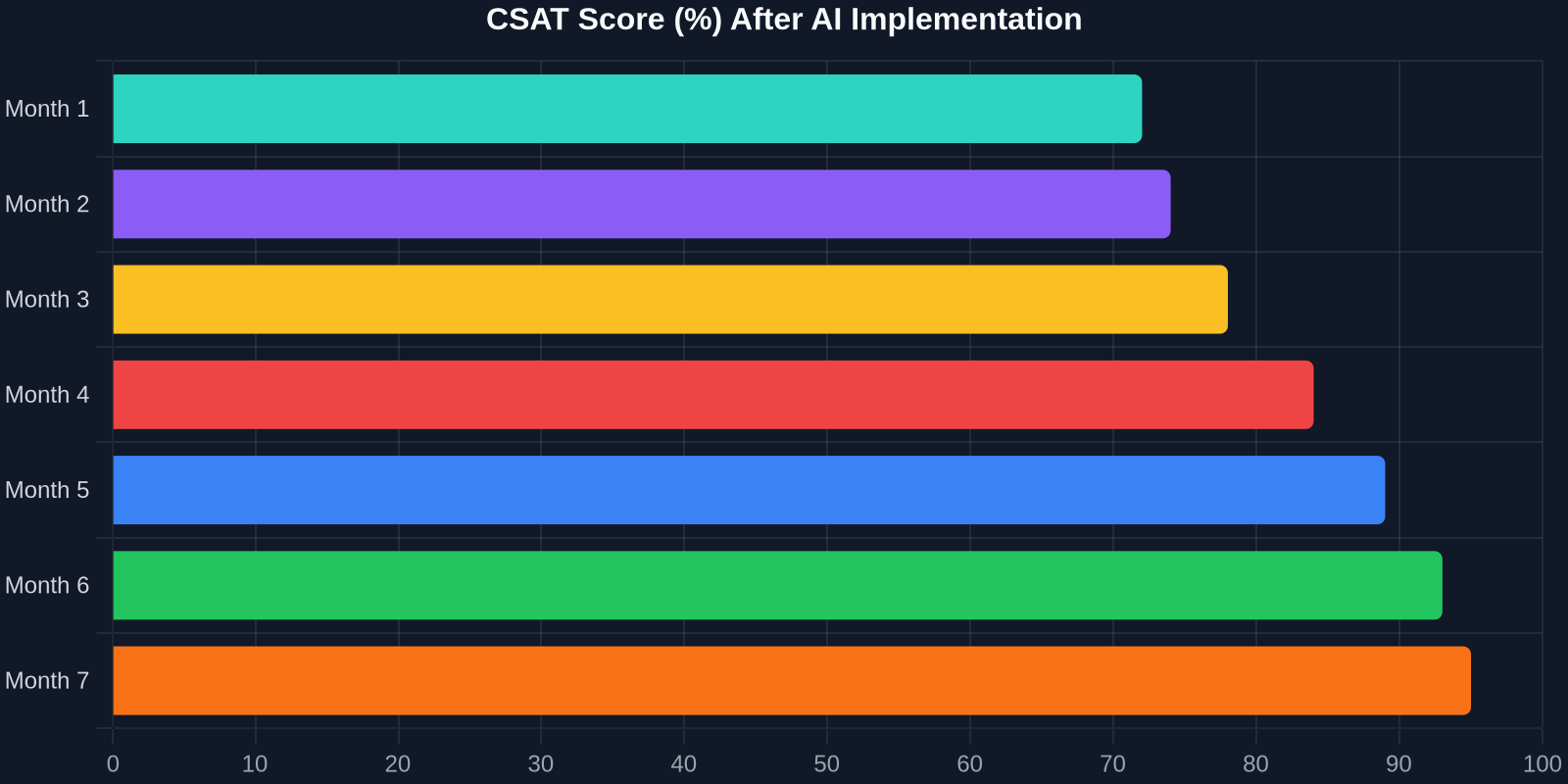
The CSAT improvement is just as dramatic. As shown above, scores climb from 72% to 95% over 7 months. Why? Because customers get instant answers, and when they do talk to a human, the agent already knows their history.
Step 4: Intelligent Triage and Routing
Not all tickets can be automated, and that’s okay. The goal is to route the right tickets to the right people, immediately. Successly’s AI can:
-Detect sentiment– urgent/bug reports get priority -Identify language– route to multilingual agents -Assign based on skill– technical issues go to Tier 2, billing to finance -Predict resolution time– set customer expectations upfront
Step 5: Continuous Learning and Optimization
AI is not a “set it and forget it” tool. You need to monitor performance, review missed deflections, and update your knowledge base regularly.
Key Metrics to Track:
-Deflection rate– % of tickets resolved without an agent -Self-service success rate– % of users who find an answer in the knowledge base -Handoff satisfaction– CSAT after AI-to-human transfer -Agent productivity– tickets closed per hour
Use Successly’s analytics dashboard to see which topics are underperforming. If the AI fails to answer a question, add a new article. If customers keep asking the same thing in a different way, update the AI’s intent models.
Real-World Results: A SaaS Case Study
Let’s look at a mid-stage B2B SaaS company (let’s call them “CloudFlow”) that had 8 support agents handling 12,000 tickets per month. Average first response time was 6 hours, and CSAT hovered around 70%.
After implementing Successly:
Indem Sie heute in KI-gestützte Support-Automatisierung investieren, senken Sie nicht nur Kosten, sondern schaffen ein Support-Erlebnis, das mit Ihrem Wachstum skaliert, Ihre Kunden begeistert und Ihre besten Talente hält.
Ihre nächsten Schritte
Bereit zu starten? Hier ist ein 30-Tage-Aktionsplan:
1.Woche 1– Analysieren Sie Ihre Ticketdaten und kategorisieren Sie die häufigsten Probleme. 2.Woche 2– Erstellen oder aktualisieren Sie Ihre Wissensdatenbank mit den Top-10-FAQs. 3.Woche 3– Implementieren Sie das KI-Widget von Successly in Ihrem Help Center und in der App. 4.Woche 4 – Überwachen Sie Abweisungen, sammeln Sie Feedback und verfeinern Sie die Lösung.
Successly bietet eine kostenlose Testversion und einen dedizierten Onboarding-Spezialisten, der Ihnen hilft, Ihre Ziele zu erreichen. Starten Sie noch heute Ihre Reise zu einer Ticketreduzierung um 43 %.
Denken Sie daran: Jedes abgewehrte Ticket ist ein Kunde, der sofortige Hilfe erhielt, und ein Agent, der frei ist, tiefere Probleme zu lösen. Das ist ein Gewinn für alle.
Datenquellen: Interne Benchmarks von Successly, Zendesk Customer Experience Trends Report 2024, Gartner Support Automation Study 2024.