Automating Customer Support with JSM Virtual Agent: A Complete Guide

Automating Customer Support with JSM Virtual Agent: A Complete Guide
Businesses today face increasing pressure to deliver fast, reliable customer support while controlling costs. The JSM Virtual Agent from Atlassian offers a powerful solution: an AI-driven chatbot integrated directly into Jira Service Management that automates common support tasks, reduces ticket volume, and empowers self-service.
According to recent industry benchmarks, organizations that deploy virtual agents can resolve up to **85%**of Level 1 support queries without human intervention, slashing average handling times by over 60%.
In this comprehensive guide, we will explore how the JSM Virtual Agent works, its key benefits, implementation best practices, and real-world performance data to help you decide if it is the right fit for your team.
What is a Virtual Agent in Customer Support?
A virtual agent is an AI-powered chatbot that interacts with users in natural language to resolve issues, answer questions, and perform tasks automatically. Unlike simple rule-based bots, modern virtual agents leverage machine learning to understand intent, maintain context, and learn from interactions.
When integrated with a service desk platform, virtual agents become the first line of support, handling password resets, password unlocks, knowledge base searches, ticket creation, and status updates without requiring a human agent.
Why Jira Service Management Chose a Virtual Agent
Atlassian built its Virtual Agent natively into Jira Service Management to close the gap between user expectations and IT service desk capacity. The goal is to deflect tickets, not just collect them. By automating Level 1 and Level 2 tasks, the virtual agent frees human agents to focus on complex, high-value work.
How JSM Virtual Agent Automates Support Workflows
JSM Virtual Agent works by combining natural language understanding with the powerful automation rules of Jira Service Management. Here is how it functions:

-Intent Recognition: The agent analyzes user messages to identify what the user wants (e.g., reset password, check ticket status).
- Conversation Design: Pre-built flows guide users through resolution steps without human handoff.
- Knowledge Base Integration: It searches Confluence or JSM Knowledge Base for relevant articles and presents them inline.
- Ticket Automation: Based on user input, the agent can create, update, or resolve tickets using custom fields and workflows.
- Approvals and Notifications: It triggers approval requests and sends updates to users and agents.
Step-by-Step Automation Example: Password Reset
- User types "I forgot my password" in the virtual agent chat.
- The agent confirms identity via linked account or security question.
- Agent executes an automated script to reset the password.
- User receives the new password via secure channel.
- A ticket is automatically created with resolution details for audit.
Implementation Best Practices
1. Start with High-Volume, Low-Complexity Tasks
Identify the top 5–10 request types in your current service desk. These are ideal candidates for automation. Common examples:
- Password resets
- Knowledge base searches
- Ticket status inquiries
- Leave requests
- Software license requests
2. Design Conversational Flows Naturally
Use a conversational tone. Avoid technical jargon. Test with actual users to refine intent recognition.
3. Integrate with Knowledge Base
Ensure your Confluence or JSM Knowledge Base is well-maintained. The virtual agent's ability to find answers depends on quality content.
4. Monitor and Optimize Regularly
Track metrics such as deflection rate, escalation rate, and user satisfaction. Use insights to update conversation flows.
5. Plan for Escalation to Human Agents
Not every issue can be automated. Design a seamless handoff where the bot provides context to the human agent.
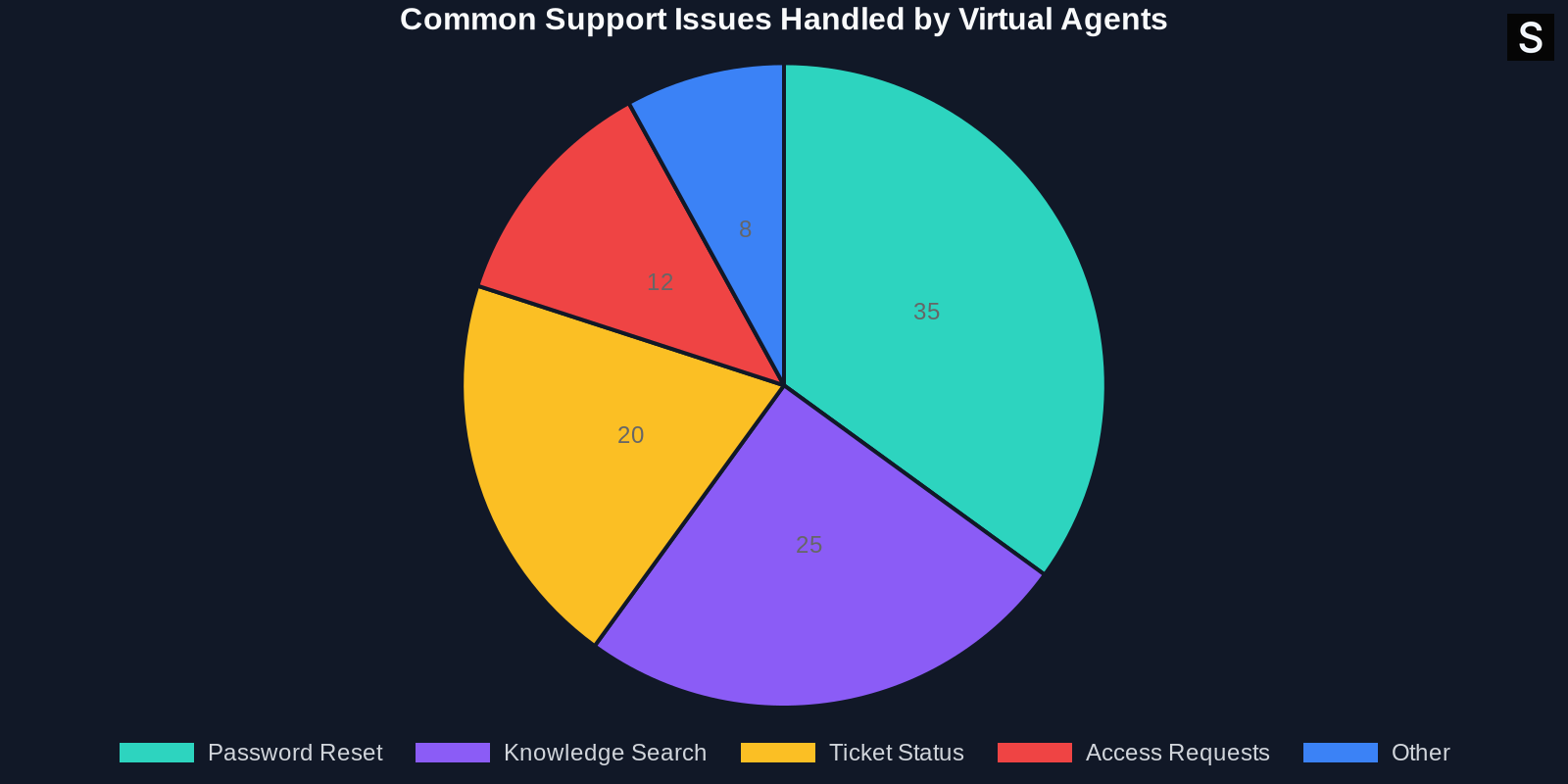
Common Pain Points Solved by Virtual Agents
Below is a breakdown of issues that virtual agents handle effectively:

- Password resets: Fully automated with identity verification.
- Account unlock: Instant resolution without IT involvement.
- Knowledge retrieval: Pulls relevant articles from Confluence.
- Device requests: Routes to approval flow with user info.
- Status updates: Users can check ticket status without creating a new request.
Measuring Success: Key Metrics to Track
To validate your investment, track these KPIs:
- Deflection Rate: Percentage of queries resolved without human agent
- First Contact Resolution (FCR): Solved in first interaction
- Average Handle Time (AHT): Time from user input to resolution
- User Satisfaction (CSAT): Post-interaction survey rating
- Escalation Rate: How often does the bot hand off to a human
- Cost Per Ticket: Total support cost divided by ticket count
Conclusion
Automating customer support with JSM Virtual Agent is not just a trend — it is a strategic necessity for IT teams aiming to deliver high-quality service with limited resources. By deflecting routine tickets, the virtual agent reduces costs, speeds up resolution, and improves agent and user satisfaction alike.
With the right implementation approach and continuous optimization, organizations can achieve a deflection rate above 80%, cut ticket volume by half, and free up human agents to solve the problems that matter most.
If you have not explored JSM Virtual Agent yet, now is the time. Start small, measure relentlessly, and scale fast. Your users — and your agents — will thank you.
This article was originally inspired by the work of the Atlassian Engineering team. For more technical details, visit the official Atlassian blog post on automating customer support.