
Agentic AI in Customer Support: From Self-Service to Self-Healing
Customer support is at an inflection point. The phrase "self-service" has traditionally meant static knowledge bases, clunky FAQ pages, or basic chatbots that frustrate users with rigid scripts. But a new paradigm, agentic AI, is rewriting the rules. Instead of simply answering questions, agentic AI systems autonomously take action. They diagnose problems, execute workflows, escalate intelligently, and even proactively prevent issues before the customer notices.
In a recent blog post, Adobe framed agentic AI as "AI that can plan and execute complex tasks independently, rather than just generating responses". This leap from reactive to proactive, from assistant to autonomous agent, promises to reshape customer support economics. In this article, we'll explore what agentic AI means for support teams, with data and strategies to help you justify investment and implement effectively.
What Is Agentic AI in Customer Support?
Agentic AI refers to AI systems that can perceive their environment, reason about goals, and take independent actions to achieve those goals, without step-by-step human instructions. In customer support, this translates to:
Autonomous ticket resolution: An AI agent can identify the issue, pull relevant data from CRM and knowledge bases, generate a personalized solution, and execute it (e.g., reset a password, issue a refund). Multi-step workflow orchestration: For complex requests, the AI can break the problem into sub-tasks, call external APIs, and verify outcomes. Proactive issue detection: By monitoring system health or user behavior, the AI can pre-emptively resolve problems, like flagging a billing error before the customer calls.
This contrasts sharply with older "rule-based" automation that requires explicit, brittle if-then-else logic. Agentic AI uses large language models, retrieval-augmented generation, and feedback loops to adapt dynamically.
The Business Case: Why Agentic AI Matters Now
From Self-Service to Self-Healing: The Evolution
EraTechnologyCustomer ExperienceCost per Interaction
Static Web (2000s)FAQ pages, emailLow, slow, generic~$10 (email) Portal Era (2010s)Knowledge bases, forumsModerate, self-help available but fragmented~$5 (chatbot) Conversational AI (2020s)Chatbots, NLUGood, fast response but limited scope~$1 (AI deflection) Agentic AI (2025+)Autonomous agentsExcellent, proactive, personalized, autonomous
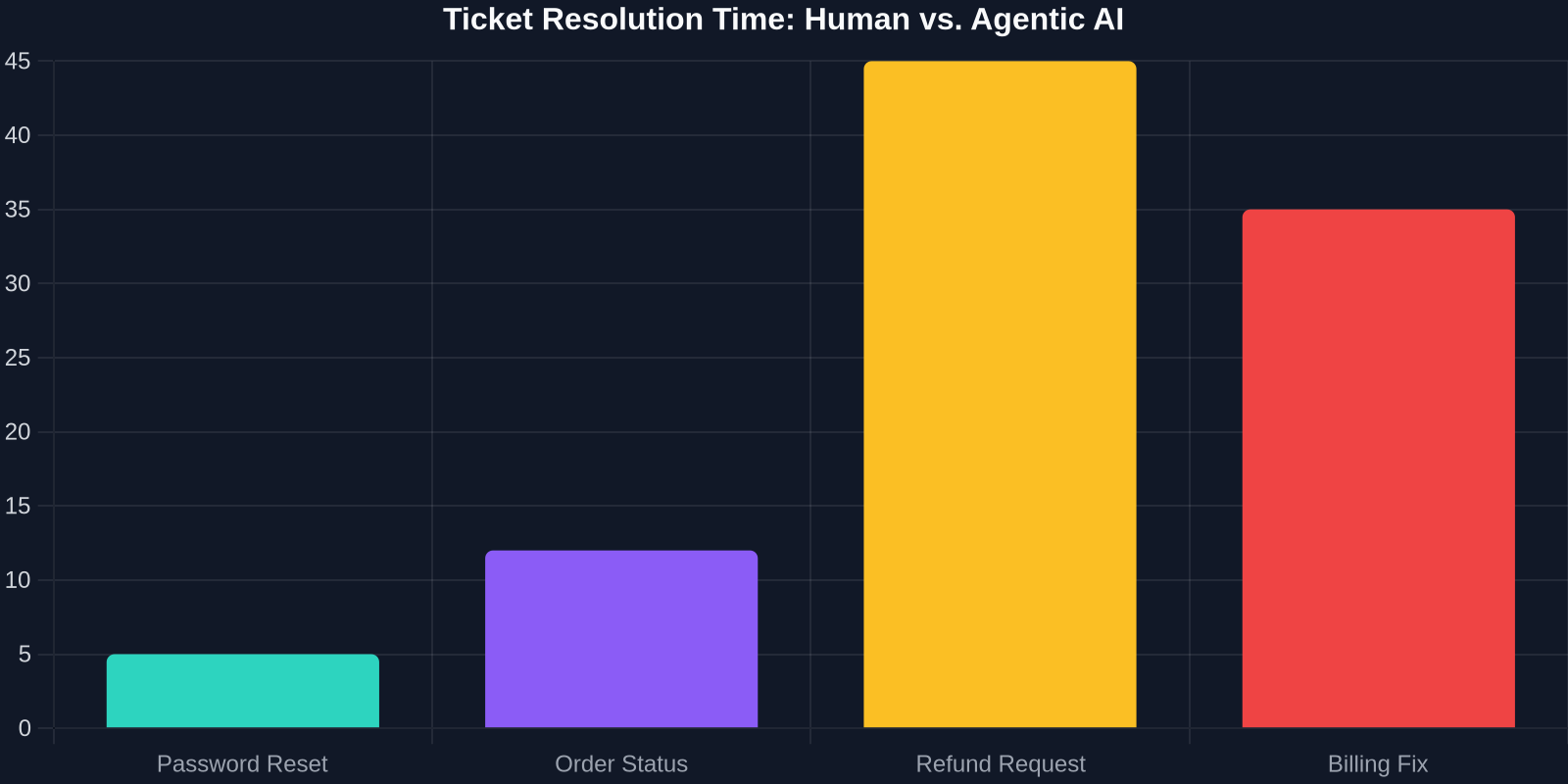
An example from a travel tech company using Successly: their agentic AI handles lost-luggage claims (a historically high-CSAT impact issue) by validating the claim, checking flight records via API, generating a compensation voucher, and notifying the customer, all in under 3 minutes. Previously, this took 45 minutes of agent time with multiple handoffs.
Building an Agentic AI Support System
Moving from theory to practice requires a structured approach. Here's a framework, based on our work with 200+ SaaS teams, to implement agentic AI in your support stack.
Phase 1: Foundation, Centralize Knowledge & Tools
Agentic AI is only as good as the data and systems it can access. Before launching agents, ensure:
Unified knowledge base: Consolidate FAQs, product docs, and internal runbooks into a searchable, version-controlled repository. API-first operations: Your support platform (e.g., Zendesk, Intercom) and CRM should expose APIs for read/write operations. Agentic AI needs to create tickets, update fields, and trigger workflows. Clear escalation rules: Define which issues can be autonomously resolved and which require human oversight. Start conservative and expand.
Phase 2: Train & Contextualize the Agent
Unlike traditional chatbots that use intent classification, agentic AI relies on rich context and few-shot learning. You'll need to:
Provide system-level context: Feed the agent your product's documentation, API schemas, and common error logs. Define success criteria: For each supported use case, specify what a successful resolution looks like (e.g., "ticket status = resolved, customer notified, refund processed"). Implement guardrails: Set up constraints, like "never delete customer data" or "always get confirmation before charging".
Phase 3: Deploy in Assist Mode First
Roll out agentic AI in "assist" mode, where it suggests actions but requires a human to click "approve". This builds trust and lets you collect real-world performance data. Monitor:
Accuracy of agent-proposed resolutions Time saved per human agent Customer sentiment on escalated vs. AI-closed tickets
After 4–6 weeks of satisfactory performance (e.g., >90% suggestion accuracy), you can move selected flows to fully autonomous mode.
The ROI of Agentic AI: Real Numbers
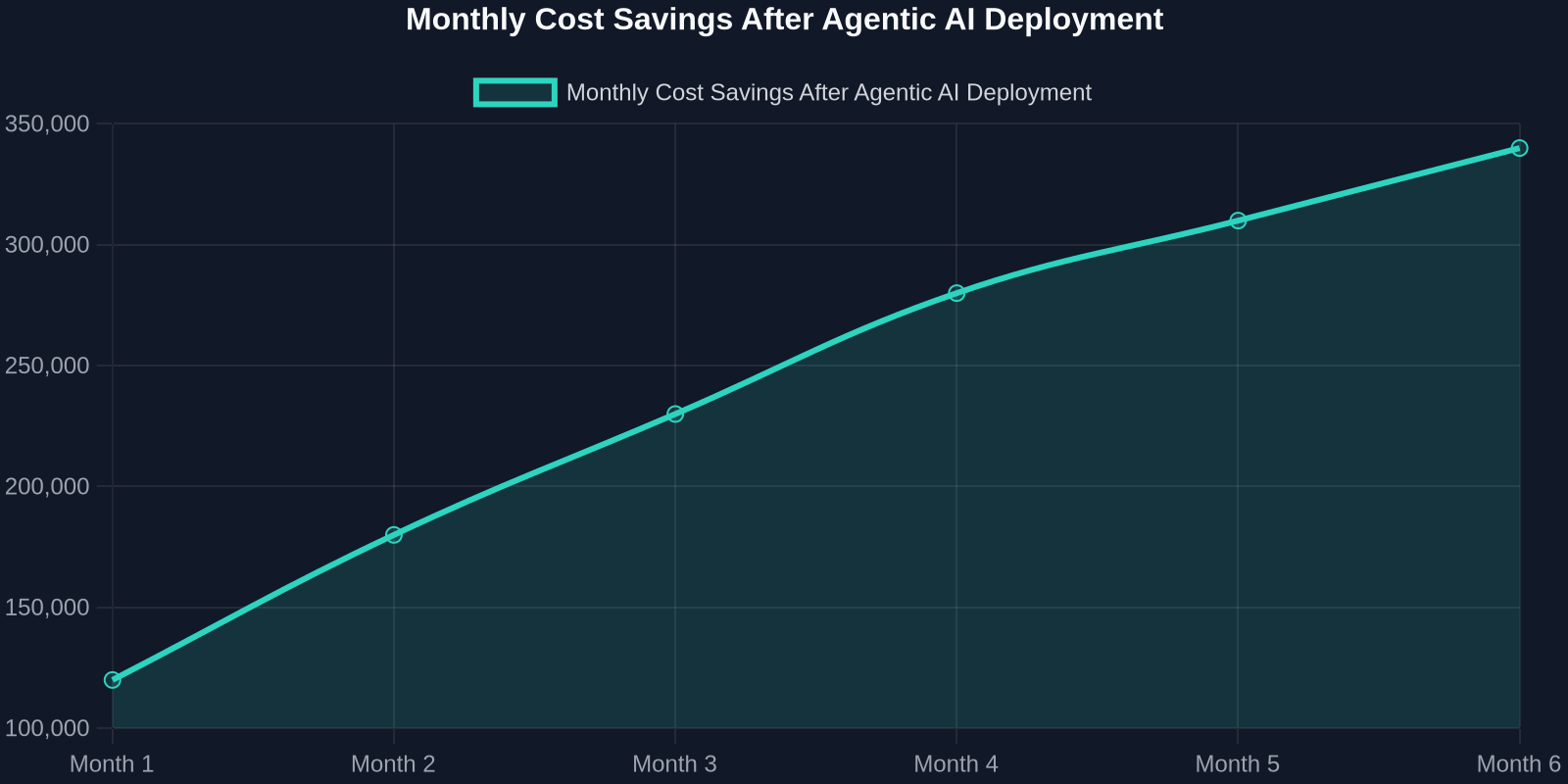
We've seen consistent patterns across early adopters. Here's a representative case from a mid-market B2B SaaS company with 50,000 monthly tickets:
Pitfall 3: Ignoring Escalation Design When the AI can't resolve an issue, the handoff to human agents must be seamless and context-rich. The AI should provide a summary of what it did and what it suspects, so the agent doesn't start from scratch.
Why Agentic AI Wins: The Competitive Advantage
Beyond cost savings, agentic AI enables a differentiated customer experience:
Zero-wait resolution: No hold music, no transfers, no repeating yourself. Proactive delight: Imagine getting a notification that a bug you reported has been fixed, without you having to ask. Continuous learning: Every interaction improves the AI's knowledge base, making resolution rates compound over time.
Getting Started with Agentic AI in Your Support Stack
Ready to move forward? Here's a six-step roadmap inspired by Adobe's principles and our own field experience:
Audit current support flows: Identify the top 10 issue types by volume. Mark which ones are rule-based vs. judgment-based. Select a champion use case: Pick one flow that's high volume, predictable, and low risk (e.g., account recovery). Prepare your data: Ensure your knowledge base and APIs are well-organized and accessible. Integrate with your stack: Connect your agentic AI (e.g., Successly) to your support ticketing system, CRM, and product backend. Run a controlled pilot: Deploy in assist mode for 30 days with a dedicated team. Track all metrics. Scale iteratively: Once the pilot meets your success criteria (e.g., >85% autonomous resolution, CSAT >90%), expand to other flows.