JSM वर्चुअल एजेंट के साथ ग्राहक सहायता को स्वचालित करना: एक संपूर्ण गाइड

JSM वर्चुअल एजेंट के साथ ग्राहक सहायता को स्वचालित करना: एक संपूर्ण मार्गदर्शिका
आज के समय में व्यवसायों पर तेज़ और विश्वसनीय ग्राहक सहायता प्रदान करने के साथ-साथ लागत को नियंत्रित करने का दबाव बढ़ रहा है। Atlassian का JSM वर्चुअल एजेंट एक शक्तिशाली समाधान प्रदान करता है: Jira Service Management में सीधे एकीकृत एक AI-संचालित चैटबॉट जो सामान्य सहायता कार्यों को स्वचालित करता है, टिकट वॉल्यूम को कम करता है, और स्वयं-सेवा को सशक्त बनाता है।
हाल के उद्योग बेंचमार्क के अनुसार, वर्चुअल एजेंट तैनात करने वाले संगठन मानव हस्तक्षेप के बिना **85%**तक लेवल 1 सहायता प्रश्नों को हल कर सकते हैं, जिससे औसत हैंडलिंग समय 60% से अधिक कम हो जाता है।
इस व्यापक मार्गदर्शिका में, हम यह पता लगाएंगे कि JSM वर्चुअल एजेंट कैसे काम करता है, इसके प्रमुख लाभ, कार्यान्वयन की सर्वोत्तम प्रथाएँ, और वास्तविक दुनिया के प्रदर्शन डेटा ताकि आप यह तय कर सकें कि यह आपकी टीम के लिए सही है या नहीं।
ग्राहक सहायता में वर्चुअल एजेंट क्या है?
वर्चुअल एजेंट एक AI-संचालित चैटबॉट है जो उपयोगकर्ताओं के साथ प्राकृतिक भाषा में बातचीत करके समस्याओं को हल करता है, सवालों के जवाब देता है, और कार्यों को स्वचालित रूप से करता है। सरल नियम-आधारित बॉट्स के विपरीत, आधुनिक वर्चुअल एजेंट इरादे को समझने, संदर्भ बनाए रखने और बातचीत से सीखने के लिए मशीन लर्निंग का लाभ उठाते हैं।
जब सर्विस डेस्क प्लेटफॉर्म के साथ एकीकृत किया जाता है, तो वर्चुअल एजेंट सहायता की पहली पंक्ति बन जाते हैं, जो पासवर्ड रीसेट, पासवर्ड अनलॉक, नॉलेज बेस खोज, टिकट निर्माण, और स्थिति अपडेट को मानव एजेंट की आवश्यकता के बिना संभालते हैं।
Jira Service Management ने वर्चुअल एजेंट को क्यों चुना
Atlassian ने अपने वर्चुअल एजेंट को Jira Service Management में मूल रूप से बनाया ताकि उपयोगकर्ता अपेक्षाओं और IT सर्विस डेस्क क्षमता के बीच की खाई को पाटा जा सके। लक्ष्य टिकटों को डिफ्लेक्ट करना है, न कि केवल उन्हें इकट्ठा करना। लेवल 1 और लेवल 2 कार्यों को स्वचालित करके, वर्चुअल एजेंट मानव एजेंटों को जटिल, उच्च-मूल्य वाले कार्यों पर ध्यान केंद्रित करने के लिए मुक्त करता है।
How JSM Virtual Agent Automates Support Workflows
JSM Virtual Agent works by combining natural language understanding with the powerful automation rules of Jira Service Management. Here is how it functions:

-Intent Recognition: The agent analyzes user messages to identify what the user wants (e.g., reset password, check ticket status).
- Conversation Design: Pre-built flows guide users through resolution steps without human handoff.
- Knowledge Base Integration: It searches Confluence or JSM Knowledge Base for relevant articles and presents them inline.
- Ticket Automation: Based on user input, the agent can create, update, or resolve tickets using custom fields and workflows.
- Approvals and Notifications: It triggers approval requests and sends updates to users and agents.
Step-by-Step Automation Example: Password Reset
- User types "I forgot my password" in the virtual agent chat.
- The agent confirms identity via linked account or security question.
- Agent executes an automated script to reset the password.
- User receives the new password via secure channel.
- A ticket is automatically created with resolution details for audit.
Implementation Best Practices
1. Start with High-Volume, Low-Complexity Tasks
Identify the top 5–10 request types in your current service desk. These are ideal candidates for automation. Common examples:
- Password resets
- Knowledge base searches
- Ticket status inquiries
- Leave requests
- Software license requests
2. Design Conversational Flows Naturally
Use a conversational tone. Avoid technical jargon. Test with actual users to refine intent recognition.
3. Integrate with Knowledge Base
Ensure your Confluence or JSM Knowledge Base is well-maintained. The virtual agent's ability to find answers depends on quality content.
4. Monitor and Optimize Regularly
Track metrics such as deflection rate, escalation rate, and user satisfaction. Use insights to update conversation flows.
5. Plan for Escalation to Human Agents
Not every issue can be automated. Design a seamless handoff where the bot provides context to the human agent.
Common Pain Points Solved by Virtual Agents
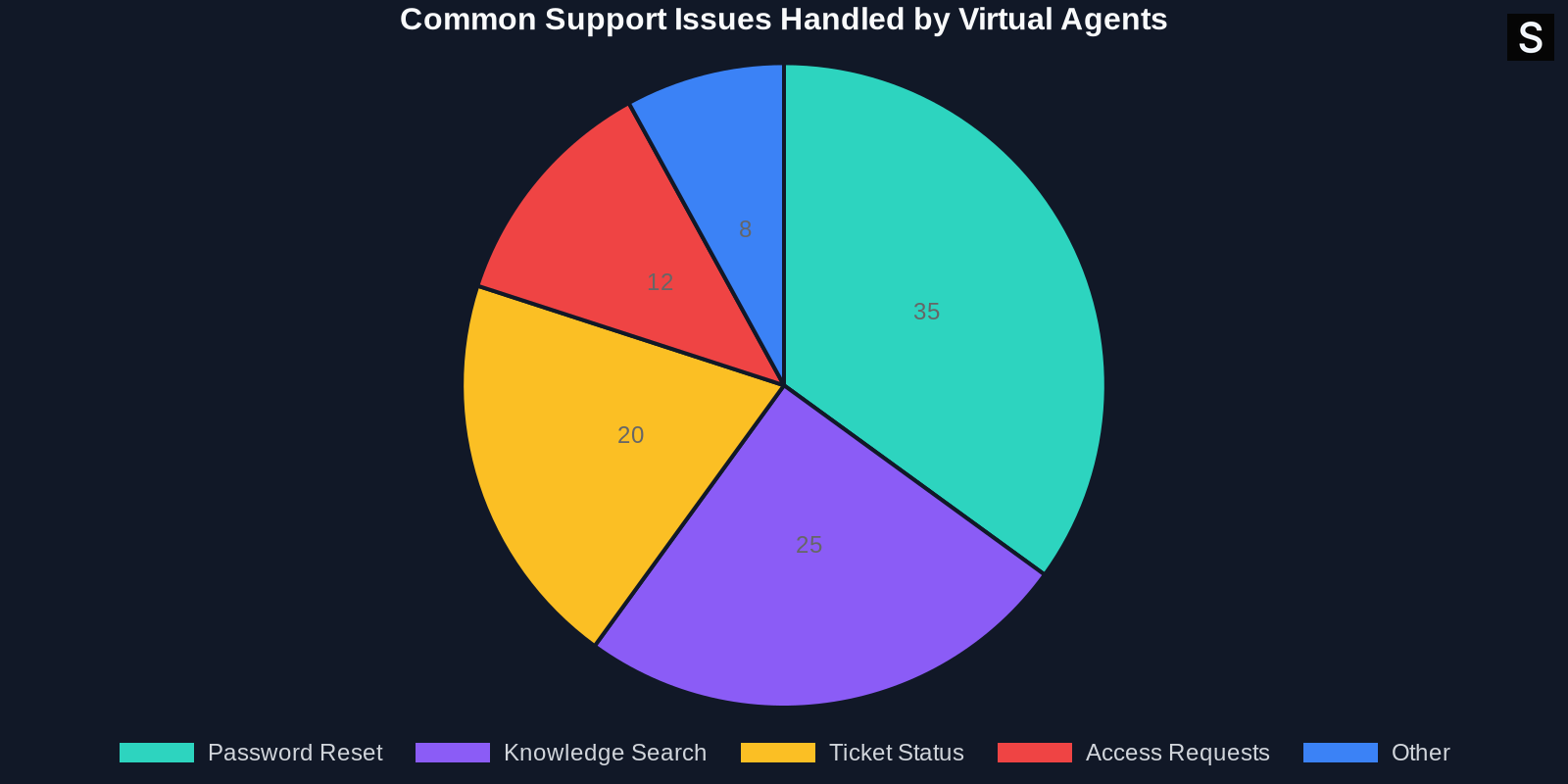
Below is a breakdown of issues that virtual agents handle effectively:

- Password resets: Fully automated with identity verification.
- Account unlock: Instant resolution without IT involvement.
- Knowledge retrieval: Pulls relevant articles from Confluence.
- Device requests: Routes to approval flow with user info.
- Status updates: Users can check ticket status without creating a new request.
Measuring Success: Key Metrics to Track
To validate your investment, track these KPIs:
- Deflection Rate: Percentage of queries resolved without human agent
- First Contact Resolution (FCR): Solved in first interaction
- Average Handle Time (AHT): Time from user input to resolution
- User Satisfaction (CSAT): Post-interaction survey rating
- Escalation Rate: How often does the bot hand off to a human
- Cost Per Ticket: Total support cost divided by ticket count
निष्कर्ष
JSM वर्चुअल एजेंट के साथ ग्राहक सहायता को स्वचालित करना केवल एक प्रवृत्ति नहीं है — यह IT टीमों के लिए एक रणनीतिक आवश्यकता है जो सीमित संसाधनों के साथ उच्च गुणवत्ता वाली सेवा प्रदान करने का लक्ष्य रखती हैं। नियमित टिकटों को डिफ्लेक्ट करके, वर्चुअल एजेंट लागत कम करता है, समाधान में तेजी लाता है, और एजेंट और उपयोगकर्ता संतुष्टि दोनों में सुधार करता है।
सही कार्यान्वयन दृष्टिकोण और निरंतर अनुकूलन के साथ, संगठन 80% से अधिक की डिफ्लेक्शन दर प्राप्त कर सकते हैं, टिकट वॉल्यूम को आधा कर सकते हैं, और मानव एजेंटों को उन समस्याओं को हल करने के लिए मुक्त कर सकते हैं जो सबसे अधिक मायने रखती हैं।
यदि आपने अभी तक JSM वर्चुअल एजेंट का पता नहीं लगाया है, तो अब समय है। छोटे से शुरू करें, लगातार मापें, और तेज़ी से स्केल करें। आपके उपयोगकर्ता — और आपके एजेंट — आपको धन्यवाद देंगे।
यह लेख मूल रूप से Atlassian इंजीनियरिंग टीम के काम से प्रेरित था। अधिक तकनीकी विवरणों के लिए, ग्राहक सहायता को स्वचालित करने पर official Atlassian blog post पर जाएँ।