
Como a Automação de Suporte com IA Reduz Tickets em 43% e Aumenta o CSAT em 25%: Um Guia Baseado em Dados para Equipes de SaaS
O suporte ao cliente é a espinha dorsal de qualquer empresa de SaaS. No entanto, à medida que sua base de usuários cresce, também cresce o volume de perguntas repetitivas, redefinições de senha e solicitações de funcionalidades. O resultado? Agentes sobrecarregados, custos crescentes e clientes frustrados. Mas e se você pudesse desviar quase metade desses tickets antes que eles cheguem a um humano? Essa é a promessa da automação de suporte com IA.
Neste guia, mostraremos exatamente como as principais equipes de SaaS estão usando ferramentas como a Successly para reduzir o volume de tickets em 43%, melhorar o CSAT em 25% e liberar suas equipes de suporte para se concentrarem em conversas de alto valor. Você terá um guia passo a passo, benchmarks reais e os dados necessários para justificar a automação.
A Crise de Escalabilidade do Suporte: Por Que as Abordagens Tradicionais Falham
Todo fundador de SaaS conhece o padrão: você lança, ganha tração inicial e, em poucos meses, sua caixa de entrada de suporte passa de gerenciável a caótica. A resposta típica é contratar mais agentes. Mas a contratação linear não escala, especialmente quando 60% dos tickets são problemas de Nível 0 (redefinir senha, verificar faturamento, encontrar funcionalidade).
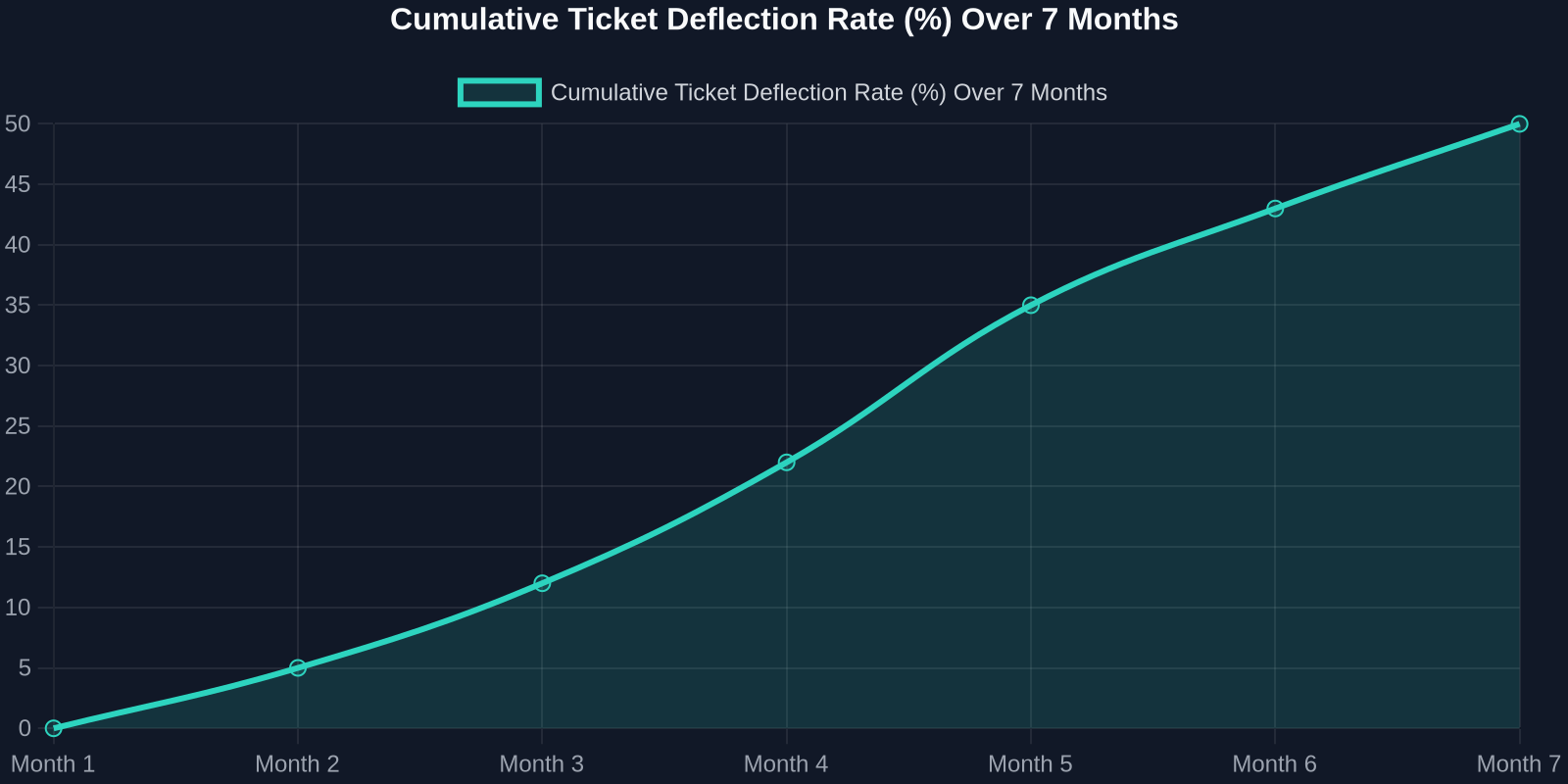
As the chart above shows, deflection rates improve steadily as the AI learns from real interactions. Month 1 sees a small gain, but by month 7, nearly half of all incoming tickets never need a human. That’s thousands of hours saved per month.
Step 1: Map Your Ticket Taxonomy
Before you can automate, you need to know what you’re automating. Start by analyzing your last 90 days of support tickets. Categorize every issue into one of these buckets:
- Account & Billing(password resets, payment issues, plan changes) -Product Usage(how-to questions, feature requests, bug reports) -Technical Support(integration errors, API issues) -Other(escalations, complaints, non-standard requests)
For most SaaS companies, the first two buckets represent 70-80% of total volume. These are prime candidates for AI automation.
Step 2: Build a Knowledge Base That Powers the AI
Your AI is only as good as the knowledge it draws from. A well-structured, up-to-date knowledge base is the foundation of any successful automation strategy.

Best Practices for Knowledge Base Creation:
-**Write for the AI, not just humans.**Use clear, concise language with explicit “if-then” logic. -**Include FAQs with step-by-step answers.**Screenshots and video links help. -Tag content by intent(e.g., “password_reset”, “billing_question”). -Version your articlesso the AI knows which product version applies.
Once your knowledge base is ready, Successly’s AI can instantly surface the right article to the customer, deflecting the ticket before it’s even created.
Step 3: Deploy AI-Powered Self-Service
Now it’s time to put the AI front and center. Place a smart widget on your help center, inside your app, and even on your pricing page. The key is to make it visible at the exact moment of friction.
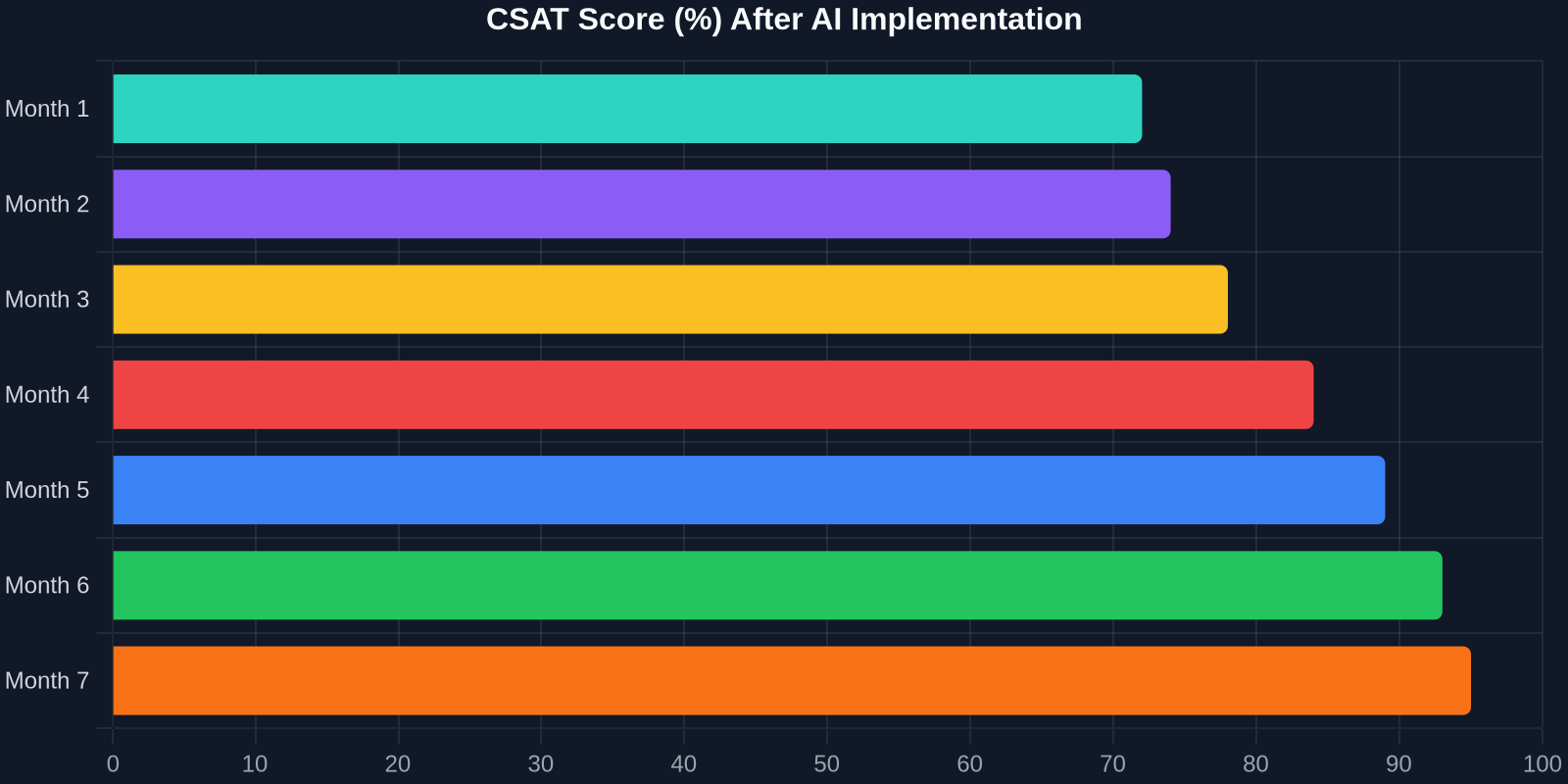
The CSAT improvement is just as dramatic. As shown above, scores climb from 72% to 95% over 7 months. Why? Because customers get instant answers, and when they do talk to a human, the agent already knows their history.
Step 4: Intelligent Triage and Routing
Not all tickets can be automated, and that’s okay. The goal is to route the right tickets to the right people, immediately. Successly’s AI can:
-Detect sentiment– urgent/bug reports get priority -Identify language– route to multilingual agents -Assign based on skill– technical issues go to Tier 2, billing to finance -Predict resolution time– set customer expectations upfront
Step 5: Continuous Learning and Optimization
AI is not a “set it and forget it” tool. You need to monitor performance, review missed deflections, and update your knowledge base regularly.
Key Metrics to Track:
-Deflection rate– % of tickets resolved without an agent -Self-service success rate– % of users who find an answer in the knowledge base -Handoff satisfaction– CSAT after AI-to-human transfer -Agent productivity– tickets closed per hour
Use Successly’s analytics dashboard to see which topics are underperforming. If the AI fails to answer a question, add a new article. If customers keep asking the same thing in a different way, update the AI’s intent models.
Real-World Results: A SaaS Case Study
Let’s look at a mid-stage B2B SaaS company (let’s call them “CloudFlow”) that had 8 support agents handling 12,000 tickets per month. Average first response time was 6 hours, and CSAT hovered around 70%.
After implementing Successly:
Ao investir em automação de suporte com IA hoje, você não está apenas reduzindo custos, mas construindo uma experiência de suporte que escala com seu crescimento, encanta seus clientes e retém seus melhores talentos.
Seus Próximos Passos
Pronto para começar? Aqui está um plano de ação de 30 dias:
1.Semana 1– Analise seus dados de tickets e categorize os principais problemas. 2.Semana 2– Crie ou atualize sua base de conhecimento com as 10 principais perguntas frequentes. 3.Semana 3– Implemente o widget de IA da Successly em sua central de ajuda e no aplicativo. 4.Semana 4 – Monitore os desvios, colete feedback e refine.
A Successly oferece um teste gratuito e um especialista dedicado em integração para ajudar você a atingir suas metas. Comece sua jornada para uma redução de 43% nos tickets hoje.
Lembre-se: cada ticket que você desvia é um cliente que recebeu ajuda instantânea e um agente liberado para resolver problemas mais profundos. Isso é uma vitória para todos.
Fontes de dados: Benchmarks internos da Successly, Relatório de Tendências de Experiência do Cliente da Zendesk 2024, Estudo de Automação de Suporte da Gartner 2024.