
Как автоматизация поддержки на основе ИИ сокращает количество обращений на 43% и повышает CSAT на 25%: руководство на основе данных для SaaS-команд
Поддержка клиентов — основа любой SaaS-компании. Однако по мере роста базы пользователей растёт и количество повторяющихся вопросов, сбросов паролей и запросов функций. Результат? Перегруженные агенты, растущие затраты и недовольные клиенты. Но что, если бы вы могли отклонить почти половину этих обращений ещё до того, как они дойдут до человека? Это обещает автоматизация поддержки на основе ИИ.
В этом руководстве мы покажем, как ведущие SaaS-команды используют такие инструменты, как Successly, чтобы сократить объём обращений на 43%, повысить CSAT на 25% и освободить команды поддержки для работы с ценными запросами. Вы получите пошаговое руководство, реальные показатели и данные, необходимые для обоснования внедрения автоматизации.
Кризис масштабирования поддержки: почему традиционные подходы не работают
Каждый основатель SaaS знает эту схему: вы запускаетесь, получаете первых клиентов, и в течение нескольких месяцев ваш почтовый ящик поддержки переходит от управляемого к хаотичному. Типичная реакция — нанимать больше агентов. Но линейный найм не масштабируется, особенно когда 60% обращений — это проблемы уровня 0 (сброс пароля, проверка биллинга, поиск функции).
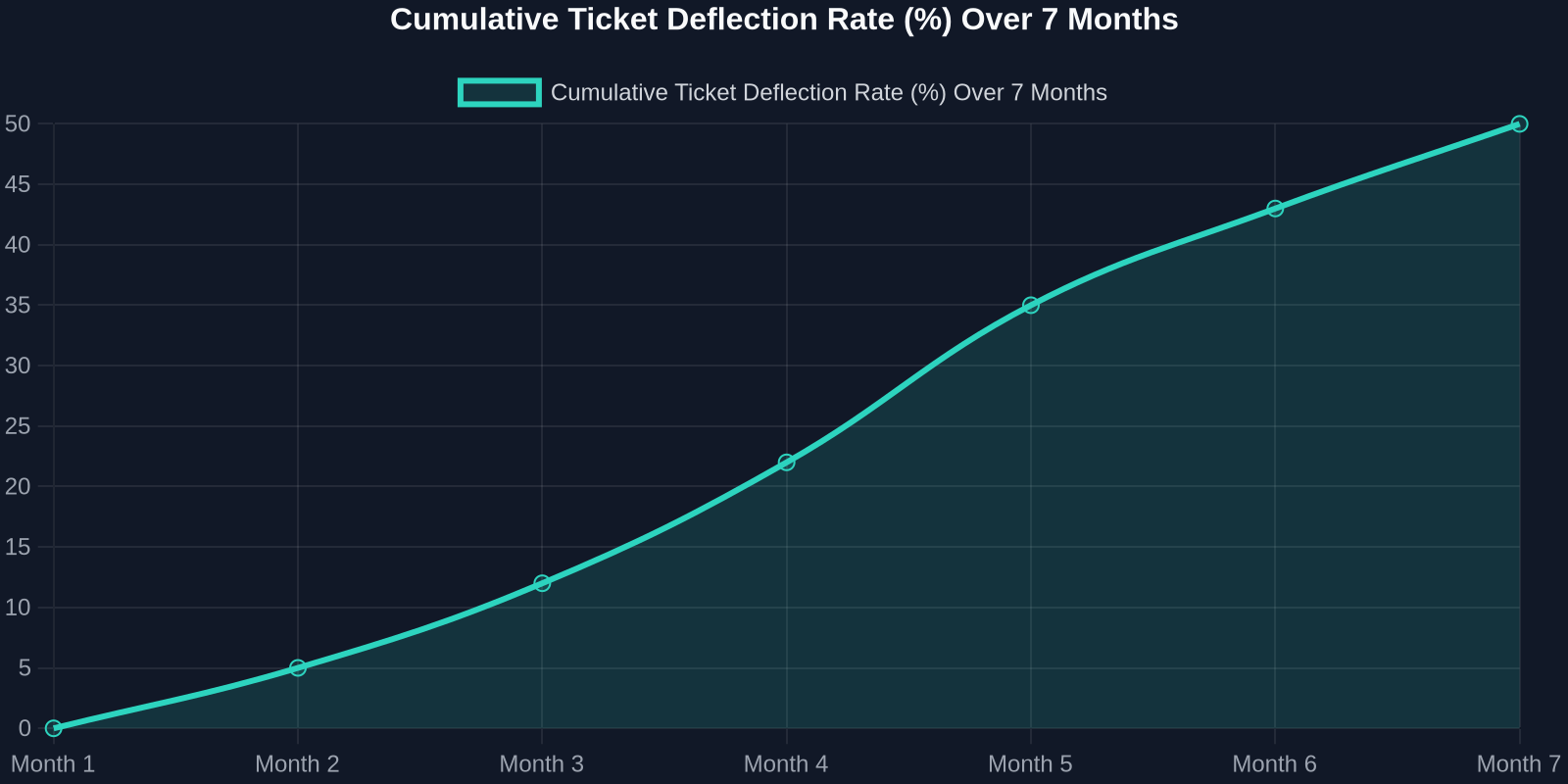
As the chart above shows, deflection rates improve steadily as the AI learns from real interactions. Month 1 sees a small gain, but by month 7, nearly half of all incoming tickets never need a human. That’s thousands of hours saved per month.
Step 1: Map Your Ticket Taxonomy
Before you can automate, you need to know what you’re automating. Start by analyzing your last 90 days of support tickets. Categorize every issue into one of these buckets:
- Account & Billing(password resets, payment issues, plan changes) -Product Usage(how-to questions, feature requests, bug reports) -Technical Support(integration errors, API issues) -Other(escalations, complaints, non-standard requests)
For most SaaS companies, the first two buckets represent 70-80% of total volume. These are prime candidates for AI automation.
Step 2: Build a Knowledge Base That Powers the AI
Your AI is only as good as the knowledge it draws from. A well-structured, up-to-date knowledge base is the foundation of any successful automation strategy.

Best Practices for Knowledge Base Creation:
-**Write for the AI, not just humans.**Use clear, concise language with explicit “if-then” logic. -**Include FAQs with step-by-step answers.**Screenshots and video links help. -Tag content by intent(e.g., “password_reset”, “billing_question”). -Version your articlesso the AI knows which product version applies.
Once your knowledge base is ready, Successly’s AI can instantly surface the right article to the customer, deflecting the ticket before it’s even created.
Step 3: Deploy AI-Powered Self-Service
Now it’s time to put the AI front and center. Place a smart widget on your help center, inside your app, and even on your pricing page. The key is to make it visible at the exact moment of friction.
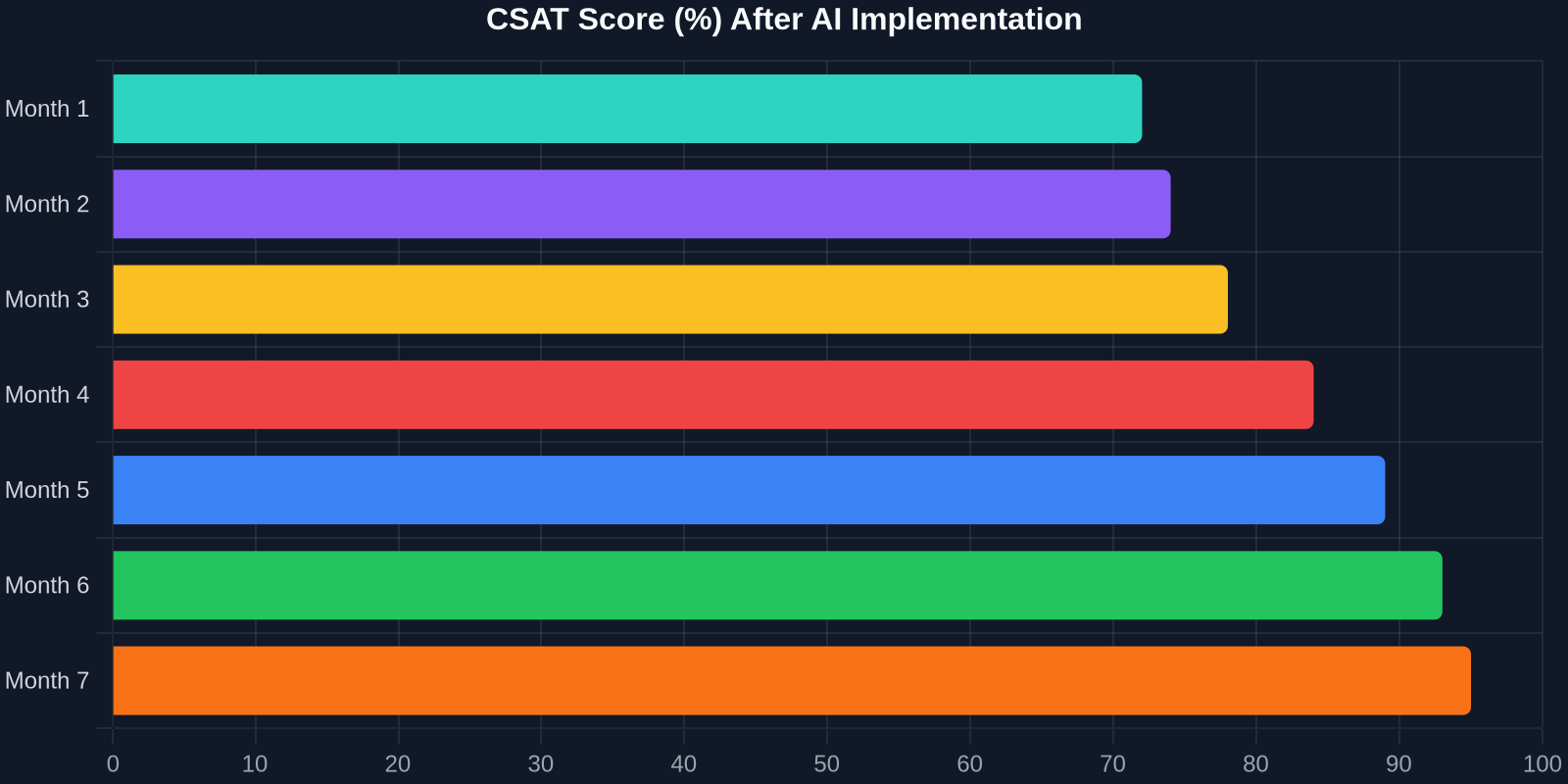
The CSAT improvement is just as dramatic. As shown above, scores climb from 72% to 95% over 7 months. Why? Because customers get instant answers, and when they do talk to a human, the agent already knows their history.
Step 4: Intelligent Triage and Routing
Not all tickets can be automated, and that’s okay. The goal is to route the right tickets to the right people, immediately. Successly’s AI can:
-Detect sentiment– urgent/bug reports get priority -Identify language– route to multilingual agents -Assign based on skill– technical issues go to Tier 2, billing to finance -Predict resolution time– set customer expectations upfront
Step 5: Continuous Learning and Optimization
AI is not a “set it and forget it” tool. You need to monitor performance, review missed deflections, and update your knowledge base regularly.
Key Metrics to Track:
-Deflection rate– % of tickets resolved without an agent -Self-service success rate– % of users who find an answer in the knowledge base -Handoff satisfaction– CSAT after AI-to-human transfer -Agent productivity– tickets closed per hour
Use Successly’s analytics dashboard to see which topics are underperforming. If the AI fails to answer a question, add a new article. If customers keep asking the same thing in a different way, update the AI’s intent models.
Real-World Results: A SaaS Case Study
Let’s look at a mid-stage B2B SaaS company (let’s call them “CloudFlow”) that had 8 support agents handling 12,000 tickets per month. Average first response time was 6 hours, and CSAT hovered around 70%.
After implementing Successly:
Инвестируя в автоматизацию поддержки на основе ИИ сегодня, вы не просто снижаете затраты — вы создаёте опыт поддержки, который масштабируется вместе с вашим ростом, радует клиентов и удерживает лучших сотрудников.
Ваши следующие шаги
Готовы начать? Вот 30-дневный план действий:
1.Неделя 1– Проанализируйте данные обращений и категоризируйте основные проблемы. 2.Неделя 2– Создайте или обновите базу знаний с 10 самыми частыми вопросами. 3.Неделя 3– Разверните ИИ-виджет Successly в вашем центре поддержки и внутри приложения. 4.Неделя 4 – Отслеживайте отклонения, собирайте отзывы и вносите улучшения.
Successly предлагает бесплатную пробную версию и выделенного специалиста по внедрению, который поможет вам достичь целей. Начните свой путь к сокращению обращений на 43% уже сегодня.
Помните: каждое отклонённое обращение — это клиент, получивший мгновенную помощь, и агент, освобождённый для решения более глубоких проблем. Это выигрыш для всех.
Источники данных: внутренние показатели Successly, отчёт Zendesk Customer Experience Trends Report 2024, исследование Gartner Support Automation Study 2024.