
AI驱动的支持自动化如何减少43%的工单并提升25%的客户满意度:SaaS团队的数据驱动策略手册
客户支持是任何SaaS公司的基石。然而,随着用户群增长,重复性问题、密码重置和功能请求的数量也随之增加。结果呢?客服人员不堪重负、成本激增、客户沮丧。但如果你能在这些工单到达人工客服之前就拦截近一半呢?这就是AI驱动的支持自动化的承诺。
在本指南中,我们将向你展示领先的SaaS团队如何利用像Successly这样的工具,将工单量减少43%,将客户满意度提升25%,并解放支持团队,让他们专注于高价值对话。你将获得一份逐步行动指南、真实基准数据以及为自动化方案论证所需的数据。
支持扩展危机:传统方法为何失败
每位SaaS创始人都熟悉这个模式:产品上线,获得早期吸引力,几个月内支持收件箱从可控变为混乱。典型的应对方式是招聘更多客服。但线性招聘无法扩展,尤其当60%的工单是零级问题(重置密码、检查账单、查找功能)。
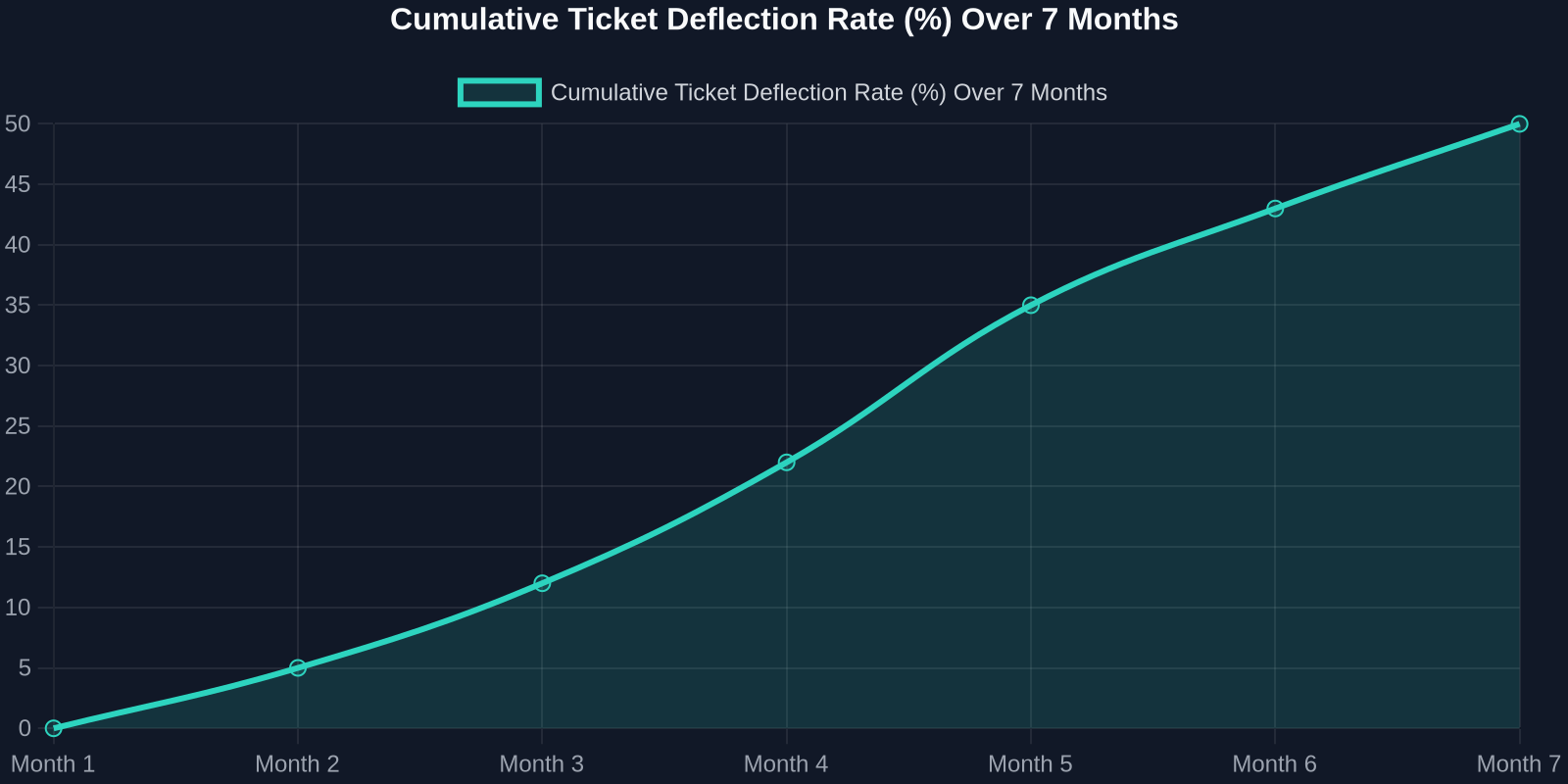
As the chart above shows, deflection rates improve steadily as the AI learns from real interactions. Month 1 sees a small gain, but by month 7, nearly half of all incoming tickets never need a human. That’s thousands of hours saved per month.
Step 1: Map Your Ticket Taxonomy
Before you can automate, you need to know what you’re automating. Start by analyzing your last 90 days of support tickets. Categorize every issue into one of these buckets:
- Account & Billing(password resets, payment issues, plan changes) -Product Usage(how-to questions, feature requests, bug reports) -Technical Support(integration errors, API issues) -Other(escalations, complaints, non-standard requests)
For most SaaS companies, the first two buckets represent 70-80% of total volume. These are prime candidates for AI automation.
Step 2: Build a Knowledge Base That Powers the AI
Your AI is only as good as the knowledge it draws from. A well-structured, up-to-date knowledge base is the foundation of any successful automation strategy.

Best Practices for Knowledge Base Creation:
-**Write for the AI, not just humans.**Use clear, concise language with explicit “if-then” logic. -**Include FAQs with step-by-step answers.**Screenshots and video links help. -Tag content by intent(e.g., “password_reset”, “billing_question”). -Version your articlesso the AI knows which product version applies.
Once your knowledge base is ready, Successly’s AI can instantly surface the right article to the customer, deflecting the ticket before it’s even created.
Step 3: Deploy AI-Powered Self-Service
Now it’s time to put the AI front and center. Place a smart widget on your help center, inside your app, and even on your pricing page. The key is to make it visible at the exact moment of friction.
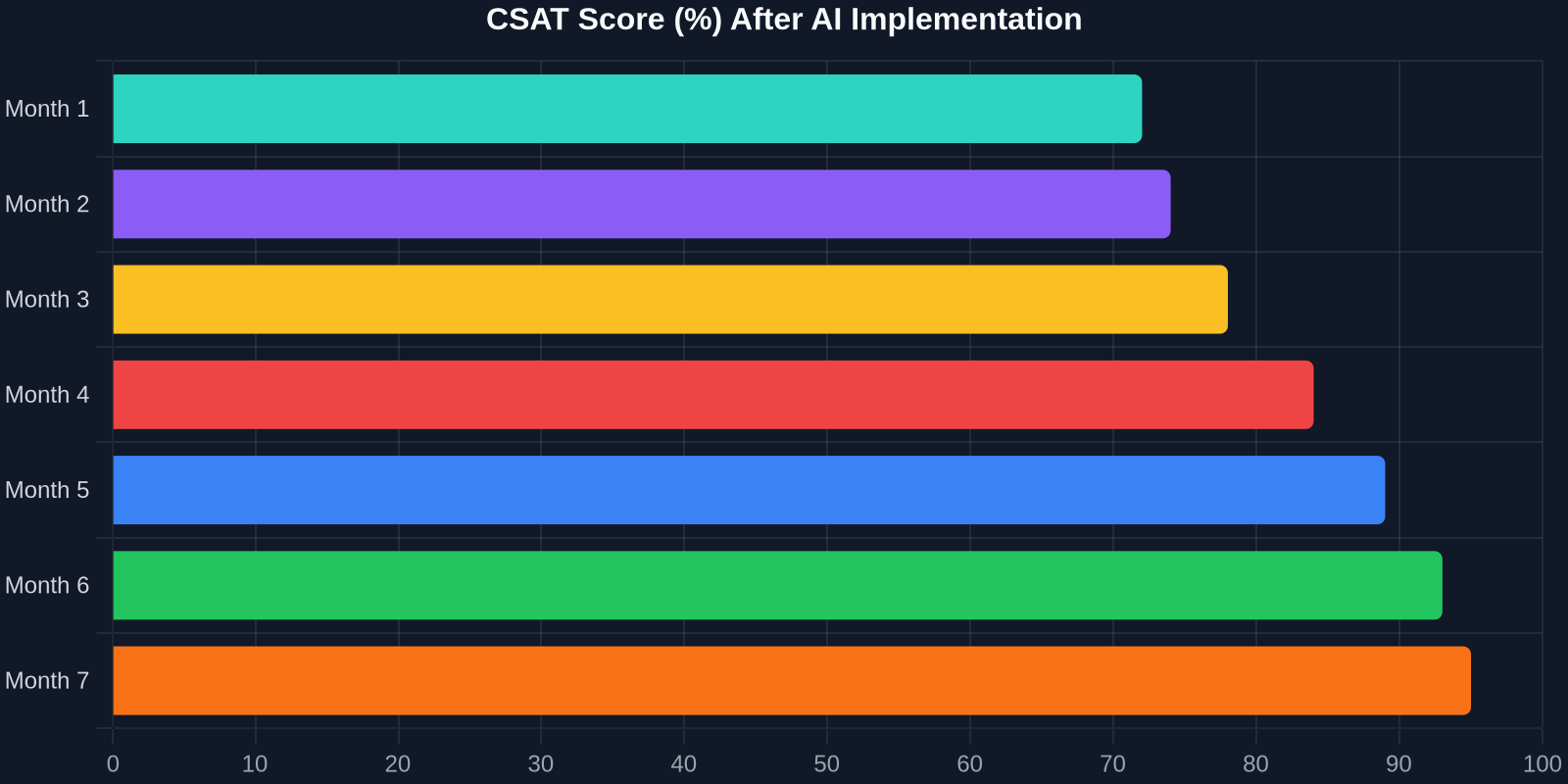
The CSAT improvement is just as dramatic. As shown above, scores climb from 72% to 95% over 7 months. Why? Because customers get instant answers, and when they do talk to a human, the agent already knows their history.
Step 4: Intelligent Triage and Routing
Not all tickets can be automated, and that’s okay. The goal is to route the right tickets to the right people, immediately. Successly’s AI can:
-Detect sentiment– urgent/bug reports get priority -Identify language– route to multilingual agents -Assign based on skill– technical issues go to Tier 2, billing to finance -Predict resolution time– set customer expectations upfront
Step 5: Continuous Learning and Optimization
AI is not a “set it and forget it” tool. You need to monitor performance, review missed deflections, and update your knowledge base regularly.
Key Metrics to Track:
-Deflection rate– % of tickets resolved without an agent -Self-service success rate– % of users who find an answer in the knowledge base -Handoff satisfaction– CSAT after AI-to-human transfer -Agent productivity– tickets closed per hour
Use Successly’s analytics dashboard to see which topics are underperforming. If the AI fails to answer a question, add a new article. If customers keep asking the same thing in a different way, update the AI’s intent models.
Real-World Results: A SaaS Case Study
Let’s look at a mid-stage B2B SaaS company (let’s call them “CloudFlow”) that had 8 support agents handling 12,000 tickets per month. Average first response time was 6 hours, and CSAT hovered around 70%.
After implementing Successly:
今天投资AI驱动的支持自动化,你不仅在降低成本,还在构建一种支持体验:它随着你的增长而扩展,让你的客户满意,并留住你最优秀的人才。
你的下一步行动
准备好开始了吗?这是30天行动计划:
1.第一周– 分析你的工单数据,并对最常见的问题进行分类。 2.第二周– 基于前10个常见问题建立或更新你的知识库。 3.第三周– 在帮助中心和产品内部署Successly的AI组件。 4.第四周 – 监控拦截率,收集反馈,并优化改进。
Successly提供免费试用以及专属入职专家,帮助你达成目标。立即开始你的工单减少43%之旅。
请记住:每一个被拦截的工单,都意味着客户即时获得了帮助,而客服则被解放出来解决更深层的问题。这对所有人都是胜利。
数据来源:Successly内部基准、Zendesk 2024年客户体验趋势报告、Gartner 2024年支持自动化研究。