
كيف يقلل أتمتة الدعم المدعومة بالذكاء الاصطناعي من التذاكر بنسبة 43% ويعزز رضا العملاء بنسبة 25%: دليل عملي قائم على البيانات لفرق SaaS
دعم العملاء هو العمود الفقري لأي شركة SaaS. ومع ذلك، مع نمو قاعدة مستخدميك، يزداد حجم الأسئلة المتكررة وإعادة تعيين كلمات المرور وطلبات الميزات. النتيجة؟ وكلاء مرهقون، وتكاليف متصاعدة، وعملاء محبطون. ولكن ماذا لو كان بإمكانك تحويل نصف هذه التذاكر تقريبًا قبل أن تصل إلى بشري؟ هذا هو وعد أتمتة الدعم المدعومة بالذكاء الاصطناعي.
في هذا الدليل، سنوضح لك بالضبط كيف تستخدم فرق SaaS الرائدة أدوات مثل Successly لتقليل حجم التذاكر بنسبة 43%، وتحسين رضا العملاء بنسبة 25%، وتحرير فرق الدعم لديهم للتركيز على المحادثات عالية القيمة. ستحصل على دليل عملي خطوة بخطوة، ومعايير حقيقية، والبيانات التي تحتاجها لتقديم حجة للأتمتة.
أزمة توسيع نطاق الدعم: لماذا تفشل الأساليب التقليدية
يعرف كل مؤسس SaaS النمط: تطلق المنتج، وتحصل على زخم مبكر، وفي غضون أشهر يتحول صندوق الوارد الخاص بالدعم من يمكن التحكم فيه إلى فوضوي. الرد النموذجي هو توظيف وكلاء أكثر. لكن التوظيف الخطي لا يتوسع، خاصة عندما تكون 60% من التذاكر من مشكلات المستوى صفر (إعادة تعيين كلمة المرور، التحقق من الفوترة، العثور على ميزة).
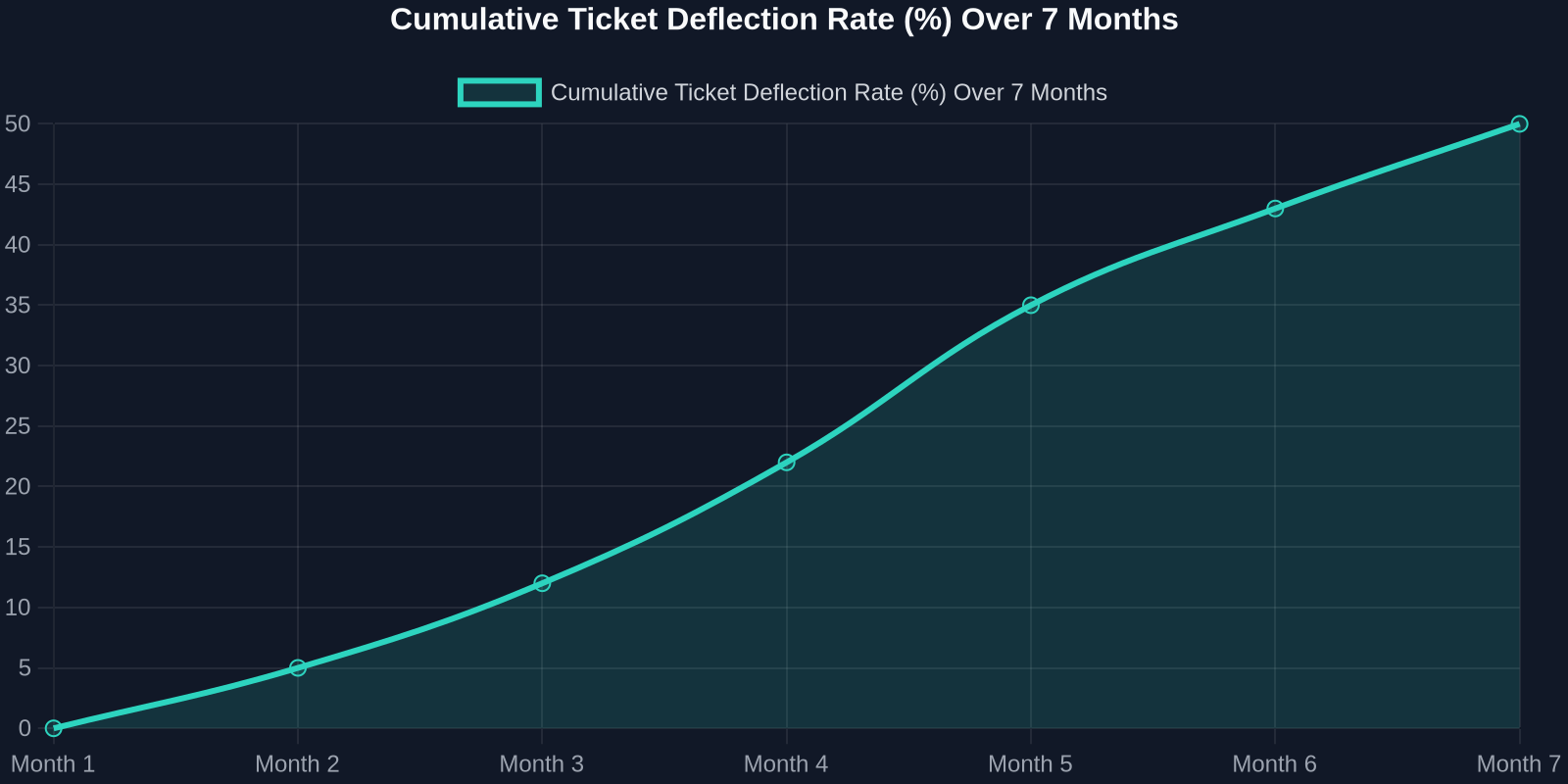
As the chart above shows, deflection rates improve steadily as the AI learns from real interactions. Month 1 sees a small gain, but by month 7, nearly half of all incoming tickets never need a human. That’s thousands of hours saved per month.
Step 1: Map Your Ticket Taxonomy
Before you can automate, you need to know what you’re automating. Start by analyzing your last 90 days of support tickets. Categorize every issue into one of these buckets:
- Account & Billing(password resets, payment issues, plan changes) -Product Usage(how-to questions, feature requests, bug reports) -Technical Support(integration errors, API issues) -Other(escalations, complaints, non-standard requests)
For most SaaS companies, the first two buckets represent 70-80% of total volume. These are prime candidates for AI automation.
Step 2: Build a Knowledge Base That Powers the AI
Your AI is only as good as the knowledge it draws from. A well-structured, up-to-date knowledge base is the foundation of any successful automation strategy.

Best Practices for Knowledge Base Creation:
-**Write for the AI, not just humans.**Use clear, concise language with explicit “if-then” logic. -**Include FAQs with step-by-step answers.**Screenshots and video links help. -Tag content by intent(e.g., “password_reset”, “billing_question”). -Version your articlesso the AI knows which product version applies.
Once your knowledge base is ready, Successly’s AI can instantly surface the right article to the customer, deflecting the ticket before it’s even created.
Step 3: Deploy AI-Powered Self-Service
Now it’s time to put the AI front and center. Place a smart widget on your help center, inside your app, and even on your pricing page. The key is to make it visible at the exact moment of friction.
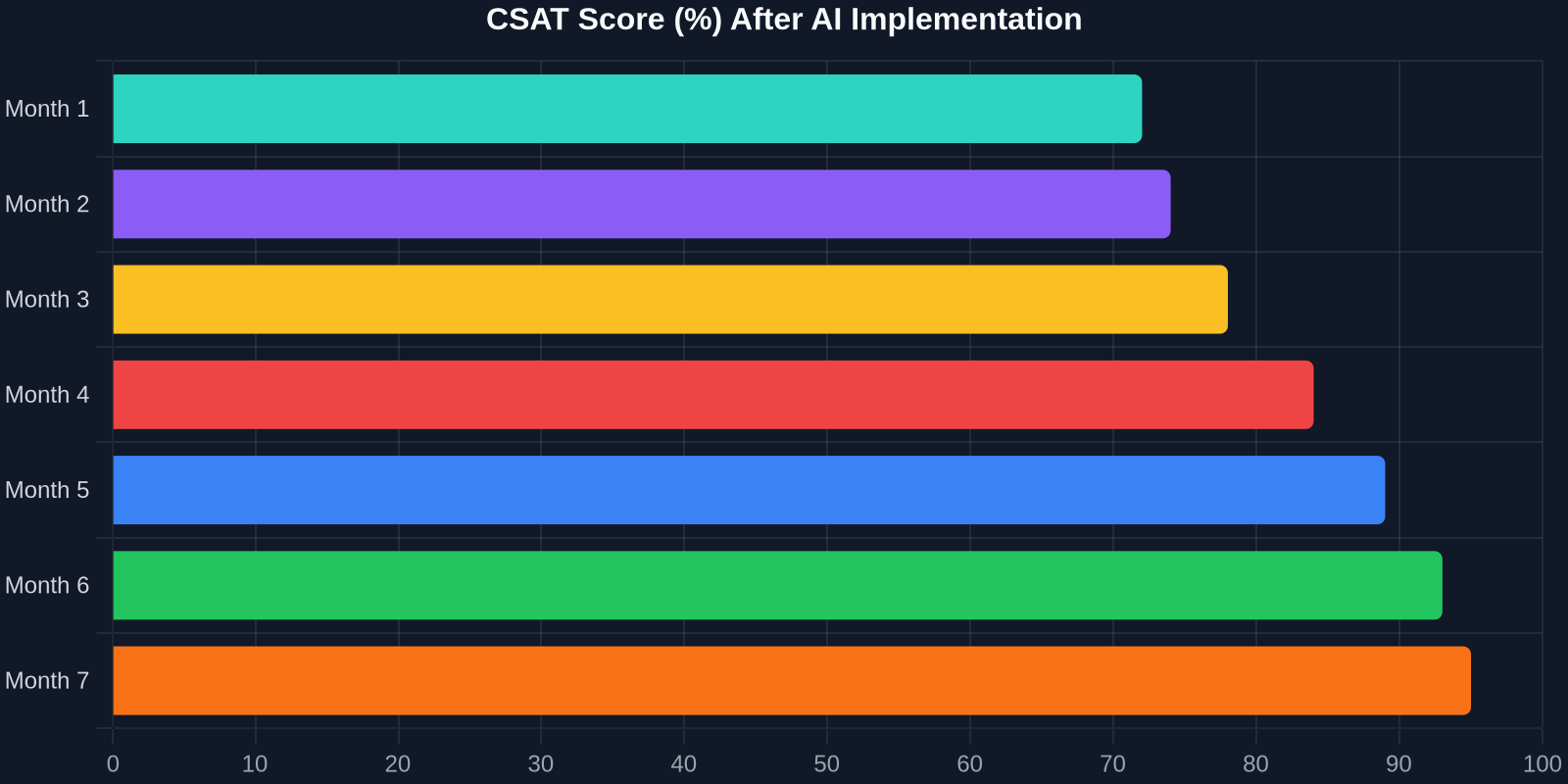
The CSAT improvement is just as dramatic. As shown above, scores climb from 72% to 95% over 7 months. Why? Because customers get instant answers, and when they do talk to a human, the agent already knows their history.
Step 4: Intelligent Triage and Routing
Not all tickets can be automated, and that’s okay. The goal is to route the right tickets to the right people, immediately. Successly’s AI can:
-Detect sentiment– urgent/bug reports get priority -Identify language– route to multilingual agents -Assign based on skill– technical issues go to Tier 2, billing to finance -Predict resolution time– set customer expectations upfront
Step 5: Continuous Learning and Optimization
AI is not a “set it and forget it” tool. You need to monitor performance, review missed deflections, and update your knowledge base regularly.
Key Metrics to Track:
-Deflection rate– % of tickets resolved without an agent -Self-service success rate– % of users who find an answer in the knowledge base -Handoff satisfaction– CSAT after AI-to-human transfer -Agent productivity– tickets closed per hour
Use Successly’s analytics dashboard to see which topics are underperforming. If the AI fails to answer a question, add a new article. If customers keep asking the same thing in a different way, update the AI’s intent models.
Real-World Results: A SaaS Case Study
Let’s look at a mid-stage B2B SaaS company (let’s call them “CloudFlow”) that had 8 support agents handling 12,000 tickets per month. Average first response time was 6 hours, and CSAT hovered around 70%.
After implementing Successly:
من خلال الاستثمار في أتمتة الدعم المدعومة بالذكاء الاصطناعي اليوم، فإنك لا تقلل التكاليف فحسب، بل تبني تجربة دعم تتوسع مع نموك، وتسعد عملاءك، وتحتفظ بأفضل مواهبك.
خطواتك التالية
هل أنت مستعد للبدء؟ إليك خطة عمل لمدة 30 يومًا:
1.الأسبوع 1– تحليل بيانات التذاكر الخاصة بك وتصنيف المشكلات الرئيسية. 2.الأسبوع 2– بناء أو تحديث قاعدة المعرفة الخاصة بك بأفضل 10 أسئلة شائعة. 3.الأسبوع 3– نشر أداة Successly الذكية في مركز المساعدة الخاص بك وداخل التطبيق. 4.الأسبوع 4 – مراقبة عمليات التحويل، وجمع الملاحظات، والتحسين.
تقدم Successly نسخة تجريبية مجانية وأخصائي تأهيل مخصص لمساعدتك في تحقيق أهدافك. ابدأ رحلتك نحو تقليل التذاكر بنسبة 43% اليوم.
تذكر: كل تذكرة تقوم بتحويلها هي عميل حصل على مساعدة فورية، ووكيل تحرر لحل مشكلات أعمق. هذا مكسب للجميع.
مصادر البيانات: معايير Successly الداخلية، تقرير Zendesk لاتجاهات تجربة العملاء 2024، دراسة Gartner لأتمتة الدعم 2024.