
4 Ways to Reduce Energy Use with AI Chatbots: A Practical Guide for Support Teams
When you think about AI chatbots, what comes to mind? For most customer support leaders, it’s faster response times, lower ticket volumes, and happier customers. But there’s another dimension that’s rapidly ascending the priority list: energy consumption. AI chatbots, especially the large language models (LLMs) that power them, are not free in terms of electricity. In fact, research highlighted by Knowable Magazine reveals that simply optimizing how we prompt AI can slash energy use significantly.
In this guide, we’ll explore four actionable ways to reduce energy consumption when using AI chatbots in your customer support operations. Each method is grounded in real data, framed for ROI-conscious managers, and designed to be implemented without sacrificing service quality. Let’s dive in.
For SaaS companies scaling support, energy costs may not yet appear on the balance sheet as a line item, but they reflect in infrastructure bills, environmental impact metrics, and even latency. Reducing energy isn’t just about going green, it’s about efficiency, cost control, and system performance. Let’s examine four proven strategies.
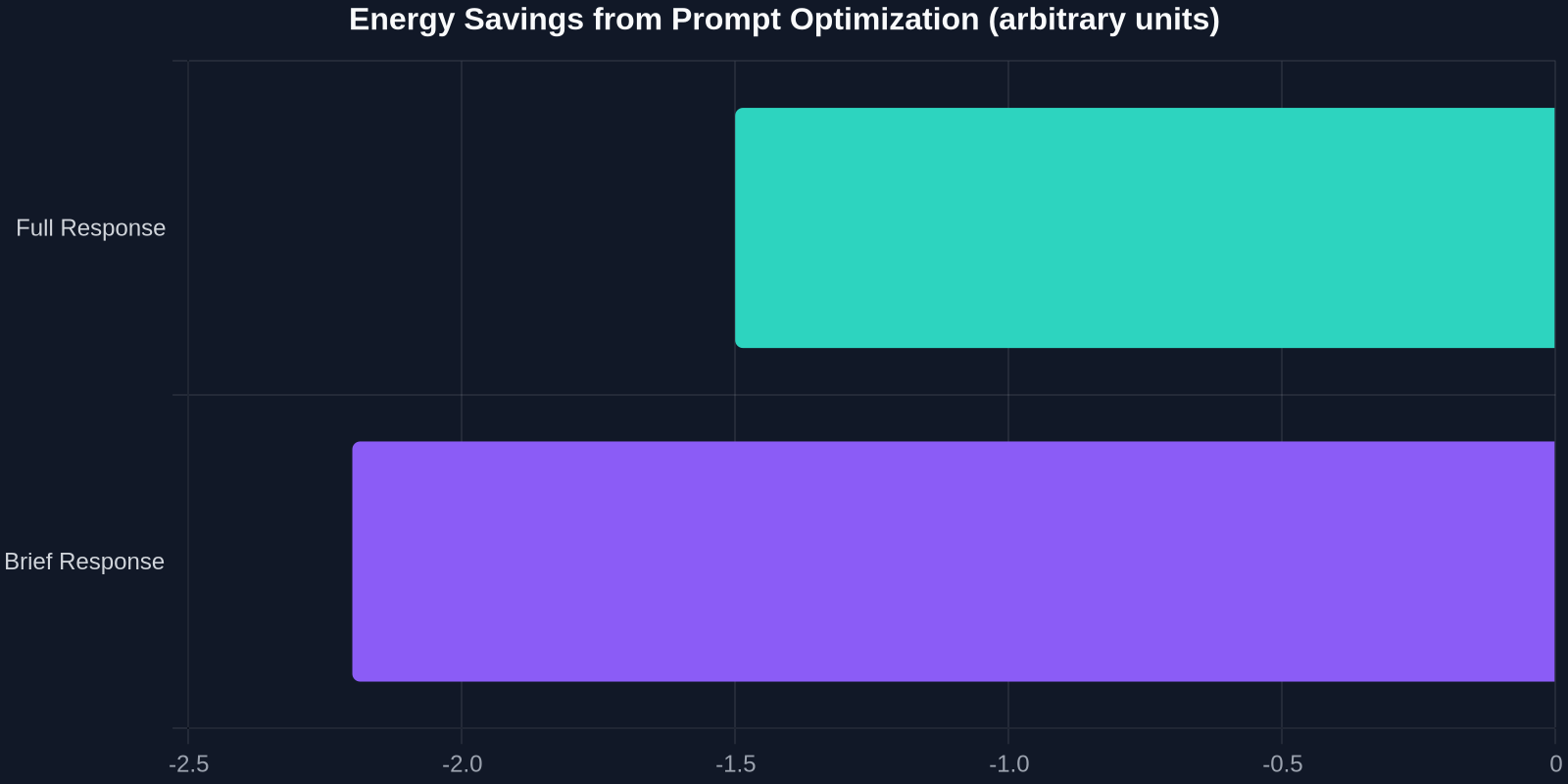
1. Optimize Prompts for Brevity and Efficiency
The most straightforward way to reduce energy consumption is to change how you ask AI to respond. Instead of allowing open-ended, verbose answers, instruct the model to be concise or limit responses to a certain number of sentences or words. This is not a theoretical idea, the UNESCO paper noted a clear drop in energy usage when prompts included brevity instructions.
Here's how to apply this in your support automation system:
- Add system-level instructions like "Respond in 3 sentences or fewer" for status-check queries.
- Use tone modifiers: "Keep language simple and direct" instead of "Explain thoroughly."
- Set max tokens in your AI configuration to cap response length automatically.
The impact is twofold: shorter responses mean less computation per query, directly reducing energy. Additionally, customers get faster answers, which improves CSAT. A win-win that requires no code changes, just smarter prompt design.
2. Implement Role-Based Prompting to Eliminate Irrelevant Computation
Another powerful technique is role-based prompting. Instead of letting the AI act as a generalist for every query, you tell it exactly what persona to adopt. For example, "Act as a billing support specialist" or "Respond as a technical troubleshooting agent." This reduces the model's tendency to generate extraneous or exploratory content that consumes energy without adding value.
Role-based prompts also improve accuracy. When the model knows it's acting as a support agent for a specific domain, it won't waste cycles considering unrelated knowledge. This both saves energy and increases first-contact resolution rate, a core KPI for any support team.
| Scenario | General Prompt | Role-Based Prompt |
|---|---|---|
| Refund request | "Help with a refund" | "Act as a refund specialist. Process a refund and explain steps." |
| Technical issue | "My app crashes" | "Act as a senior support engineer. Diagnose crash and provide fix." |
The energy savings from caching compound over time. Every time a cached answer is used, you avoid the computation of a full LLM generation. For high-volume support teams, this can translate to significant cost savings and a noticeably smaller carbon footprint.
Overcoming Common Objections
Some support leaders worry that constraining AI responses will make the chatbot seem robotic or unhelpful. But the data says otherwise. With role-based and brevity-focused prompts, you can maintain warmth and accuracy while cutting energy. The key is to test and iterate. Start with a small percentage of traffic (e.g., 20%), measure CSAT and resolution rates, then roll out broadly.
Another concern: Is prompt optimization just a temporary workaround until models become more efficient? While next-gen models may indeed use less energy per query, the savings from best practices will still compound. Moreover, efficient prompting is free and immediate, no need to wait for hardware upgrades.
Why This Matters for Customer Success Leaders
Energy reduction in AI isn’t just a tech team concern. For CS and support management, it directly affects:
- Budget: Lower compute costs mean more budget for headcount or feature development.
- Sustainability goals: Many companies now require vendors to report carbon impact. An efficient chatbot helps you meet ESG targets.
- Performance: shorter responses mean faster reply times, which boost CSAT and first-contact resolution.
By applying these four strategies, you can create a chatbot that’s not only effective but also energy-smart. And when you combine that with a platform like Successly, which natively supports prompt optimization, caching, and monitoring, the effort becomes minimal.