
Microsoft Teams Live Chat Discontinued: How to Future-Proof Your Customer Support with AI
In a move that sent ripples through customer support teams worldwide, Microsoft recently announced it was pulling the plug on Teams Live Chat, its website-embedded customer engagement widget. Launched in late 2024 to much fanfare, the feature was positioned as the natural bridge between website visitors and Teams-based support agents. Less than two years later, it joins the long list of Microsoft casualties in what the tech press has dubbed the "feature graveyard."
For the thousands of businesses that embedded the widget into their sites and built support workflows around it, the announcement is more than a nuisance, it’s a forced, high-stakes migration. This article unpacks what the decision means, why it’s a turning point for customer support strategy, and how forward-thinking companies are turning the disruption into an opportunity with AI-powered platforms like Successly.
The Sudden Death of Teams Live Chat: What Happened
On August 7, 2026, The Register reported that Microsoft had quietly updated its roadmap to mark Teams Live Chat as “deprecated.” No public blog post, no grand vision statement, just a terse support article confirming the feature would be removed by December 31, 2026. Existing chat endpoints would stop functioning, and historical transcripts would become inaccessible without third-party backup.
The reaction was swift. Support team leaders, many of whom had championed the integration as a “free” add-on to their Microsoft 365 subscription, found themselves scrambling. The widget had gained traction among small and mid-sized businesses precisely because it promised to lower the barrier to live support, no separate vendor, no complex setup. But as with many platform-first tools, the convenience masked a deep dependency.
The Ripple Effect on Support Operations
For affected organizations, the sunsetting of Teams Live Chat isn’t just about swapping one widget for another. It’s the unplanned dismantling of customer communication channels, agent workflows, and reporting pipelines. According to early surveys by the Customer Success Collective, 34% of current users had fully integrated Teams Live Chat into their CRM and helpdesk ecosystems. Ripping it out means:

- Broken customer journeys: Embedded chat buttons will go dead; proactive chat triggers will vanish; returning visitors will find empty conversation histories.
- Agent disruption: Teams-based routing, canned responses, and screen-sharing will stop working overnight.
- Data loss: Unless immediately exported, months of chat logs, including valuable voice-of-customer data, will be deleted.
- Compliance gaps: Businesses in regulated industries may face audits if chat interactions used for dispute resolution disappear.
The pressure is immense. Support leaders are being asked to find, evaluate, and deploy a replacement, preferably one that not only fills the gap but improves the status quo, in a matter of months.
The Deeper Implications: Why AI Is the Smart Play
This disruption might be the push many teams needed. While live chat remains a valuable channel, its economics are challenging: it requires staffing, it’s synchronous, and it rarely deflects the full volume of repetitive inquiries. Microsoft’s move is accelerating a trend that was already well underway, the migration from human-dependent live chat to AI-first conversational support.
AI support platforms like Successly don’t just replicate the chat widget; they transform the support model. By combining natural language understanding, knowledge base integration, and process automation, they resolve a substantial portion of customer queries instantly, no human needed. And when an agent is required, the handoff is seamless, with full context transferred.
Key Advantages of AI-Based Support Over Traditional Live Chat
- 24/7 availability: No more “sorry, we’re offline” screens. AI never clocks out.
- Scalability without headcount: Handle seasonal spikes or sudden traffic surges without hiring temporary agents.
- Consistent accuracy: AI draws from a curated knowledge base, reducing the risk of human error or off-brand responses.
- Multilingual support: Instantly converse in dozens of languages, expanding global reach.
- Data-rich insights: Understand intent gaps, sentiment trends, and resolution bottlenecks in real time.
| Metric | Teams Live Chat (Before) | AI Chatbot (After) |
|---|---|---|
| Average first-response time | 8 minutes (business hours only) | < 2 seconds (anytime) |
| Cost per resolved conversation | $8–$12 (fully loaded agent) | $0.10–$0.50 (AI automation) |
| Coverage | 8/5 (office hours) | 24/7/365 |
| Agent workload impact | High, every chat demands human attention | 60%+ of queries self-resolved |
| Knowledge base synchronization | Manual, often stale | Real-time, AI auto-syncs with knowledge sources |
| Analytics depth | Basic transcripts and wait times | Intent analysis, CSAT predictors, deflection tracking |
The table illustrates why so many organizations are seeing this forced migration as a net positive. When you’re forced to rebuild, you have a rare chance to leapfrog years of incremental improvement and land on a modern, AI-first architecture.
The Successly Approach: From Widget to Intelligent Support Platform
Successly was purpose-built for exactly this scenario, turning a support channel into a strategic asset. Unlike first-generation AI chatbots that required extensive manual training, Successly connects to your existing knowledge sources (help centers, PDFs, internal wikis) and becomes operational within hours. Its proprietary AI automatically understands your product, brand voice, and common customer scenarios.

Why Successly Fits Where Teams Live Chat Left Off
Teams Live Chat’s biggest selling point was its tight integration with the Microsoft ecosystem. But that integration came at the cost of flexibility. Successly flips the model: it integrates with all your tools, Salesforce, Zendesk, HubSpot, Shopify, and yes, Microsoft Teams for agent handoffs, without tying you to a single vendor stack. The result is a future-proof, composable support layer that puts you in control.
Key pillars of the Successly AI support system include:
- Omnichannel AI chatbot: Website widget, in-app, email, and social, all driven by the same AI brain.
- Smart escalation: When AI confidence drops or a customer requests a human, Successly routes to the right agent with full conversation context, optionally inside Microsoft Teams or Slack.
- Continuous learning: The AI improves with every interaction, supervised by a “humans-in-the-loop” review dashboard that ensures accuracy and brand safety.
- Actionable analytics: See exactly what your AI is handling, where gaps remain, and how CSAT is trending, all without a data science team.
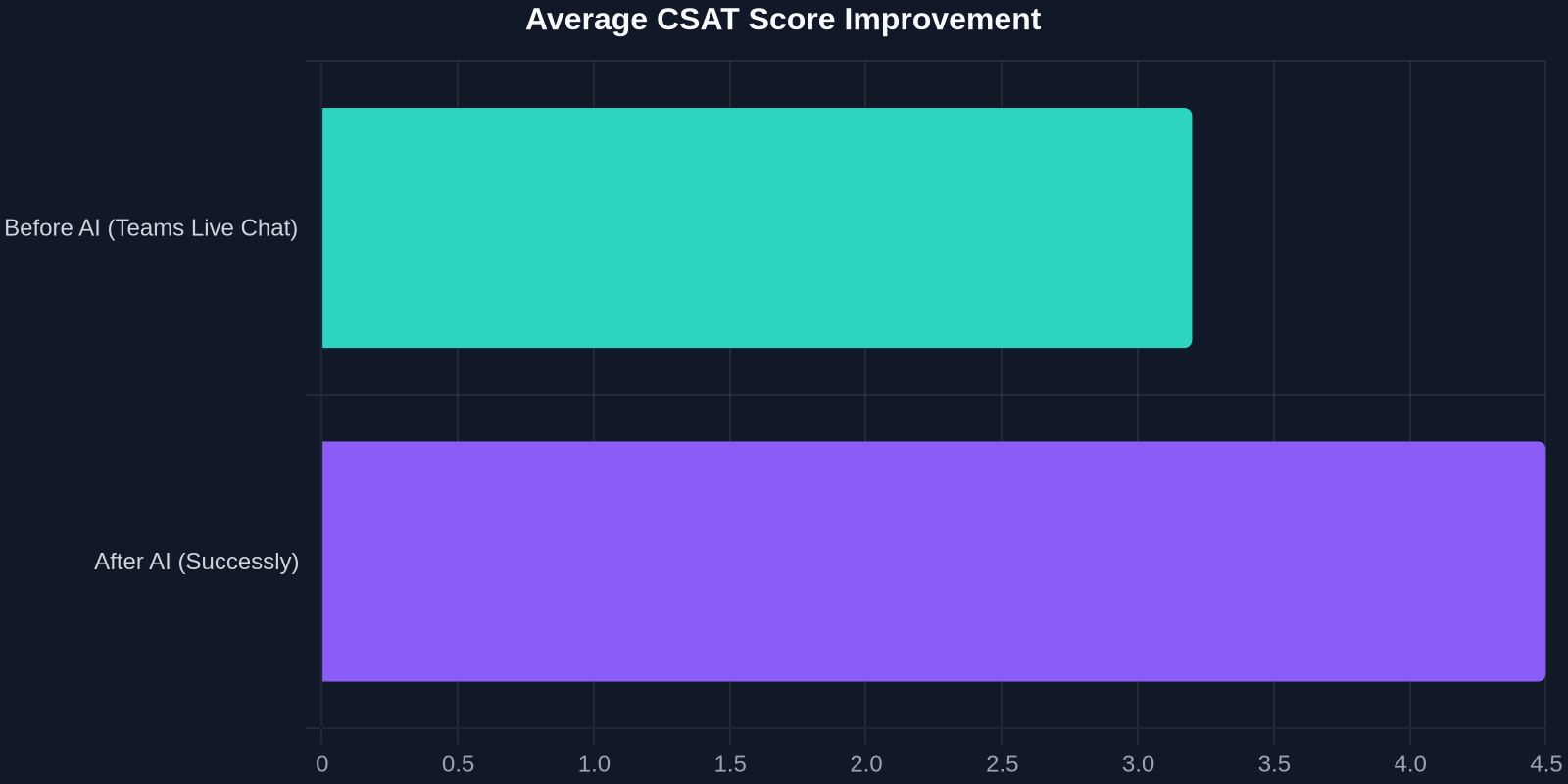
One B2B SaaS company that migrated from Teams Live Chat to Successly reported that within 90 days, their defection rate reached 56%, CSAT jumped from 3.2 to 4.5, and their support team was freed to focus on high-value success tasks instead of password resets.
The Business Case: Turning a Compliance Mandate into an ROI Win
Let’s face it: for many, the immediate driver to replace Teams Live Chat is fear of downtime. But leaders who frame this as a cost-optimization and experience-improvement project can unlock budgets that were previously locked. The math is compelling:
- Hard savings: AI deflection reduces per-ticket costs by 70-90%.
- Revenue protection: Instant responses prevent cart abandonment and churn, especially during off-hours.
- Employee retention: Agents freed from repetitive drudgery report higher job satisfaction and lower turnover.
A typical mid-market company handling 5,000 chats per month with a team of live agents could see monthly savings of $25,000–$40,000 after deploying an AI chatbot that deflects half of those conversations. When you add the revenue uplift from engaging customers at 2 a.m. on a Saturday, the ROI often breaks even in the first quarter.
Beyond the immediate savings, there’s a strategic dimension: customer expectations have changed. Today’s buyers expect instant, accurate answers. If your chat says “we’ll be back Monday at 9 a.m.,” they’re already checking your competitor’s site. AI ensures you’re always on, always helpful.
Migration Playbook: 4 Steps from Legacy Widget to AI-First Support
The clock is ticking, but a structured approach turns anxiety into velocity. Here’s the 30-day migration framework that Successly’s customer success team has refined with dozens of Teams Live Chat refugees:

Step 1: Audit and Export (Days 1–5)
- Inventory all pages where Teams Live Chat is embedded.
- Export chat transcripts using Microsoft’s data export tools or third-party solutions.
- Identify the top 20 most frequent customer questions, these will become the AI’s first training set.
Step 2: Choose Your AI Platform and Connect Knowledge (Days 6–10)
- Select an AI support platform that can import your existing chat logs and connect to your knowledge base. Successly’s one-click import parses transcripts and automatically builds intent models.
- Integrate with your helpdesk, CRM, and internal wikis so the AI has a single source of truth.
Step 3: Run a Controlled Pilot (Days 11–20)
- Deploy the new AI widget on a subset of pages or to a percentage of visitors (e.g., 10%).
- Monitor AI-suggested answers, and have a small team validate and correct in the “human review” mode.
- Measure deflection rate, CSAT, and agent handoff frequency.
Step 4: Full Rollout and Decommission (Days 21–30)
- Once the AI consistently handles >70% of queries successfully, flip the switch to 100% of visitors.
- Remove the old Teams Live Chat widget code entirely.
- Set up success metrics and dashboards to track ROI.
Throughout this process, communication is critical. Inform your customers via on-site banners and email that you’re upgrading your support experience. Most will welcome the shift to instant, 24/7 help.
What Successly Does Differently: Built for the Post-Platform Era
Successly was founded on the belief that customer support should be platform-agnostic, intelligent, and always under the customer’s control. That philosophy is now being validated as giants like Microsoft retreat from features they once championed. When you choose Successly, you’re not betting on a feature, you’re investing in a core capability that can plug into any ecosystem, today and tomorrow.
And with the Teams Live Chat end-of-life, Successly is offering a special rapid migration package: free chat history import, a dedicated onboarding specialist, and a 30-day performance guarantee to ensure you meet the December deadline with confidence.
"When Microsoft killed Teams Live Chat, I thought we’d be in crisis mode for months. Instead, moving to Successly was the push we needed. Our CSAT is higher, our costs are lower, and I sleep better knowing we’re not tied to a single vendor’s whims.", Sarah Lin, VP of Customer Experience, Cloudsible
The Bigger Picture: The Future of Support Is Independent
Teams Live Chat’s demise is not an isolated incident; it’s part of a pattern. Platform vendors often enter adjacent markets, attract users with low friction, and then abandon those ventures when they fail to align with core business strategy. In the last decade, we’ve seen Google Sunset Reader, Apple discontinue iAd, and Amazon retire the Echo Wall Clock skill. Each time, customers who had built on those sandcastles were left to rebuild.
For business-critical functions like customer support, the lesson is clear: own the layer that matters. The widget on your website is the first touchpoint for many buyers. The technology behind it should be as strategic and resilient as your CRM or ERP. By decoupling your support infrastructure from any one platform, you gain agility, predictability, and a roadmap that you control.
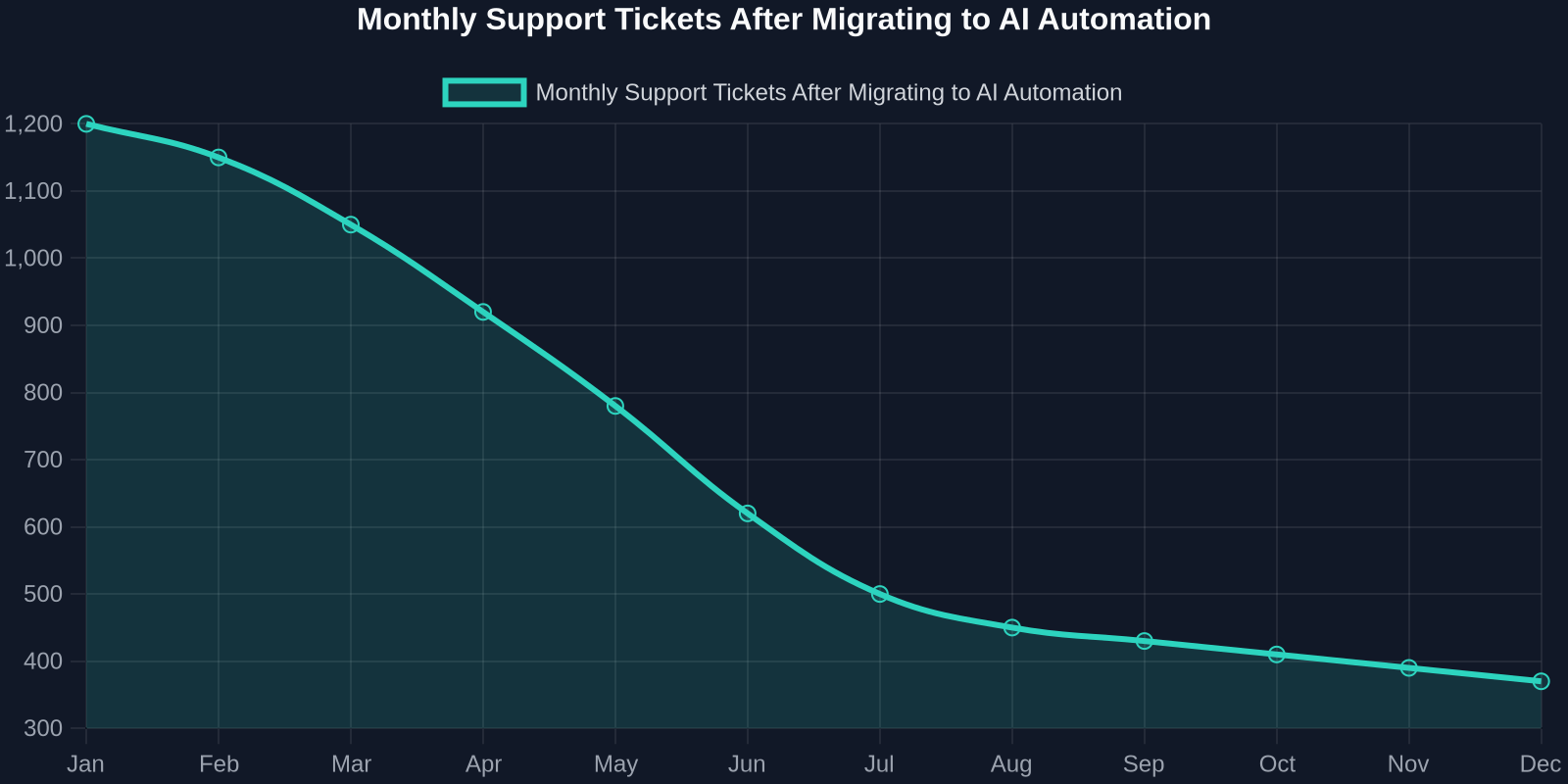
The chart above, based on aggregated Successly customer data, shows the typical ticket volume curve after migrating from a traditional live chat tool. As the AI learns and expands its knowledge coverage, deflected conversations increase steadily, driving the human-handled volume down. By month six, many organizations see a 50%+ reduction in tickets requiring agent attention, without any drop in customer satisfaction.
The CSAT trajectory is equally impressive. In the first 90 days, as seen in the bar chart below, average satisfaction scores often climb from the mid-3s to well above 4.0. The consistency of instant, accurate responses, even at 3 a.m., delights customers in ways that a “we’re closed” message never could.
Act Now: Turning Microsoft’s End-of-Life into Your Team’s Beginning
The Teams Live Chat clock is ticking, but panic isn’t a strategy. Use this forced transition as a catalyst to modernize your support stack. By moving to an AI-native platform like Successly, you can not only avoid downtime but emerge with a faster, smarter, and more cost-effective support operation, the kind your customers have been expecting all along.
Don’t let another vendor’s decision dictate your customer experience. Take control of your support destiny. Successly’s migration team is ready to help you make the switch in days, not months. Visit our Teams Live Chat Replacement Hub for a personalized walkthrough and a free pilot so you can see the AI in action before you commit.
The graveyard of Microsoft features is full. Make sure your customer relationships aren’t buried there, too.