
Cómo la Automatización de Soporte Impulsada por IA Reduce los Tickets en un 43% y Aumenta el CSAT en un 25%: Un Manual Basado en Datos para Equipos SaaS
El soporte al cliente es la columna vertebral de cualquier empresa SaaS. Sin embargo, a medida que tu base de usuarios crece, también lo hace el volumen de preguntas repetitivas, restablecimientos de contraseñas y solicitudes de funciones. ¿El resultado? Agentes abrumados, costos crecientes y clientes frustrados. Pero, ¿y si pudieras desviar casi la mitad de esos tickets antes de que lleguen a un humano? Esa es la promesa de la automatización de soporte impulsada por IA.
En esta guía, te mostraremos exactamente cómo los equipos SaaS líderes están utilizando herramientas como Successly para reducir el volumen de tickets en un 43%, mejorar el CSAT en un 25% y liberar a sus equipos de soporte para que se centren en conversaciones de alto valor. Obtendrás un manual paso a paso, puntos de referencia reales y los datos que necesitas para justificar la automatización.
La Crisis de Escalabilidad del Soporte: Por Qué los Enfoques Tradicionales Fracasan
Todo fundador de SaaS conoce el patrón: lanzas, obtienes tracción temprana y, en cuestión de meses, tu bandeja de entrada de soporte pasa de ser manejable a caótica. La respuesta típica es contratar más agentes. Pero la contratación lineal no escala, especialmente cuando el 60% de los tickets son problemas de Nivel 0 (restablecer contraseña, verificar facturación, encontrar una función).
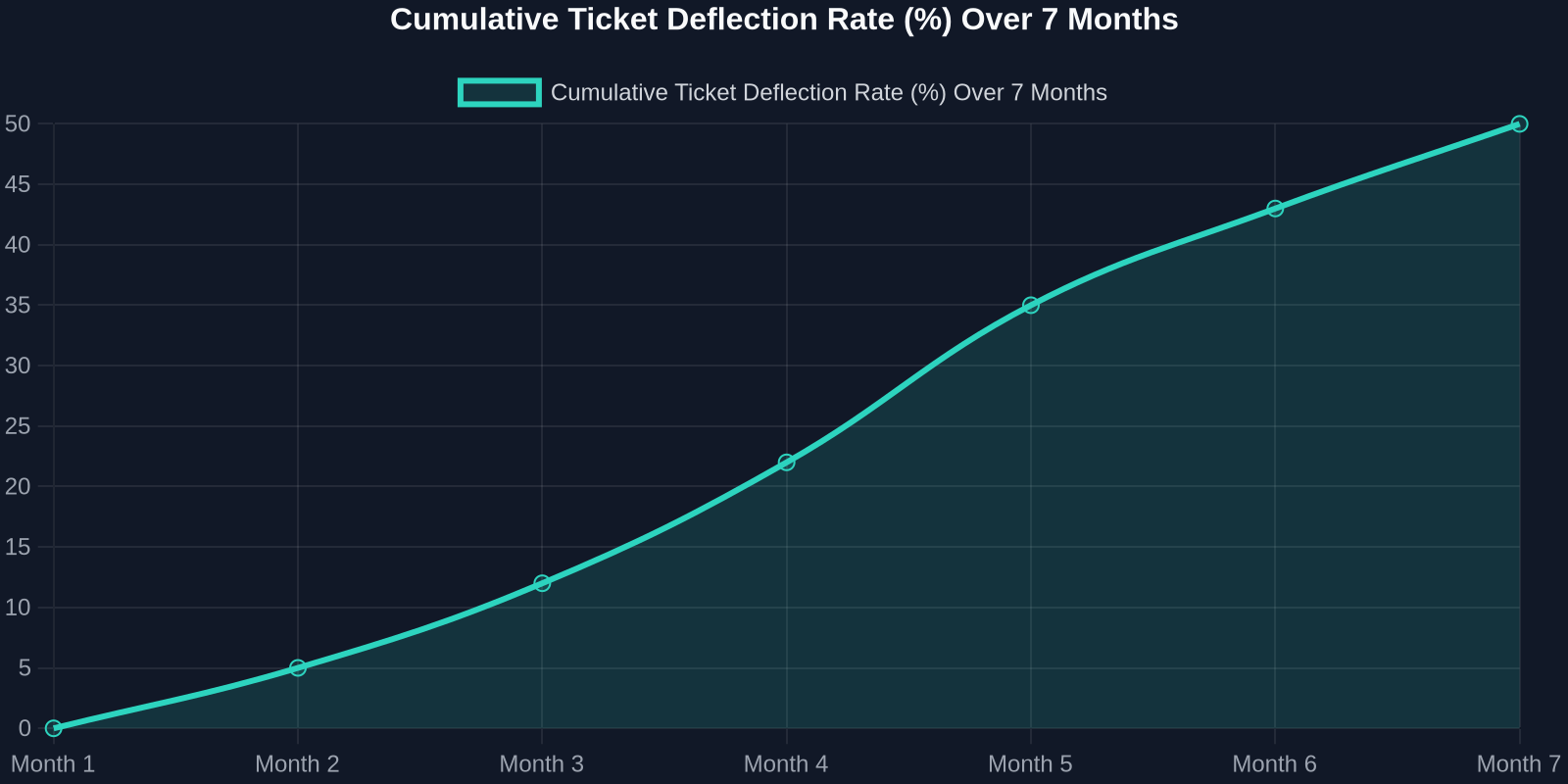
As the chart above shows, deflection rates improve steadily as the AI learns from real interactions. Month 1 sees a small gain, but by month 7, nearly half of all incoming tickets never need a human. That’s thousands of hours saved per month.
Step 1: Map Your Ticket Taxonomy
Before you can automate, you need to know what you’re automating. Start by analyzing your last 90 days of support tickets. Categorize every issue into one of these buckets:
- Account & Billing(password resets, payment issues, plan changes) -Product Usage(how-to questions, feature requests, bug reports) -Technical Support(integration errors, API issues) -Other(escalations, complaints, non-standard requests)
For most SaaS companies, the first two buckets represent 70-80% of total volume. These are prime candidates for AI automation.
Step 2: Build a Knowledge Base That Powers the AI
Your AI is only as good as the knowledge it draws from. A well-structured, up-to-date knowledge base is the foundation of any successful automation strategy.

Best Practices for Knowledge Base Creation:
-**Write for the AI, not just humans.**Use clear, concise language with explicit “if-then” logic. -**Include FAQs with step-by-step answers.**Screenshots and video links help. -Tag content by intent(e.g., “password_reset”, “billing_question”). -Version your articlesso the AI knows which product version applies.
Once your knowledge base is ready, Successly’s AI can instantly surface the right article to the customer, deflecting the ticket before it’s even created.
Step 3: Deploy AI-Powered Self-Service
Now it’s time to put the AI front and center. Place a smart widget on your help center, inside your app, and even on your pricing page. The key is to make it visible at the exact moment of friction.
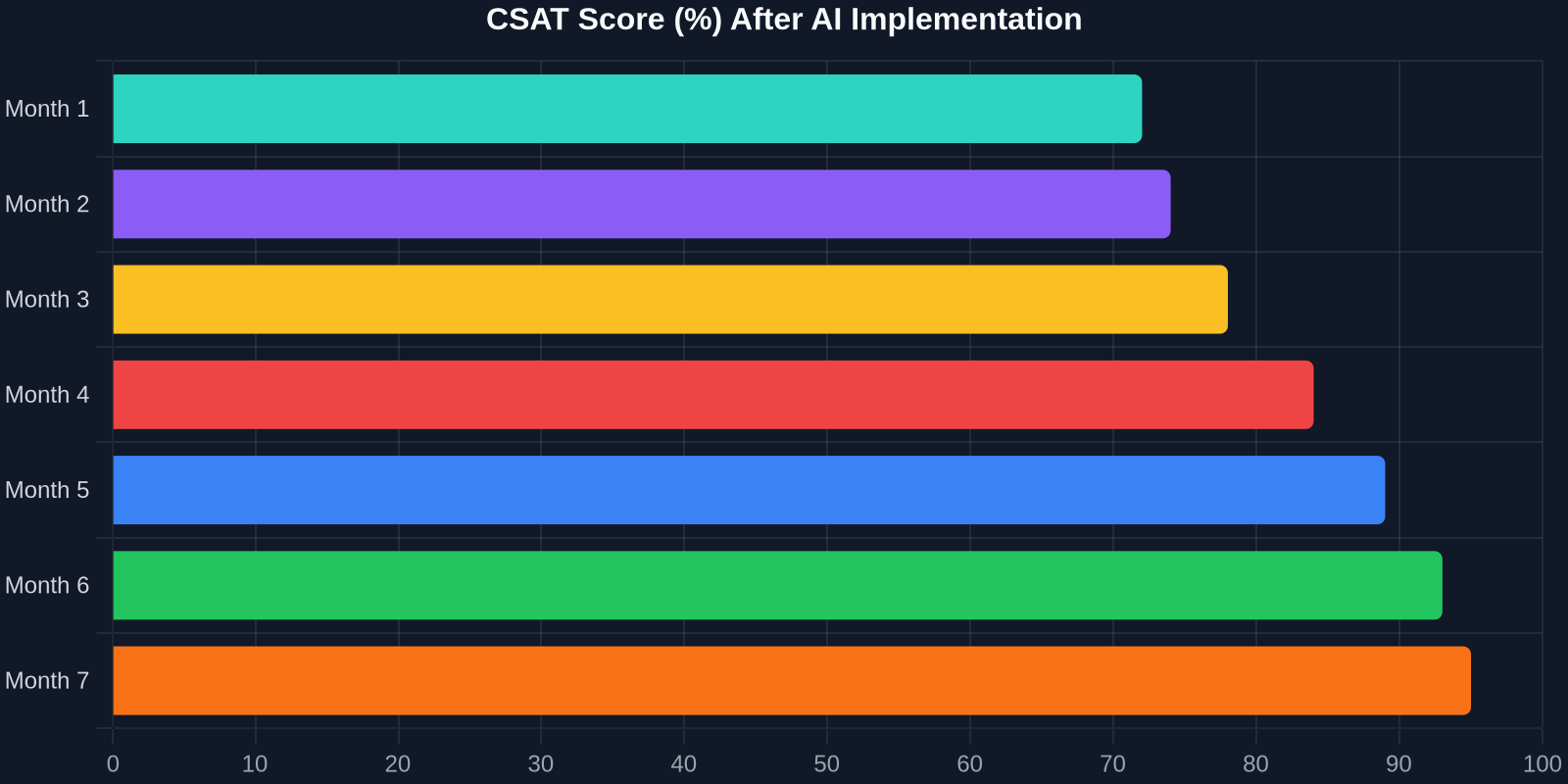
The CSAT improvement is just as dramatic. As shown above, scores climb from 72% to 95% over 7 months. Why? Because customers get instant answers, and when they do talk to a human, the agent already knows their history.
Step 4: Intelligent Triage and Routing
Not all tickets can be automated, and that’s okay. The goal is to route the right tickets to the right people, immediately. Successly’s AI can:
-Detect sentiment– urgent/bug reports get priority -Identify language– route to multilingual agents -Assign based on skill– technical issues go to Tier 2, billing to finance -Predict resolution time– set customer expectations upfront
Step 5: Continuous Learning and Optimization
AI is not a “set it and forget it” tool. You need to monitor performance, review missed deflections, and update your knowledge base regularly.
Key Metrics to Track:
-Deflection rate– % of tickets resolved without an agent -Self-service success rate– % of users who find an answer in the knowledge base -Handoff satisfaction– CSAT after AI-to-human transfer -Agent productivity– tickets closed per hour
Use Successly’s analytics dashboard to see which topics are underperforming. If the AI fails to answer a question, add a new article. If customers keep asking the same thing in a different way, update the AI’s intent models.
Real-World Results: A SaaS Case Study
Let’s look at a mid-stage B2B SaaS company (let’s call them “CloudFlow”) that had 8 support agents handling 12,000 tickets per month. Average first response time was 6 hours, and CSAT hovered around 70%.
After implementing Successly:
Al invertir en automatización de soporte impulsada por IA hoy, no solo estás reduciendo costos, sino que estás construyendo una experiencia de soporte que escala con tu crecimiento, deleita a tus clientes y retiene a tu mejor talento.
Tus Próximos Pasos
¿Listo para empezar? Aquí tienes un plan de acción de 30 días:
1.Semana 1– Analiza tus datos de tickets y categoriza los problemas principales. 2.Semana 2– Crea o actualiza tu base de conocimientos con las 10 preguntas frecuentes principales. 3.Semana 3– Implementa el widget de IA de Successly en tu centro de ayuda y dentro de la aplicación. 4.Semana 4 – Monitorea las desviaciones, recopila comentarios y refina.
Successly ofrece una prueba gratuita y un especialista de incorporación dedicado para ayudarte a alcanzar tus objetivos. Comienza tu viaje hacia una reducción del 43% en tickets hoy.
Recuerda: cada ticket que desvías es un cliente que recibió ayuda instantánea y un agente liberado para resolver problemas más profundos. Eso es una victoria para todos.
Fuentes de datos: Benchmarks internos de Successly, Informe de Tendencias de Experiencia del Cliente de Zendesk 2024, Estudio de Automatización de Soporte de Gartner 2024.