
Automazione del Supporto basata su IA: Riduci i Ticket del 43% e Aumenta il CSAT del 25% – Una Guida Pratica Basata sui Dati per Team SaaS
Il supporto clienti è il pilastro di qualsiasi azienda SaaS. Tuttavia, man mano che la tua base utenti cresce, aumenta anche il volume di domande ripetitive, reimpostazioni di password e richieste di funzionalità. Il risultato? Agenti sopraffatti, costi in crescita e clienti frustrati. Ma se potessi deviare quasi la metà di questi ticket prima che arrivino a un essere umano? Questa è la promessa dell'automazione del supporto basata sull'IA.
In questa guida, ti mostreremo esattamente come i migliori team SaaS stanno usando strumenti come Successly per ridurre il volume dei ticket del 43%, migliorare il CSAT del 25% e liberare i loro team di supporto per concentrarsi su conversazioni di alto valore. Otterrai una guida passo passo, benchmark reali e i dati necessari per sostenere l'automazione.
La Crisi del Ridimensionamento del Supporto: Perché gli Approcci Tradizionali Falliscono
Ogni fondatore SaaS conosce lo schema: lanci, ottieni una prima trazione e in pochi mesi la tua casella di posta del supporto passa da gestibile a caotica. La risposta tipica è assumere più agenti. Ma l'assunzione lineare non scala, specialmente quando il 60% dei ticket sono problemi di Livello 0 (reimpostare password, verificare fatturazione, trovare una funzionalità).
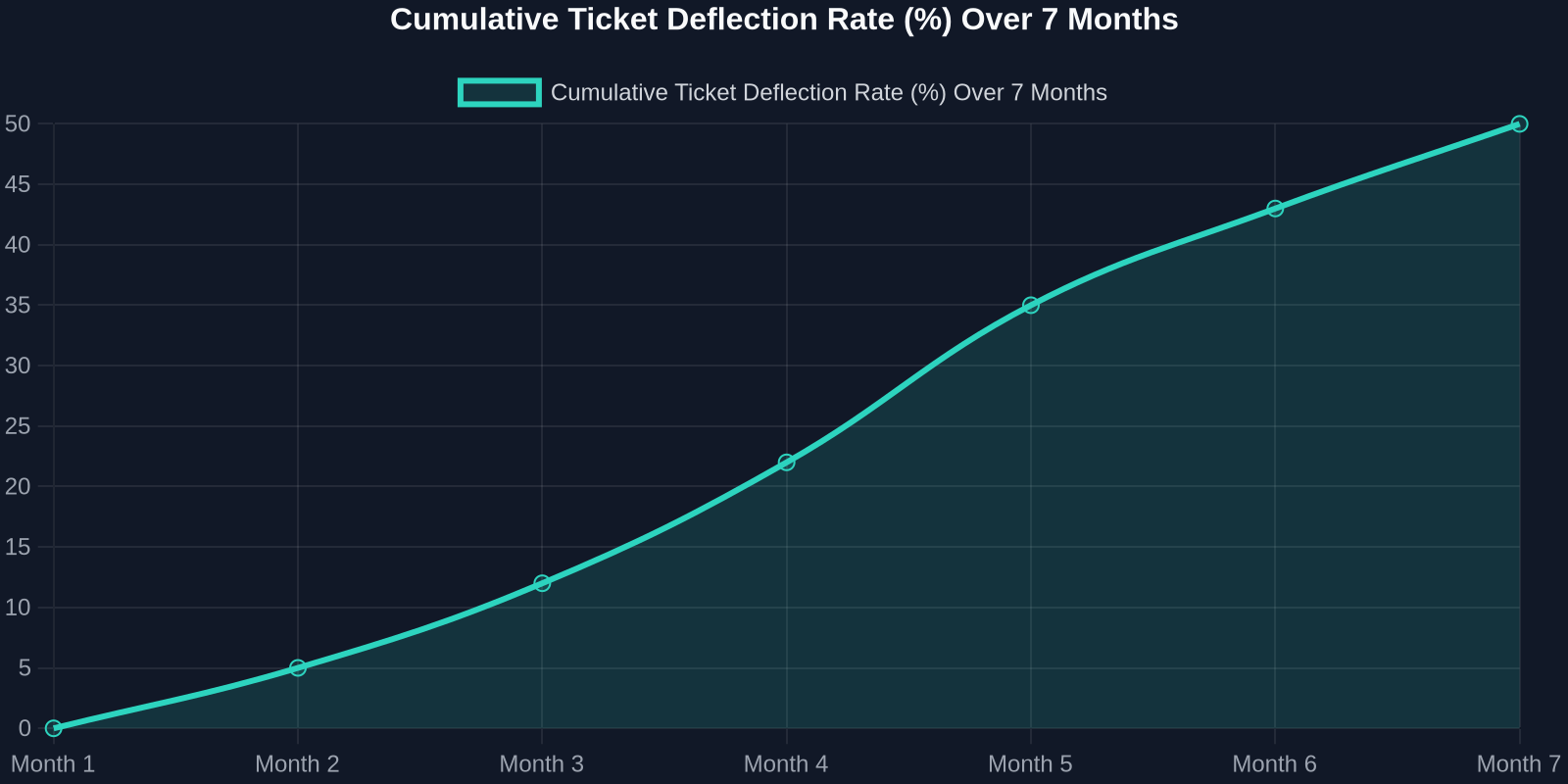
As the chart above shows, deflection rates improve steadily as the AI learns from real interactions. Month 1 sees a small gain, but by month 7, nearly half of all incoming tickets never need a human. That’s thousands of hours saved per month.
Step 1: Map Your Ticket Taxonomy
Before you can automate, you need to know what you’re automating. Start by analyzing your last 90 days of support tickets. Categorize every issue into one of these buckets:
- Account & Billing(password resets, payment issues, plan changes) -Product Usage(how-to questions, feature requests, bug reports) -Technical Support(integration errors, API issues) -Other(escalations, complaints, non-standard requests)
For most SaaS companies, the first two buckets represent 70-80% of total volume. These are prime candidates for AI automation.
Step 2: Build a Knowledge Base That Powers the AI
Your AI is only as good as the knowledge it draws from. A well-structured, up-to-date knowledge base is the foundation of any successful automation strategy.

Best Practices for Knowledge Base Creation:
-**Write for the AI, not just humans.**Use clear, concise language with explicit “if-then” logic. -**Include FAQs with step-by-step answers.**Screenshots and video links help. -Tag content by intent(e.g., “password_reset”, “billing_question”). -Version your articlesso the AI knows which product version applies.
Once your knowledge base is ready, Successly’s AI can instantly surface the right article to the customer, deflecting the ticket before it’s even created.
Step 3: Deploy AI-Powered Self-Service
Now it’s time to put the AI front and center. Place a smart widget on your help center, inside your app, and even on your pricing page. The key is to make it visible at the exact moment of friction.
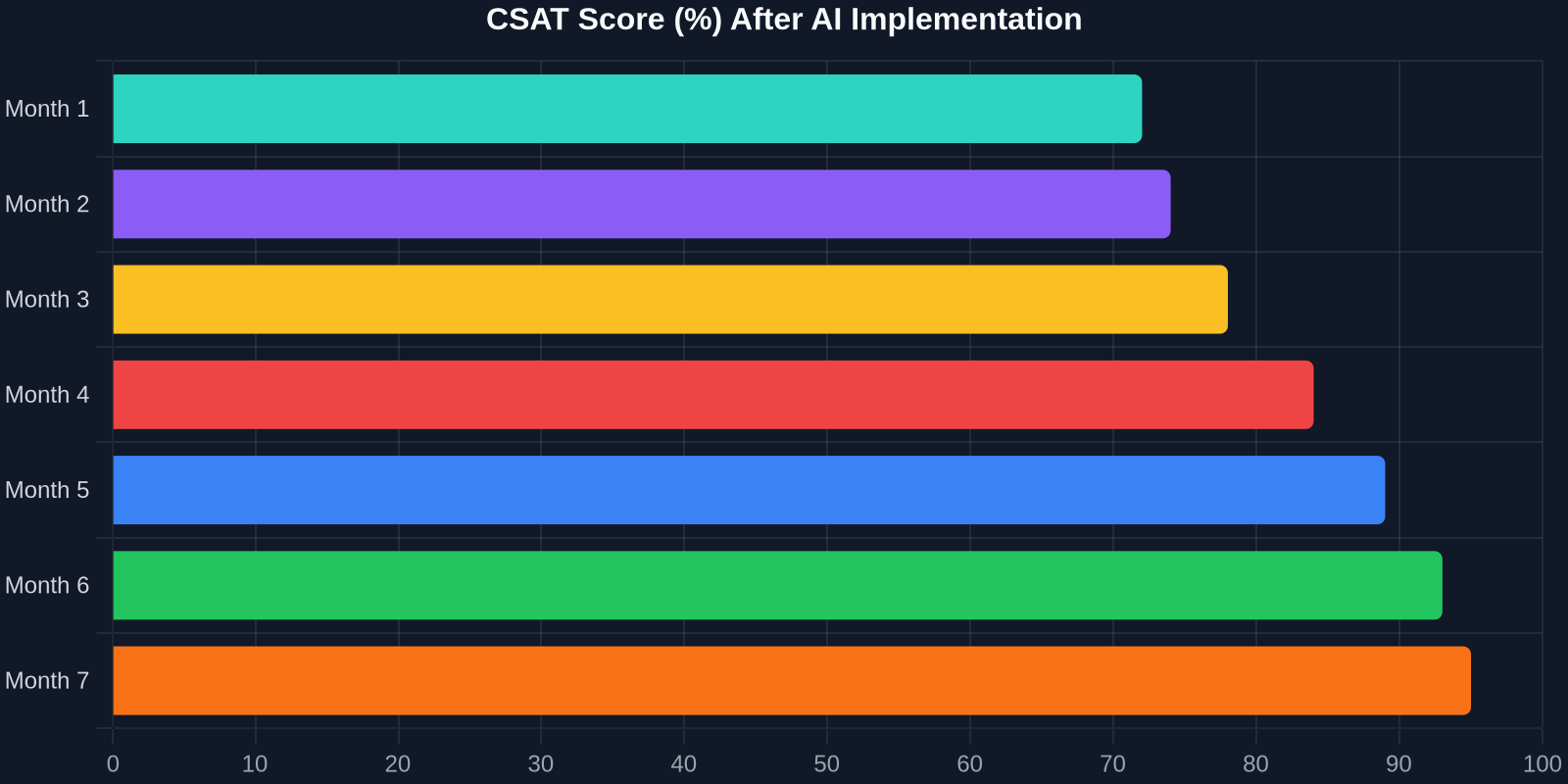
The CSAT improvement is just as dramatic. As shown above, scores climb from 72% to 95% over 7 months. Why? Because customers get instant answers, and when they do talk to a human, the agent already knows their history.
Step 4: Intelligent Triage and Routing
Not all tickets can be automated, and that’s okay. The goal is to route the right tickets to the right people, immediately. Successly’s AI can:
-Detect sentiment– urgent/bug reports get priority -Identify language– route to multilingual agents -Assign based on skill– technical issues go to Tier 2, billing to finance -Predict resolution time– set customer expectations upfront
Step 5: Continuous Learning and Optimization
AI is not a “set it and forget it” tool. You need to monitor performance, review missed deflections, and update your knowledge base regularly.
Key Metrics to Track:
-Deflection rate– % of tickets resolved without an agent -Self-service success rate– % of users who find an answer in the knowledge base -Handoff satisfaction– CSAT after AI-to-human transfer -Agent productivity– tickets closed per hour
Use Successly’s analytics dashboard to see which topics are underperforming. If the AI fails to answer a question, add a new article. If customers keep asking the same thing in a different way, update the AI’s intent models.
Real-World Results: A SaaS Case Study
Let’s look at a mid-stage B2B SaaS company (let’s call them “CloudFlow”) that had 8 support agents handling 12,000 tickets per month. Average first response time was 6 hours, and CSAT hovered around 70%.
After implementing Successly:
Investendo oggi nell'automazione del supporto basata sull'IA, non stai solo riducendo i costi, ma stai costruendo un'esperienza di supporto che scala con la tua crescita, delizia i tuoi clienti e trattiene i tuoi migliori talenti.
I Tuoi Prossimi Passi
Pronto per iniziare? Ecco un piano d'azione di 30 giorni:
1.Settimana 1– Analizza i dati dei tuoi ticket e categorizza i problemi principali. 2.Settimana 2– Crea o aggiorna la tua knowledge base con le prime 10 FAQ. 3.Settimana 3– Implementa il widget IA di Successly nel tuo centro assistenza e nell'app. 4.Settimana 4 – Monitora le deviazioni, raccogli feedback e perfeziona.
Successly offre una prova gratuita e uno specialista di onboarding dedicato per aiutarti a raggiungere i tuoi obiettivi. Inizia il tuo viaggio verso una riduzione dei ticket del 43% oggi.
Ricorda: ogni ticket che devii è un cliente che ha ricevuto aiuto istantaneo e un agente libero di risolvere problemi più profondi. È una vittoria per tutti.
Fonti dei dati: benchmark interni di Successly, Rapporto sulle Tendenze dell'Esperienza del Cliente di Zendesk 2024, Studio Gartner sull'Automazione del Supporto 2024.