
Hoe AI-gestuurde Support Automatisering Tickets met 43% Vermindert en CSAT met 25% Verhoogt: Een Datagestuurd Draaiboek voor SaaS-teams
Klantenservice is de ruggengraat van elk SaaS-bedrijf. Maar naarmate je gebruikersbestand groeit, groeit ook het aantal repetitieve vragen, wachtwoordresets en functieverzoeken. Het resultaat? Overbelaste medewerkers, escalerende kosten en gefrustreerde klanten. Maar wat als je bijna de helft van die tickets zou kunnen afweren voordat ze ooit bij een mens terechtkomen? Dat is de belofte van AI-gestuurde support automatisering.
In deze gids laten we je precies zien hoe vooraanstaande SaaS-teams tools zoals Successly gebruiken om het ticketvolume met 43% te verminderen, de CSAT met 25% te verbeteren en hun supportteams vrij te maken om zich te concentreren op waardevolle gesprekken. Je krijgt een stapsgewijs draaiboek, echte benchmarks en de gegevens die je nodig hebt om de zaak voor automatisering te bepleiten.
De Support Schaalbaarheidscrisis: Waarom Traditionele Aanpak Faalt
Elke SaaS-oprichter kent het patroon: je lanceert, krijgt vroege tractie en binnen enkele maanden verandert je supportinbox van beheersbaar in chaotisch. De typische reactie is om meer medewerkers aan te nemen. Maar lineair aannemen schaalt niet, vooral niet wanneer 60% van de tickets Level 0-problemen zijn (wachtwoord resetten, factuur controleren, functie vinden).
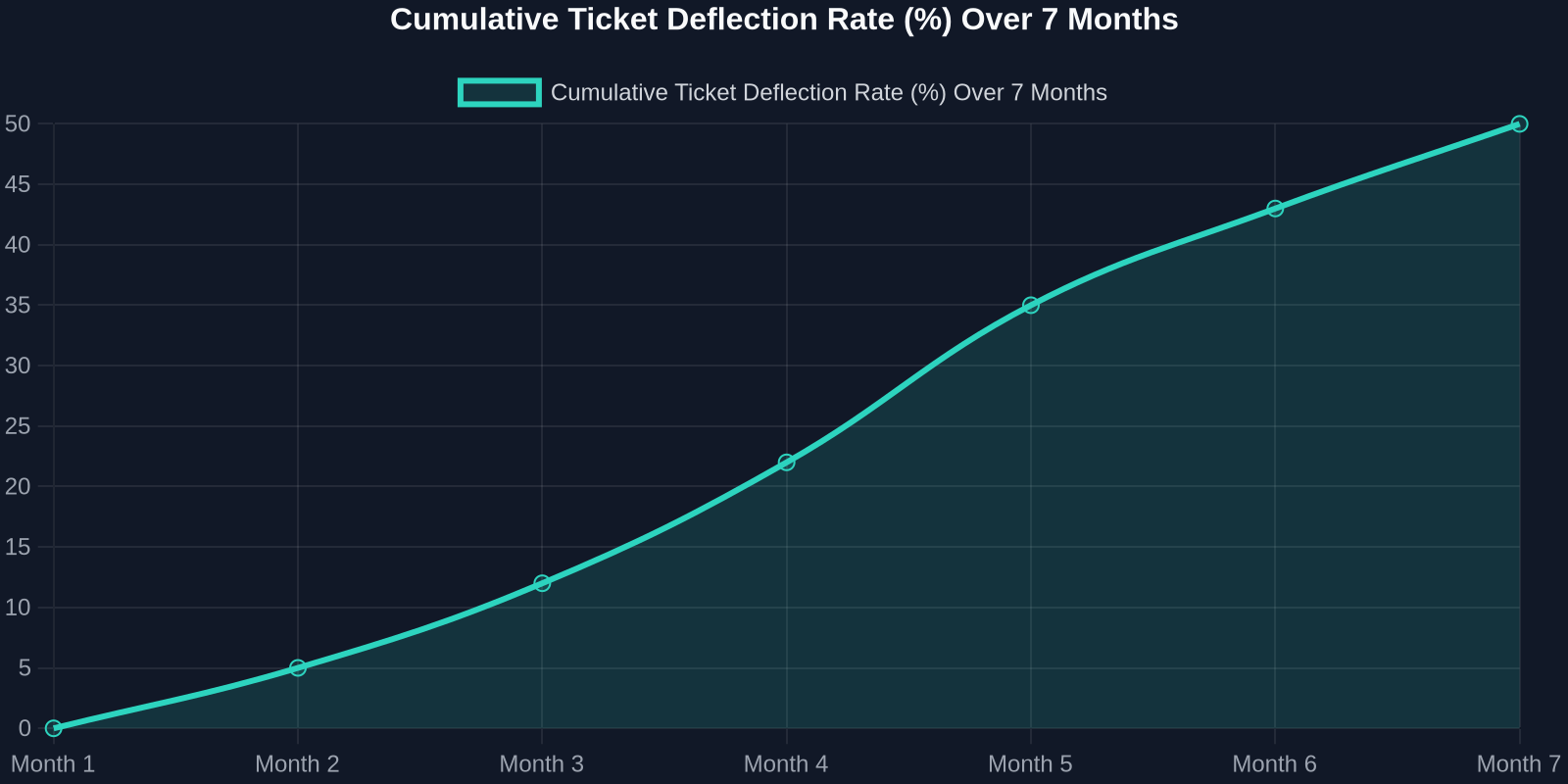
As the chart above shows, deflection rates improve steadily as the AI learns from real interactions. Month 1 sees a small gain, but by month 7, nearly half of all incoming tickets never need a human. That’s thousands of hours saved per month.
Step 1: Map Your Ticket Taxonomy
Before you can automate, you need to know what you’re automating. Start by analyzing your last 90 days of support tickets. Categorize every issue into one of these buckets:
- Account & Billing(password resets, payment issues, plan changes) -Product Usage(how-to questions, feature requests, bug reports) -Technical Support(integration errors, API issues) -Other(escalations, complaints, non-standard requests)
For most SaaS companies, the first two buckets represent 70-80% of total volume. These are prime candidates for AI automation.
Step 2: Build a Knowledge Base That Powers the AI
Your AI is only as good as the knowledge it draws from. A well-structured, up-to-date knowledge base is the foundation of any successful automation strategy.

Best Practices for Knowledge Base Creation:
-**Write for the AI, not just humans.**Use clear, concise language with explicit “if-then” logic. -**Include FAQs with step-by-step answers.**Screenshots and video links help. -Tag content by intent(e.g., “password_reset”, “billing_question”). -Version your articlesso the AI knows which product version applies.
Once your knowledge base is ready, Successly’s AI can instantly surface the right article to the customer, deflecting the ticket before it’s even created.
Step 3: Deploy AI-Powered Self-Service
Now it’s time to put the AI front and center. Place a smart widget on your help center, inside your app, and even on your pricing page. The key is to make it visible at the exact moment of friction.
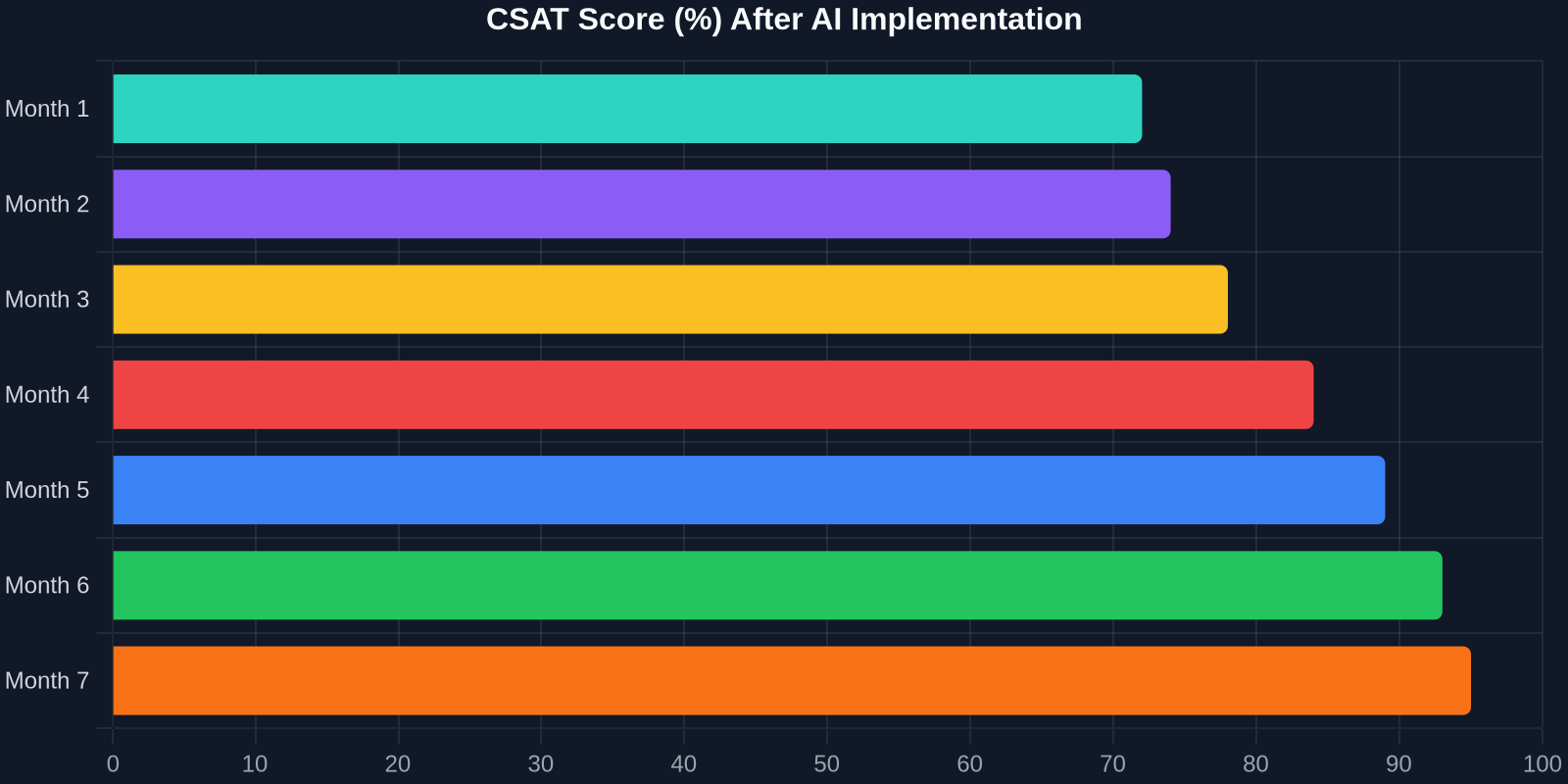
The CSAT improvement is just as dramatic. As shown above, scores climb from 72% to 95% over 7 months. Why? Because customers get instant answers, and when they do talk to a human, the agent already knows their history.
Step 4: Intelligent Triage and Routing
Not all tickets can be automated, and that’s okay. The goal is to route the right tickets to the right people, immediately. Successly’s AI can:
-Detect sentiment– urgent/bug reports get priority -Identify language– route to multilingual agents -Assign based on skill– technical issues go to Tier 2, billing to finance -Predict resolution time– set customer expectations upfront
Step 5: Continuous Learning and Optimization
AI is not a “set it and forget it” tool. You need to monitor performance, review missed deflections, and update your knowledge base regularly.
Key Metrics to Track:
-Deflection rate– % of tickets resolved without an agent -Self-service success rate– % of users who find an answer in the knowledge base -Handoff satisfaction– CSAT after AI-to-human transfer -Agent productivity– tickets closed per hour
Use Successly’s analytics dashboard to see which topics are underperforming. If the AI fails to answer a question, add a new article. If customers keep asking the same thing in a different way, update the AI’s intent models.
Real-World Results: A SaaS Case Study
Let’s look at a mid-stage B2B SaaS company (let’s call them “CloudFlow”) that had 8 support agents handling 12,000 tickets per month. Average first response time was 6 hours, and CSAT hovered around 70%.
After implementing Successly:
Door vandaag te investeren in AI-gestuurde support automatisering, verlaag je niet alleen de kosten, je bouwt een supportervaring die meeschaalt met je groei, je klanten verrukt en je beste talent behoudt.
Jouw Volgende Stappen
Klaar om te beginnen? Hier is een actieplan van 30 dagen:
1.Week 1– Analyseer je ticketgegevens en categoriseer de belangrijkste problemen. 2.Week 2– Bouw of werk je kennisbank bij met de top 10 veelgestelde vragen. 3.Week 3– Implementeer Successly's AI-widget op je helpcenter en in de app. 4.Week 4 – Monitor afwijzingen, verzamel feedback en verfijn.
Successly biedt een gratis proefperiode en een dedicated onboarding specialist om je te helpen je doelen te bereiken. Begin vandaag nog je reis naar 43% ticketvermindering.
Onthoud: elk ticket dat je afweert, is een klant die direct hulp kreeg, en een medewerker die vrij is om diepere problemen op te lossen. Dat is een win-win voor iedereen.
Gegevensbronnen: Interne benchmarks van Successly, Zendesk Customer Experience Trends Report 2024, Gartner Support Automation Study 2024.