Cara Otomatisasi Dukungan Bertenaga AI Mengurangi Tiket Sebanyak 43% dan Meningkatkan CSAT Sebesar 25%: Buku Pedoman Berbasis Data untuk Tim SaaS
Dukungan pelanggan adalah tulang punggung setiap perusahaan SaaS. Namun, seiring bertambahnya basis pengguna Anda, volume pertanyaan berulang, pengaturan ulang kata sandi, dan permintaan fitur juga ikut bertambah. Hasilnya? Agen kewalahan, biaya meningkat, dan pelanggan frustrasi. Tetapi bagaimana jika Anda bisa mengalihkan hampir setengah dari tiket tersebut sebelum mencapai manusia? Itulah janji dari otomatisasi dukungan bertenaga AI.
Dalam panduan ini, kami akan menunjukkan secara tepat bagaimana tim SaaS terkemuka menggunakan alat seperti Successly untuk mengurangi volume tiket sebesar 43%, meningkatkan CSAT sebesar 25%, dan membebaskan tim dukungan mereka untuk fokus pada percakapan bernilai tinggi. Anda akan mendapatkan buku pedoman langkah demi langkah, tolok ukur nyata, dan data yang Anda butuhkan untuk membangun argumen bagi otomatisasi.
Krisis Skalabilitas Dukungan: Mengapa Pendekatan Tradisional Gagal
Setiap pendiri SaaS mengetahui polanya: Anda meluncurkan, mendapatkan daya tarik awal, dan dalam beberapa bulan kotak masuk dukungan Anda berubah dari yang terkendali menjadi kacau. Respons tipikal adalah merekrut lebih banyak agen. Namun perekrutan linier tidak berskala, terutama ketika 60% tiket adalah masalah Level 0 (atur ulang kata sandi, periksa penagihan, temukan fitur).
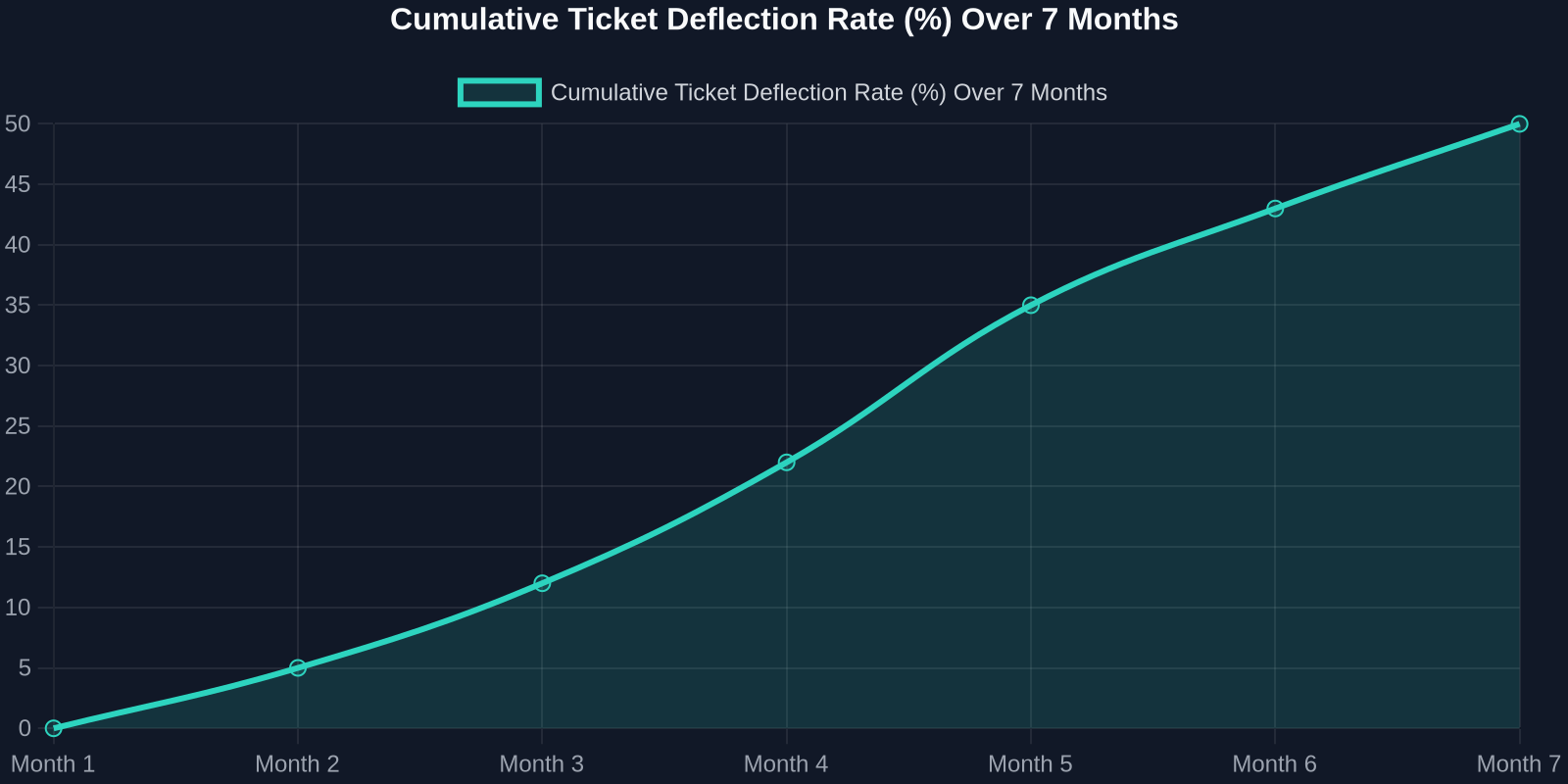
As the chart above shows, deflection rates improve steadily as the AI learns from real interactions. Month 1 sees a small gain, but by month 7, nearly half of all incoming tickets never need a human. That’s thousands of hours saved per month.
Step 1: Map Your Ticket Taxonomy
Before you can automate, you need to know what you’re automating. Start by analyzing your last 90 days of support tickets. Categorize every issue into one of these buckets:
- Account & Billing(password resets, payment issues, plan changes) -Product Usage(how-to questions, feature requests, bug reports) -Technical Support(integration errors, API issues) -Other(escalations, complaints, non-standard requests)
For most SaaS companies, the first two buckets represent 70-80% of total volume. These are prime candidates for AI automation.
Step 2: Build a Knowledge Base That Powers the AI
Your AI is only as good as the knowledge it draws from. A well-structured, up-to-date knowledge base is the foundation of any successful automation strategy.

Best Practices for Knowledge Base Creation:
-**Write for the AI, not just humans.**Use clear, concise language with explicit “if-then” logic. -**Include FAQs with step-by-step answers.**Screenshots and video links help. -Tag content by intent(e.g., “password_reset”, “billing_question”). -Version your articlesso the AI knows which product version applies.
Once your knowledge base is ready, Successly’s AI can instantly surface the right article to the customer, deflecting the ticket before it’s even created.
Step 3: Deploy AI-Powered Self-Service
Now it’s time to put the AI front and center. Place a smart widget on your help center, inside your app, and even on your pricing page. The key is to make it visible at the exact moment of friction.
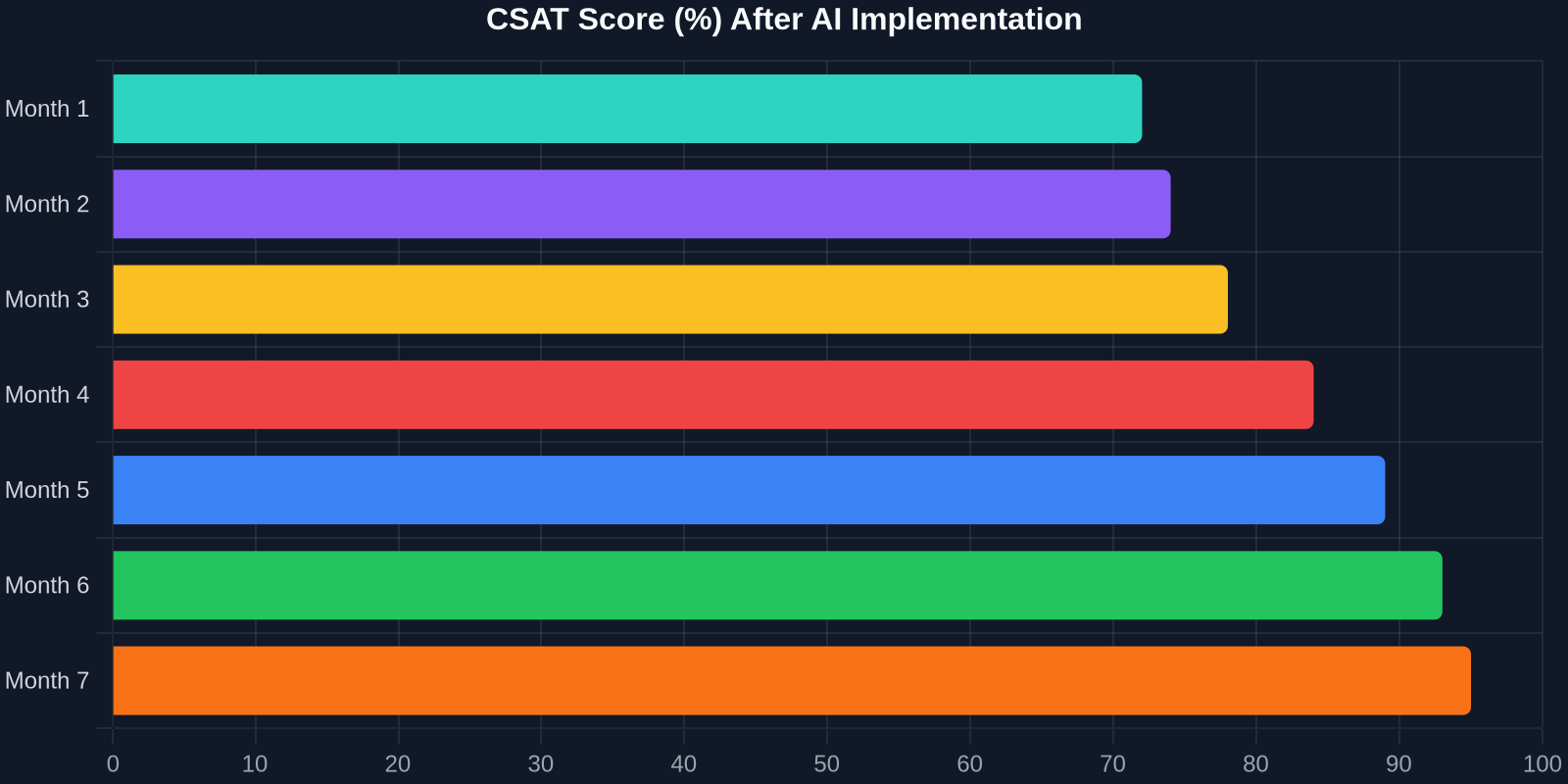
The CSAT improvement is just as dramatic. As shown above, scores climb from 72% to 95% over 7 months. Why? Because customers get instant answers, and when they do talk to a human, the agent already knows their history.
Step 4: Intelligent Triage and Routing
Not all tickets can be automated, and that’s okay. The goal is to route the right tickets to the right people, immediately. Successly’s AI can:
-Detect sentiment– urgent/bug reports get priority -Identify language– route to multilingual agents -Assign based on skill– technical issues go to Tier 2, billing to finance -Predict resolution time– set customer expectations upfront
Step 5: Continuous Learning and Optimization
AI is not a “set it and forget it” tool. You need to monitor performance, review missed deflections, and update your knowledge base regularly.
Key Metrics to Track:
-Deflection rate– % of tickets resolved without an agent -Self-service success rate– % of users who find an answer in the knowledge base -Handoff satisfaction– CSAT after AI-to-human transfer -Agent productivity– tickets closed per hour
Use Successly’s analytics dashboard to see which topics are underperforming. If the AI fails to answer a question, add a new article. If customers keep asking the same thing in a different way, update the AI’s intent models.
Real-World Results: A SaaS Case Study
Let’s look at a mid-stage B2B SaaS company (let’s call them “CloudFlow”) that had 8 support agents handling 12,000 tickets per month. Average first response time was 6 hours, and CSAT hovered around 70%.
After implementing Successly:
Dengan berinvestasi dalam otomatisasi dukungan bertenaga AI hari ini, Anda tidak hanya mengurangi biaya, Anda membangun pengalaman dukungan yang berskala seiring pertumbuhan Anda, menyenangkan pelanggan Anda, dan mempertahankan talenta terbaik Anda.
Langkah Selanjutnya Anda
Siap memulai? Berikut adalah rencana aksi 30 hari:
1.Minggu 1– Analisis data tiket Anda dan kategorikan masalah utama. 2.Minggu 2– Bangun atau perbarui basis pengetahuan Anda dengan 10 FAQ teratas. 3.Minggu 3– Terapkan widget AI Successly di pusat bantuan dan dalam aplikasi Anda. 4.Minggu 4 – Pantau pengalihan, kumpulkan umpan balik, dan sempurnakan.
Successly menawarkan uji coba gratis dan spesialis orientasi khusus untuk membantu Anda mencapai tujuan. Mulailah perjalanan Anda menuju pengurangan tiket sebesar 43% hari ini.
Ingat: setiap tiket yang Anda alihkan adalah pelanggan yang mendapat bantuan instan, dan agen yang dibebaskan untuk memecahkan masalah yang lebih dalam. Itu adalah kemenangan bagi semua orang.
Sumber data: Tolok ukur internal Successly, Laporan Tren Pengalaman Pelanggan Zendesk 2024, Studi Otomatisasi Dukungan Gartner 2024.