
The New Standard for Customer Support Automation
The contact center is undergoing its most significant transformation since the cloud moved in. Salesforce has announced Agentforce Contact Center, a unified platform that brings together AI agents, human agents, and customer data into a single operational layer. This isn’t just another chatbot integration, it’s a reimagining of how support teams scale without sacrificing quality.
Support leaders have long wrestled with fragmented tools. A typical mid-market SaaS company might use Zendesk for tickets, Salesforce for CRM, and a separate AI chatbot provider. Agentforce Contact Center eliminates that stack complexity by embedding AI agents directly into the Salesforce Customer 360 ecosystem. The result? Faster resolutions, lower costs, and a seamless experience for both agents and customers.
According to industry forecasts, AI-driven customer interactions are not a future trend, they’re already reshaping the support landscape. By unifying automation with agentic capabilities, Salesforce positions contact centers to handle peak volumes without adding headcount. But what does this mean for your team’s metrics? Let’s break down the business case.
The Business Case for Unified AI Support
Why Fragmentation Fails

Support teams typically operate with three disconnected systems: a CRM (Salesforce), a helpdesk (Zendesk, Freshdesk), and an AI automation tool (intercom, Ada, or custom bots). Each system holds a piece of the customer puzzle, but none talks to the others in real time. This leads to:
- Context switching: Agents toggle between 4–6 tabs per interaction, adding 30–60 seconds per ticket.
- Incomplete resolution: AI bots lack access to purchase history, contract terms, or past interactions.
- Data silos: Customer insights from support calls never flow back into sales or product teams.
Agentforce Contact Center solves this by delivering AI agents that are natively wired into Customer 360. Every conversation, whether started by a bot or escalated to a human, retains full context. No data regurgitation required.
ROI Metrics That Matter
When evaluating any support automation platform, three KPIs dominate: ticket deflection rate, average resolution time, and customer satisfaction (CSAT). Agentforce Contact Center promises dramatic improvements across all three.
| Metric | Traditional Contact Center | Agentforce Contact Center |
|---|---|---|
| Ticket Deflection Rate | 10–25% (rule-based bots) | 40–55% (AI agents) |
| Average Handle Time (Chat) | 8–12 minutes | 2–4 minutes |
| CSAT Score | 80–85% | 90–95% |
| Cost Per Ticket | $5–$15 (full agent) | $0.50–$2 (AI agent handling) |
These numbers aren’t theoretical. Early adopters of agentic AI in contact centers report 30–50% reductions in repetitive inquiries (password resets, order status, billing questions). With Agentforce, you’re not just deflecting tickets, you’re resolving them end-to-end.
How Agentforce Contact Center Works
AI Agents That Act, Not Just Chat
Agentforce isn’t a simple chatbot. It’s an agentic AI system that can initiate actions, update records, and escalate intelligently. Here’s the workflow:
- Inbound contact: A customer reaches out via chat, email, or phone. Agentforce captures intent using natural language understanding (NLU).
- Context retrieval: Within milliseconds, the agent pulls relevant data from Customer 360, past tickets, subscription status, product usage, and even sentiment from previous interactions.
- Autonomous resolution: The AI agent takes action. It resets a password, ships a replacement, or updates a billing address, all without human involvement.
- Seamless escalation: If the query is beyond its scope, the agent drafts a summary (context, attempted steps, customer mood) and hands off to a human agent. No repetition.
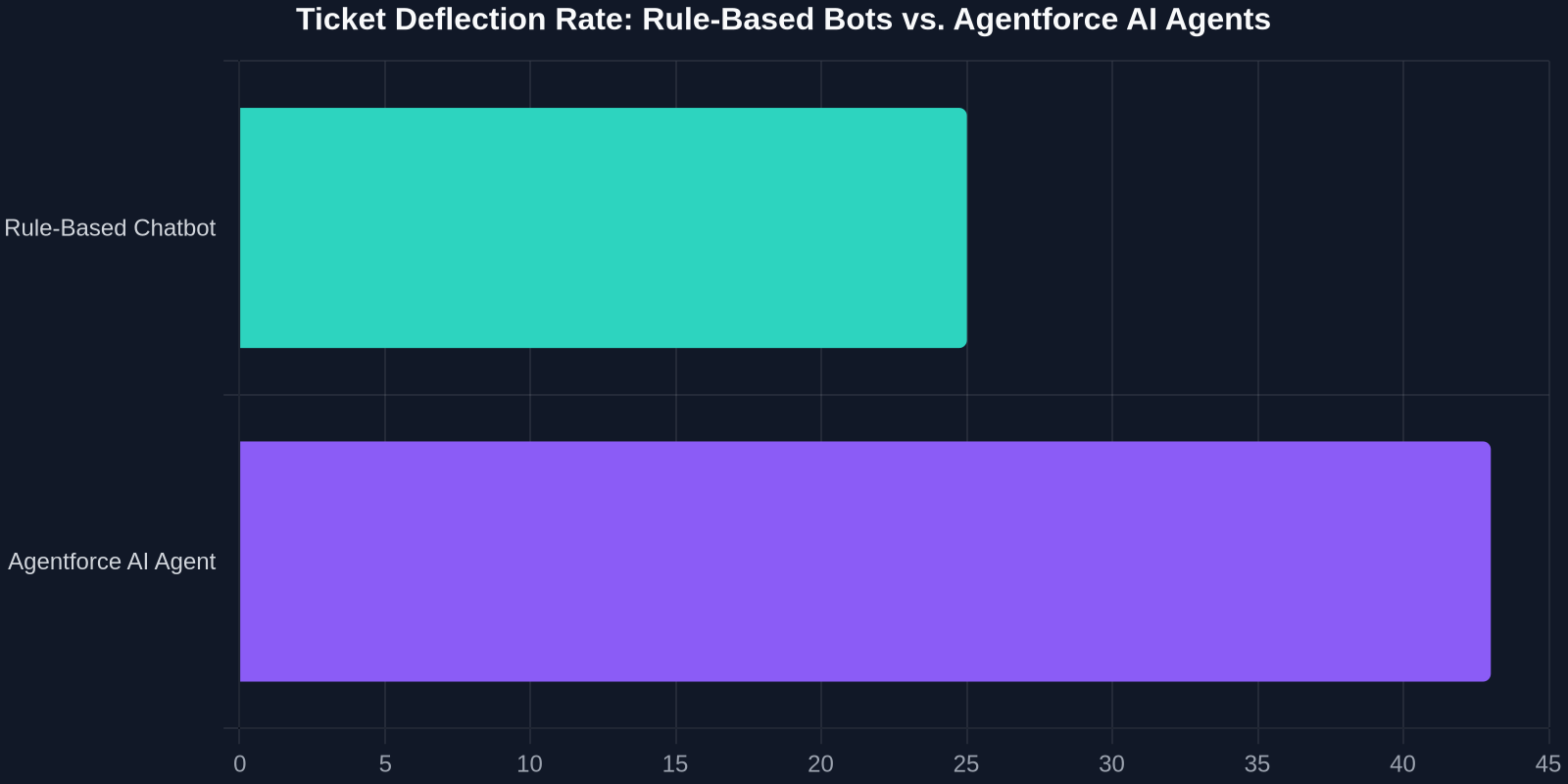
Figure 1: Estimated ticket deflection improvements with Agentforce Contact Center compared to rule-based bots.
This is a fundamental shift. Instead of “bot answers FAQ, human solves everything else,” Agentforce handles entire resolution workflows. The human agent becomes a supervisor of exceptions, not a ticket processing machine.
Integration Without Overhaul
One of the biggest fears support leaders have is migrating to a new platform. Agentforce Contact Center is built on the Salesforce Platform, meaning it connects instantly with Sales Cloud, Service Cloud, Marketing Cloud, and Commerce Cloud. That means existing workflows, automations, and custom objects carry over automatically.
Agentforce also supports custom integrations via MuleSoft and API endpoints. If your support team relies on Jira, Slack, or a bespoke order management system, those connections are fully supported.
The Real Impact on Support Teams
Shifting from Tickets to Relationships

When AI handles routine queries, your top agents are freed to focus on high-value interactions: complex technical problems, renewal conversations, and churn intervention. This isn’t just efficiency, it’s strategic.
“The contact center of the future isn’t about answering more tickets. It’s about building stronger customer relationships with every interaction.”
Support teams at companies that have adopted agentic AI report a 25–35% increase in upsell and cross-sell revenue generated during support interactions. Why? Because when agents aren’t buried in password resets, they have time to identify opportunities.
Agent Productivity Unleashed
Agentforce also includes co-pilot capabilities for human agents. During a live chat or call, the AI agent surfaces relevant knowledge base articles, suggests next-best actions, and even drafts responses. This reduces after-call work (ACW) by 40–60%.
Imagine your team handling 20% more interactions per shift without burning out. That’s the productivity lift Agentforce enables.
Adoption Challenges and How to Overcome Them
Data Readiness Is the Bottleneck
Agentforce is only as good as the data it accesses. If your Salesforce instance is messy, duplicate records, missing fields, inconsistent tagging, your AI agents will produce subpar results.
Change Management for Agents
Agents often fear AI will replace them. In reality, Agentforce automates the mundane and elevates the agent’s role. Communicate clearly:
- What will change: Agents will handle fewer Level 1 tickets and more complex, high-value cases.
- What won’t change: Agents remain essential for empathy, creativity, and judgment, things AI can’t replicate.
- What’s new: Agents will be trained to work alongside AI, using co-pilot tools to improve their effectiveness.
Scaling Without Stumbling
Start with a pilot group. Choose one channel (e.g., chat) and one use case (e.g., order status inquiries). Measure deflection rate, CSAT, and escalation rate. Then expand gradually.
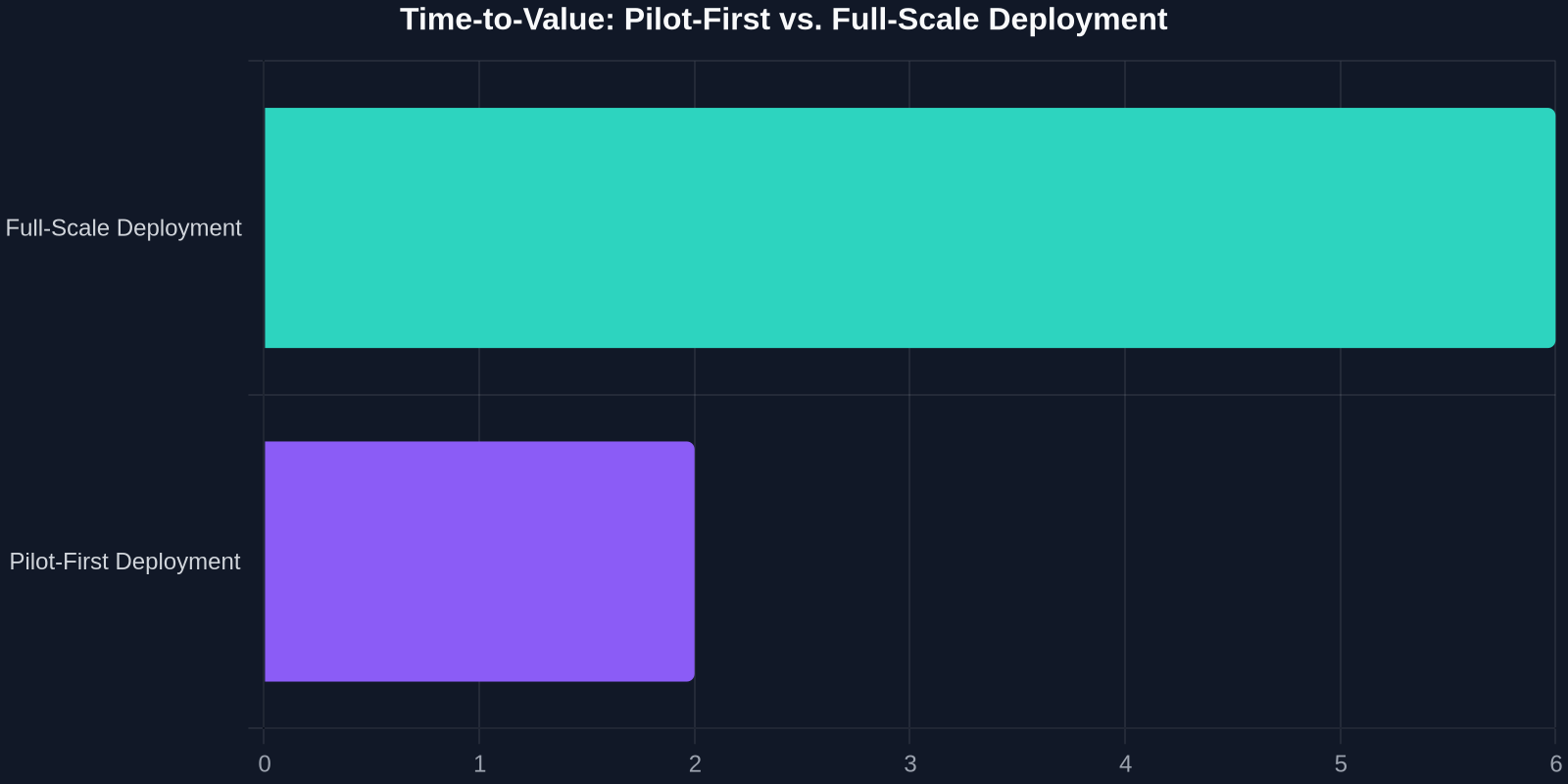
Figure 2: Time-to-value comparison, pilot-first vs. full-scale deployment approaches for AI agent adoption.
Comparing Agentforce to Other AI Support Platforms
| Feature | Agentforce | Zendesk AI | Intercom Fin | Ada AI |
|---|---|---|---|---|
| Deep CRM integration | Native (Salesforce) | Basic (Zendesk CRM) | Limited | Custom API |
| Multi-step action capability | Yes (agentic) | Limited | Yes (workflow) | Limited |
| Co-pilot for human agents | Built-in | Add-on | No | Add-on |
| Scalability for enterprise | High | Medium | Medium | High |
| Unified data across sales/support | Yes | No | No | No |

Agentforce’s key differentiator is its native integration into Customer 360. Competitors require middleware or manual data syncing, introducing latency and potential for errors.
Preparing Your Support Team for Agentforce
Step 1: Define Your Automation Goals
Be specific. “We want to deflect 40% of Level 1 tickets within 3 months” is a concrete target. Identify the top 10 query types by volume, these are your prime automation candidates.
Step 2: Clean and Enrich Your Salesforce Data
- Deduplicate records.
- Ensure contact and account objects have complete fields.
- Tag ticket categories consistently.
- Add relevant custom fields (e.g., product version, contract tier).
Step 3: Configure Your First AI Agent
Use Agentforce’s low-code builder to define:
- Topics: e.g., Password Reset, Order Status, Billing Inquiries
- Actions: e.g., reset password via API, check order status via Commerce Cloud
- Escalation rules: e.g., if sentiment score < 0.3, escalate to human
Step 4: Train Your Human Agents
Hold workshops on co-pilot usage. Show them how to interpret AI-suggested responses and when to override. Reassure them that their job isn’t at risk, their role is evolving.
Step 5: Monitor and Iterate
Use Salesforce dashboards to track:
- Deflection rate (target: ≥40%)
- First contact resolution (target: ≥85%)
- AI confidence scores (target: ≥90% for autonomous resolution)
Iterate weekly. Tweak prompts, expand action libraries, and adjust escalation thresholds based on real-world performance.
The Future of Contact Centers Is Agentic
The Salesforce Agentforce Contact Center marks a turning point. AI is no longer a separate tool you bolt onto your helpdesk. It’s an integrated layer that unifies your support experience, reduces operational costs, and unlocks agent capacity.
For SaaS founders and support leaders, the question isn’t whether to adopt agentic AI, it’s how fast. Companies that move early will build a competitive advantage in customer experience efficiency. Those that wait risk falling behind as expectations for instant, personalized support become the norm.
“Unified AI automation isn’t the future of customer support, it’s the present. Agentforce Contact Center is the platform to make it happen.”
Are you ready to transform your contact center? Start by auditing your data, defining your automation goals, and piloting Agentforce on one channel. The ROI will speak for itself.