
Grok Bot Customer Support: How xAI’s AI Teammates Cut Ticket Volume for SaaS Teams
Customer support leaders are caught between two pressures: ticket volumes keep climbing while budgets for headcount stay flat. xAI’s renewed push into Grok Bot customer support, including shared Team Bots and deeper X/Grok integration, signals that AI-native support automation is becoming a board-level priority. This guide breaks down what Grok Bot customer support means for SaaS support teams, the ROI you can expect, and a practical rollout checklist that minimizes risk.
For most B2B SaaS companies, 50–70% of incoming tickets are repetitive requests that don’t require human judgment: password resets, “how do I export,” “where is my invoice,” and billing confirmations. Grok Bot customer support targets exactly this layer, high-volume, low-complexity work that blocks agents from handling strategic escalations. The result isn’t just faster replies; it’s a measurable shift in cost per ticket, agent capacity, and CSAT.
What Is Grok Bot Customer Support?
Grok Bot customer support is xAI’s evolution of its Grok family of large language models into a customer-facing support agent. Rather than a generic chatbot, the product direction emphasizes shared AI teammates that work alongside human agents. According to xAI’s announcement, “Now @bot works as a team! … Introducing Team Bots, shared AI teammates that learn as your team works with them.”
In practice, a Grok Bot customer support deployment typically handles:
- Intent classification and routing
- Instant answers from your help center, FAQs, and past tickets
- Escalation to a human agent with full transcript context
- Post-resolution follow-up and CSAT surveys
This workflow is not unique to Grok; it’s the emerging standard for AI support platforms. What makes Grok Bot notable is the breadth of its underlying LLM and the promise of shared learning across an entire support team, not just one agent’s assistant.
Why Customer Support Teams Are Turning to Grok Bot
Support operations leaders face a structural problem: ticket volume grows with customer count, but linear headcount growth is unsustainable at 40–60% gross margins. AI deflection changes that math.

The companies winning at customer support aren’t hiring more agents, they’re giving existing teams AI teammates that handle 40%+ of repetitive tickets.
Three drivers are pushing support teams toward Grok Bot customer support:
- First response time (FRT) expectations have collapsed. Customers expect acknowledgement in minutes, not hours. AI can respond instantly at any hour.
- Agent burnout is real. Repetitive tickets cause churn among support specialists; AI deflection frees humans for complex, rewarding work.
- B2B support is increasingly multi-channel. Email, chat, Slack communities, and in-app messaging create fragmentation. Grok Bot’s shared model can maintain context across surfaces.
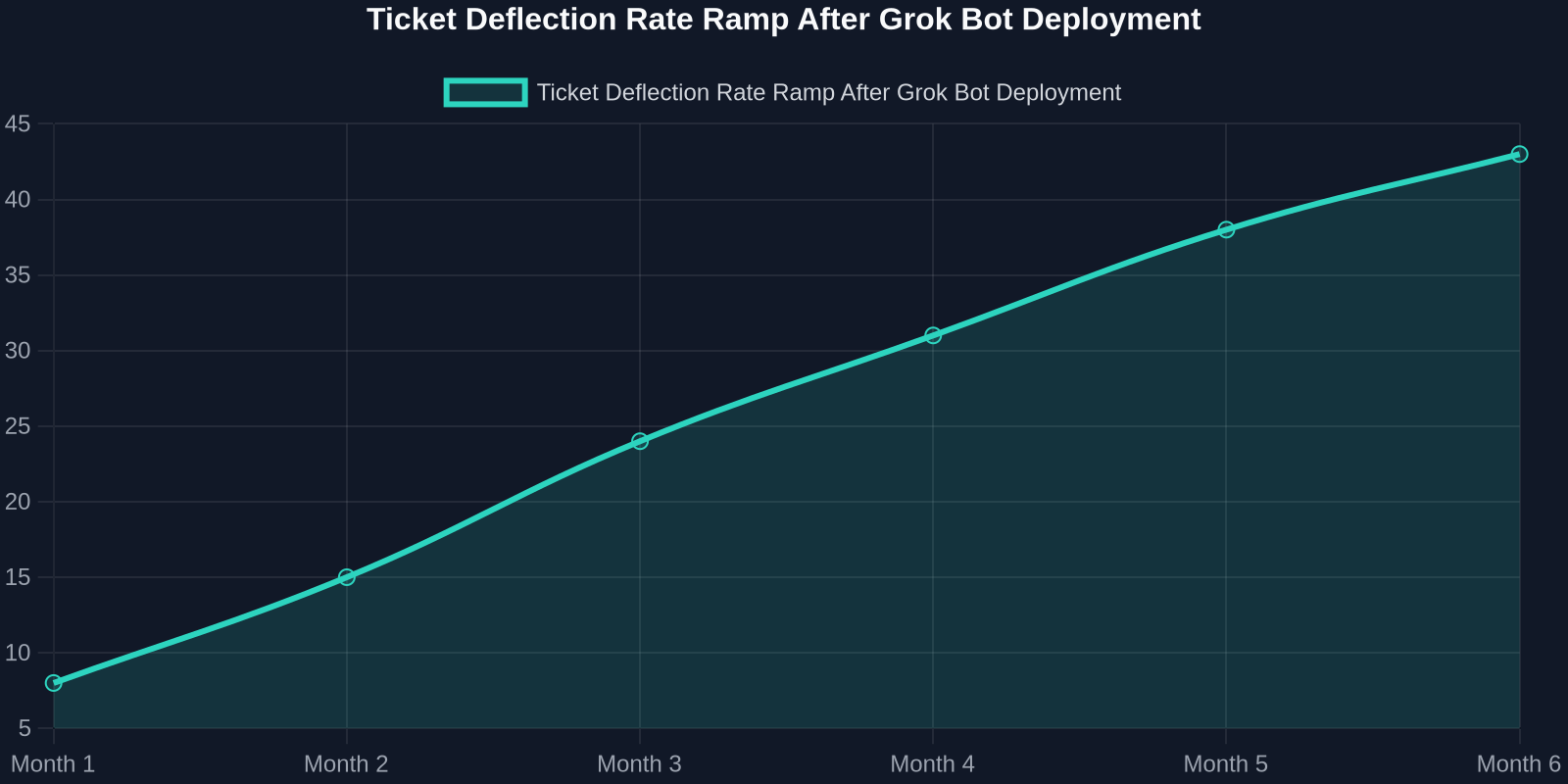
Early adopters of AI support agents report that automation handles 30–45% of total ticket volume within the first quarter, with deflection rates rising as the system learns from each interaction. That’s not a futuristic projection; it’s the operational benchmark many teams now use internally.
How Grok Bot Works in a Modern Support Workflow
A well-architected Grok Bot customer support flow typically follows four stages:
1. Ingestion & Knowledge Grounding
Grok Bot connects to your help center, product docs, billing FAQ, and historical ticket resolutions. Instead of answering from general internet knowledge, it grounds responses in your approved source material, reducing hallucination risk and maintaining brand voice.
2. Triage & Intent Detection
When a ticket arrives, the bot classifies intent (billing, onboarding, technical, feature request) and determines whether it can resolve the issue autonomously. Low-complexity, high-confidence intents are answered immediately; ambiguous or high-stakes cases route to a human.
3. Resolution & Deflection
For repetitive questions, Grok Bot generates a contextual response with links to help center articles, videos, or step-by-step instructions. If the customer indicates the answer didn’t help, the ticket escalates seamlessly, no dead ends.
4. Learning & Reporting
Every interaction becomes a data point. Team Bots share that learning across the team, improving future deflection and providing support leaders with reporting on containment rate, CSAT, and escalation reasons.
This four-stage process is what separates a proper AI support agent from a simple FAQ widget. The business value accumulates at stage 4: the system compounds, so week 8 performs better than week 1 without headcount expansion.
Key Features of Grok Bot for Customer Support
Based on xAI’s public announcements and product direction, several features make Grok Bot customer support relevant for B2B support teams:

- Shared Team Bots: Instead of each agent configuring a personal assistant, Team Bots operate as a shared AI coworker that learns from all team interactions.
- Deep LLM capabilities: Grok’s language model family is trained at scale, offering strong multi-turn reasoning and follow-up handling.
- Possible X/Grok subscription integration: xAI has signaled plans to integrate X and Grok into a unified subscription, which could make Grok Bot available across X DMs and customer conversations on the platform.
- Human-in-the-loop escalation: The product work emphasizes collaboration, not replacement, bots handle repetitive tickets and pass complex cases with full context.
The Business Case: Quantifying Grok Bot’s ROI
For support leaders, Grok Bot customer support isn’t a technology project; it’s a cost and retention decision. The most useful way to evaluate it is through four metrics: ticket deflection, first response time, cost per ticket, and CSAT.
A typical B2B SaaS support team handling 10,000 tickets per month at a fully loaded cost of $17 per human-resolved ticket spends roughly $170,000 monthly on support resolution. If Grok Bot deflects 40% of tickets at $2.50 each, the blended cost drops to about $111,000, a 35% reduction. That’s before accounting for faster response times and improved CSAT, which reduce churn and upsell friction.
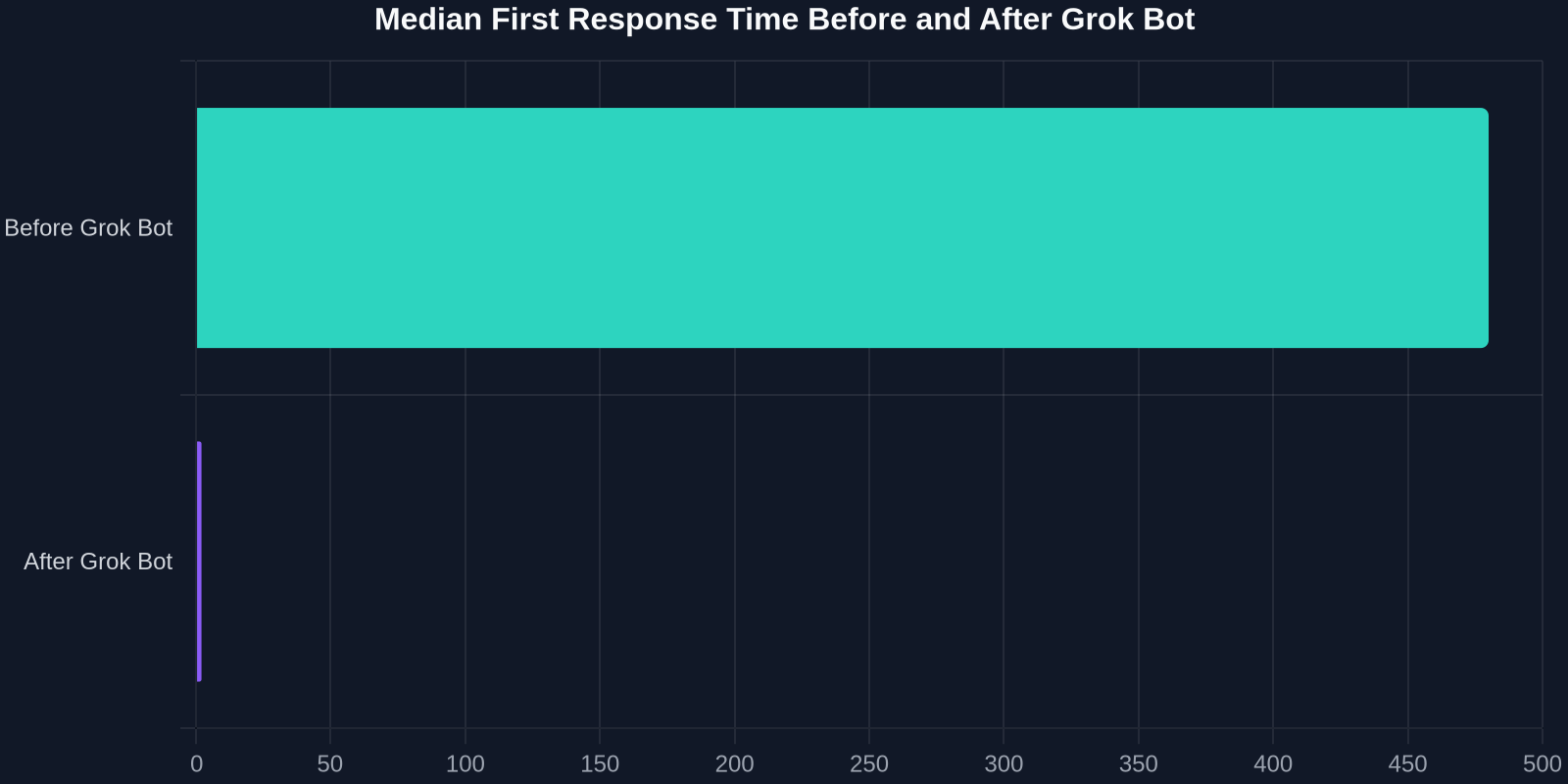
Before and After: Support Operations with Grok Bot
| Metric | Before Grok Bot | After Grok Bot |
|---|---|---|
| Median First Response Time | 8 hours | 2 minutes |
| Ticket Deflection Rate | 0% | 43% |
| Cost per Ticket | $17 | $2.50 |
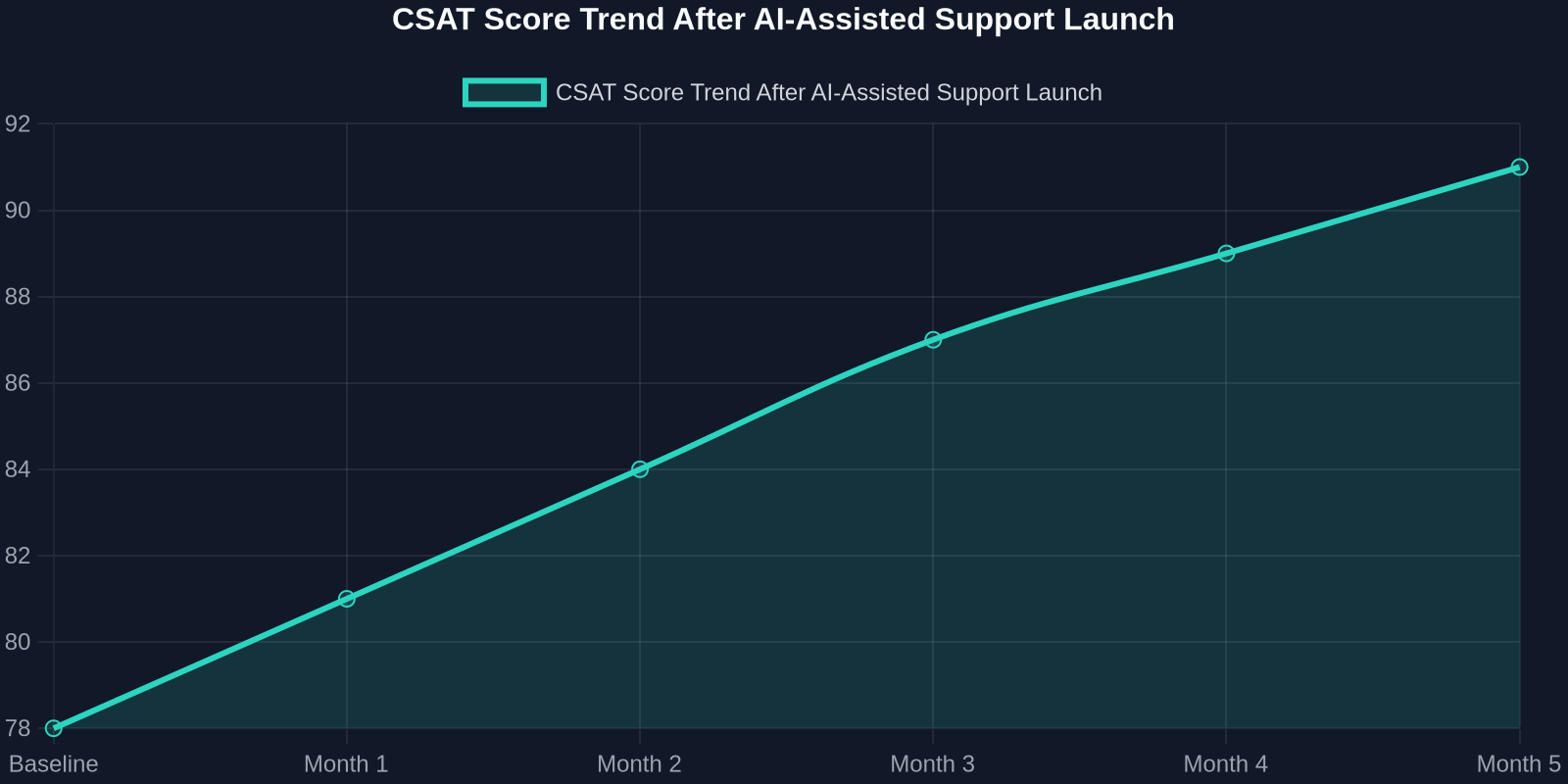
| CSAT Score | 78% | 91% |
| Agent Utilization on Complex Work | 32% | 68% |
These figures are representative benchmarks, not guaranteed outcomes. The actual impact depends on ticket mix, knowledge base quality, and escalation rules. But the pattern is consistent: AI support agents compress FRT, deflect repetitive tickets, and shift human effort toward high-value interactions.
Grok Bot vs. Successly and Other AI Support Platforms
When evaluating Grok Bot customer support, support operations specialists should compare it against purpose-built AI support platforms, not just raw LLM capability. Here’s a practical comparison framework:

| Capability | Grok Bot | Successly / AI Support Platforms |
|---|---|---|
| Core LLM | Grok family, broad and powerful | Optimized for support workflows |
| Shared Team Learning | Team Bots | Built-in knowledge base and deflection analytics |
| CSAT & SLA Reporting | Emerging | Native CSAT tracking, SLA routing, ROI dashboards |
| Human Escalation | Yes, with context | Yes, with guardrails and handoff playbooks |
| Deployment Speed | May require internal engineering | Fast, no-code / low-code configuration |
The point isn’t that one is universally better; it’s that support teams should buy based on operational outcomes, not model benchmarks. A platform with built-in CSAT tracking, ticket deflection reporting, and human-in-the-loop guardrails often reaches ROI faster than a general-purpose LLM that must be wired into support infrastructure.
Implementation Checklist: Deploying Grok Bot Without Breaking Your Support Ops
A phased rollout minimizes risk and maximizes learning. Use this checklist to structure your Grok Bot customer support deployment:
- Audit ticket categories for 30 days. Identify the top 10 intents by volume and resolution complexity.
- Pick one deflection category. Start with a single high-volume, low-complexity category (billing FAQ, password reset, status check).
- Connect knowledge sources. Ensure your help center and internal docs are current; stale content degrades AI accuracy.
- Define escalation rules. Set clear thresholds: billing disputes, security issues, and VIP customers always route to humans.
- Turn on CSAT and containment tracking. Measure deflection rate, FRT, CSAT, and escalation reasons from day one.
- Review weekly for the first month. Adjust tone, guardrails, and knowledge gap coverage based on real transcripts.
- Expand to 2–3 more categories. Only after containment and CSAT hold steady above targets.
Risks, Limitations, and How to Mitigate Them
No AI support system is risk-free. Grok Bot customer support deployments should account for four risks:
- Hallucination and off-brand responses. Large models can generate plausible but incorrect answers. Mitigation: strict knowledge grounding, response confidence thresholds, and human review for new or low-confidence intents.
- Guardrail bypass. Recent reports around Grok’s guardrails highlight the importance of continuous red-teaming and content policy enforcement in customer-facing contexts.
- Over-automation. Deflecting too aggressively can frustrate high-value customers. Mitigation: segment customers by tier and lifetime value, and route VIPs to humans proactively.
- Privacy and data residency. Customer support tickets contain PII and billing data. Ensure your deployment complies with SOC 2, GDPR, and contractual commitments.
Successful teams treat AI as a collaborator with guardrails, not an autonomous replacement. The goal is to shrink repetitive work while preserving human judgment for delicate or high-stakes situations.
The Future of Grok Bot and AI Customer Support
xAI’s broader moves tell a clear story. Reports indicate SpaceXAI is planning a new subscription service that will integrate X and Grok, possibly into a four-tier pricing system. If Grok Bot becomes natively available inside X DMs and customer conversations, support teams using X as a support channel would get a direct, low-friction AI layer.
Grok Bot’s promise isn’t just faster replies; it’s turning support from a cost center into a retention engine.
At the same time, Team Bots represent a longer-term shift toward agentic support, AI teammates that don’t just answer questions but take actions: updating account settings, issuing refunds under policy, scheduling calls, and proactively reaching out when adoption drops. As LLMs improve, the boundary between support chatbot and support operator will blur.
The teams that win won’t be those with the most advanced model alone. They’ll be the ones that ground AI in clean knowledge bases, measure deflection and CSAT relentlessly, and maintain human escalation paths that reinforce trust. Grok Bot customer support is one credible route to that future, but it’s the operating discipline, not the logo on the model, that determines ROI.
Conclusion: Should Your SaaS Team Adopt Grok Bot Customer Support?
If your support team handles thousands of repetitive tickets monthly, Grok Bot customer support is worth evaluating. The business case is strong: deflection rates of 30–45%, first response times in minutes, and blended cost per ticket below $10 are achievable with disciplined rollout. But don’t buy on hype. Evaluate Grok Bot against purpose-built AI support platforms that offer native CSAT tracking, escalation playbooks, and fast deployment.
Bottom line: Grok Bot customer support signals where the market is heading, shared AI teammates that learn as your team works. Whether you choose Grok Bot or a specialized AI support platform, the mandate is the same: automate the repetitive, escalate the complex, and measure everything. If you want a support AI that turns those principles into measurable CSAT and deflection gains, Successly is built for exactly that.