
Hidden Help: The Critical Lesson for SaaS Support Teams from WhatsApp's Stealth Instructions
In a revealing October 2026 report, cybersecurity and tech journalists at The Hacker News uncovered something peculiar: WhatsApp had embedded detailed, privacy-focused instructions for users directly within its app's help pages. The instructions, covering nuanced settings for disappearing messages, backup encryption, and advanced two-step verification, were technically present. The problem? Almost nobody found them.
This isn't a story about WhatsApp's interface design. It’s a universal parable for every SaaS founder, support team lead, and customer success manager relying on a "build-it-and-they-will-come" model for self-service support. When your help content is a hidden treasure chest, the cost isn't just user frustration, it’s measured in thousands of redundant support tickets, churning customers, and a support team drowning in Level 1 (L1) queries they were never meant to handle.
At Successly, we see this pattern daily. Companies invest heavily in building comprehensive knowledge bases, elaborate FAQ sections, and interactive walkthroughs. Yet, their support queues remain clogged with questions like "How do I reset my password?" or "Where is the billing tab?" The missing link is almost always discoverability. Let’s break down the hidden cost of “stealth support” and how to build a system that actively deflects tickets before they’re even written.
The High Cost of a “Field of Dreams” Support Strategy
WhatsApp’s approach, placing critical security configuration steps in a static, hard-to-navigate menu, mirrors the “Field of Dreams” fallacy in SaaS: "If you build it, they will come." In a product environment where milliseconds dictate user retention, this passive strategy is a revenue leak. Users do not read manuals; they scan, they search, and if they fail to find an answer instantly, they hit the “Contact Support” button or, worse, they silently churn.
The Ticket Deflection Gap
For a mid-market B2B SaaS company with a $50k average contract value (ACV), the economics of hidden help are brutal. A single L1 support interaction, handling a question that exists in a knowledge base article, costs roughly $15 to $40 in fully loaded agent time. If the article remains undiscovered, that cost is incurred hundreds of times over. For a growing scale-up processing 5,000 tickets a month, a 20% deflection failure rate translates to a direct operational burn of over $15,000 monthly. That’s capital stolen from product innovation and customer success initiatives that drive expansion revenue.
| Metric | Static Help Center (Hidden) | AI-Proactive Self-Service |
|---|---|---|
| Content Discovery Rate | < 15% of users | > 65% of users |
| L1 Ticket Volume | High (55-70% of queue) | Low (15-25% of queue) |
| Average Resolution Time | 8+ hours (human-dependent) | < 2 minutes (automated) |
| Customer Effort Score | High (frustrating search) | Low (instant answer) |
| Support Cost per Ticket | $15 - $40 | $0.50 - $2.00 |
Why Users Miss Your Help Content: The UX of Discovery
The WhatsApp case study is a masterclass in failed content discovery. They had the content, but the architecture failed. This happens in SaaS for three core reasons: passive placement, semantic disconnection, and lack of context.

1. Passive Placement vs. Proactive Interception
Traditional support relies on a detached help widget, a small question mark in the corner of the screen. A user experiencing a payment failure doesn’t want to leave the checkout flow to browse a generic knowledge base. They want the answer inside the checkout flow. Hidden help pages, like WhatsApp’s security instructions buried in a general settings menu, fail because they demand context-switching. Proactive interception, powered by AI, identifies the user’s “moment of friction” (error page, repeated failed action) and surfaces the specific article in situ, stopping the ticket at its source.
2. Semantic Search Failure: Keywords vs. Intent
A user searching for “delete chat permanently” won’t find WhatsApp’s article titled “Managing Disappearing Messages Retention Policy.” This semantic gap is the silent killer of self-service. Support content written by product teams often uses internal taxonomy, not the vocabulary of a frustrated user. Modern AI-powered support platforms close this gap by using natural language processing (NLP) to match user intent with documentation, regardless of keyword mismatch.
3. The "Logged-Out" Blind Spot
Many SaaS companies hide their help documentation behind a login wall. If a user is locked out due to two-factor authentication failure, they cannot access the help article explaining how to recover their account. This creates a Kafkaesque support trap that drives furious calls to sales reps and emergency emails. Your critical troubleshooting content must exist in an unauthenticated, easily indexable layer that an AI chatbot can serve without requiring a session token.
From Static Repository to Revenue Protector: Rethinking Self-Service
The solution to the “hidden help” crisis is not simply “write more articles.” It’s a strategic shift from a static repository to a revenue protection layer. For B2B SaaS, the support function must evolve from a cost center into a proactive churn-prevention and adoption engine. This requires three architectural changes in how you deploy and manage your help content.
1. Contextual Embedding: The Right Answer, Right Now
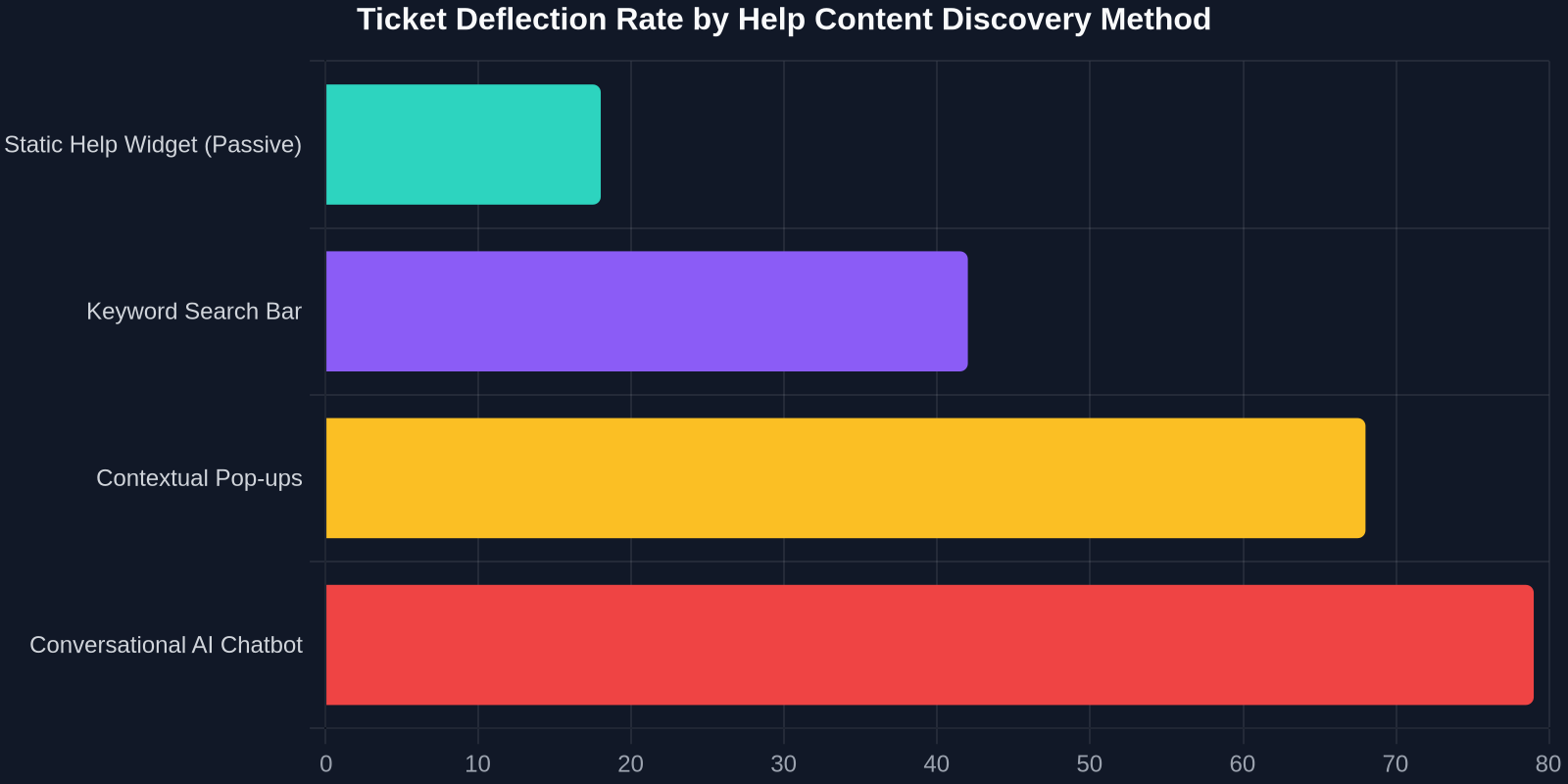
Your application knows the user’s state. It knows their plan tier, their permission level, and the specific screen they are viewing. Using this metadata, your self-service AI can filter help results to show only the documentation relevant to that user on that screen. An enterprise admin viewing the SSO configuration page should never see a knowledge base article for a solo-preneur’s email login setup. Contextual embedding lifts deflection rates from an average of 20% to over 60% by eliminating the noise of irrelevant information. It’s the difference between a messy warehouse and a neatly curated shelf.
2. Conversational AI as the Front Door
A search bar is a high-effort interface. When a user is stressed, typing out a coherent search query with proper syntax is cognitively taxing. A conversational AI interface allows for fractured input: “my report is missing data from yesterday, help.” Successly’s AI agents parse this low-quality input, handling spelling errors, vague references, and emotional venting, to retrieve the guide on refreshing dataset caches. By removing the cognitive load, you democratize access to help content, covering users with varying levels of technical literacy.
3. The Content Decay Audit: Automated Freshness
WhatsApp’s help pages might contain outdated screenshots from UI versions released three years ago. In fast-shipping SaaS, stale documentation is worse than no documentation, it actively creates confusion and mistrust. An automated content decay audit process, using AI to compare documentation text against live UI elements, flags outdated steps before they generate a wave of “broken” tickets. This proactive content hygiene closes the gap between product releases and support readiness, a gap that manual review processes consistently fail to bridge.
Building the “No-Ticket” Funnel: A Playbook for SaaS Leaders
The WhatsApp story reinforces a brutal reality: if your support content is a scavenger hunt, you are buying tickets in bulk. To transform your help center from a hidden archive into a deflector shield, you need to operationalize a “No-Ticket” funnel. Here’s the playbook our customers use to slash L1 volumes by over 40% within a quarter.

Step 1: Map the “Friction Heatmap”
Stop guessing what users need help with. Run a heatmap analysis of your application logs combined with support ticket tags. Identify the Top 10 “Breakdown” Screens, pages where user rage-clicks spike and sessions end abruptly. These are your trigger zones. For each breakdown screen, map the specific ticket topic that follows (e.g., “Export Failed” leads to a ticket about “File Format Requirements”).
Step 2: Inject Micro-Content Interceptors
Create dense, 40-word help interceptors, we call them “Snippets”, and inject them directly into the breakdown screens via an AI layer. A dialogue bubble that says, “Invoice Export Failed? Most browsers block pop-ups. Click here to allow downloads,” resolves the issue in seconds. The key is specificity. Generic banners like “Need Help?” are ignored. Snippet interceptors mimic the precision of a senior support engineer whispering over the user’s shoulder.
Step 3: Create the Escalation Escape Hatch
AI deflection must handle the nuance of “husky, N0RP 0th3r”, the non-standard cases. Design your AI handler to recognize when it has failed. After two loop cycles, it must not keep spinning. It must compile a perfect handoff summary, "User John on Enterprise Plan, stuck on Step 3 of API setup, received Error Code 403. Suggested article KB-451 did not resolve", and warm-transfer it to a human agent. This eliminates the repetitive data gathering that humans hate and transforms the handoff from a cold escalation into a warm, informed conversation.
Step 4: Close the Loop with “Ghost Tickets”
Track everything the AI resolves before a human sees it as a “Ghost Ticket.” Analyze this pool weekly. If ghosts cluster around a specific feature, say, a new dashboard filter, the product team receives a signal to redesign the UX, not just update the help text. This turns support data into a product intelligence stream, fixing the root cause permanently.
The Economic Argument: Switching from “Hidden” to “Visible”
For the financially-minded Chief Customer Officer, the transition away from hidden, static help is a clear ROI win. Let’s model the unit economics. A scale-up with 500 support tickets per day, averaging a $25 fully loaded human-resolution cost, spends roughly $12,500 per day on support operations. By moving even 40% of those tickets to a visible, contextually-aware AI resolution layer at a cost of $0.50 per resolution, the daily operational cost drops to $7,600, a daily savings of $4,900.
Annualized, that’s over $1.2 million returned to the business. But the hidden impact is even greater on retention. A user stuck on a “simple” task for 45 minutes while searching unsuccessfully in a static help center has a Customer Effort Score (CES) that is sky-high. High effort correlates almost perfectly with churn in subscription models. Reducing effort by surfacing invisible help is a retention play masked as a support play.
Successly: The Anti-Hidden-Help Architecture
The WhatsApp scenario is precisely what Successly is designed to prevent. We don’t just hold your knowledge base; we push it to the frontlines. Our AI engine sits as a semantic layer between your raw documentation and the user’s real-time behavior. It intercepts the “hidden” status by doing three things that a static .html page cannot do:

- Intent Detection Over Keyword Reliance: We process the user’s natural language, even misspelled, incomplete rants, and vectorize it against your knowledge base to find the mathematically closest resolution path.
- Proactive Triggering: Error codes, idle time on complex forms, and repeated failed actions trigger the Successly widget to pop out contextually before the user has to search. We surface the hidden instructions that WhatsApp users couldn’t find.
- Human-in-the-Loop Intelligence: When the AI hits a confidence threshold, it seamlessly pulls in a human agent with full context. There is no dead-end frustration; there is only a graceful handoff with zero repetition.
"The future of support isn't a larger knowledge base; it's an invisible layer of intelligence that ensures the right knowledge finds the user at the exact moment of need."
Actionable Checklist: Exposing Your Company’s Hidden Help
To prevent your organization from repeating WhatsApp’s mistake, conduct a “Hidden Help Audit” this week. Complete these five tasks:
- Logout Mystery Shop: Log out of your product and try to solve five common locked-out scenarios. If you can’t access the help without logging in, you’ve failed the audit.
- SEM Check: Type the top 10 words your users use in support tickets into your help center search. Does the correct article rank in the top 3 results? If not, your NLP tagging is broken.
- Rage-Click Analysis: Pull your product analytics for screens with >3 rapid clicks in 2 seconds. Check if a contextual help trigger exists on those screens. No trigger = hidden help.
- Content Currency Score: Randomly sample 20 knowledge base articles. Check them against live UI for button label accuracy. Stale screenshots = confidence killers.
- Cost Leak Calculation: Ask your support ops team to calculate the exact cost of "Answered by Existing KB" tickets. If this number is high, you are paying for discoverability failure.
Conclusion: Visibility is a Product Feature, Not an Appendix
WhatsApp’s stealth help pages are a symptom of a systemic disconnect between content creation and content consumption. In the SaaS industry, support content is often treated as a compliance checkbox, an appendix to the product. The data, however, is unambiguous: discoverable, proactive help is a core product feature that directly impacts net revenue retention. By turning on the lights in your help center with AI-driven, contextual delivery, you don’t just save your support team’s time. You save your customers from the silent frustration that erodes trust and ends subscriptions.
Stop hiding your best answers. Surface them, inject them, and let AI be the guide that walks every user home.