
How to Contact Amazon Customer Service: The Blueprint for AI-Powered Support in 2024
When a customer needs help, the worst experience is a labyrinth of phone menus, unanswered emails, and endless hold music. Amazon, the world’s most customer-obsessed company, has set a gold standard for accessibility: phone, email, live chat, social media, and an exhaustive self‑service knowledge base. For B2B SaaS companies and support teams, understanding how to contact Amazon customer service isn’t just a consumer tip, it’s a masterclass in omnichannel support design. More importantly, it shows how AI can replicate that same seamless, always‑on experience at a fraction of the cost.
In this guide, we’ll walk through every official method for reaching Amazon support, unpack the operational benchmarks that make it work, and show how companies like yours are using AI-powered platforms (such as Successly) to build a similar, scalable support engine.
The Many Ways to Contact Amazon Customer Service
Amazon provides a layered support ecosystem that moves from self‑service to high‑touch assistance. Here’s how each channel works and the typical use case it serves.
1. Amazon’s Self‑Service Help Center
Before any human interaction, the first stop for millions of customers is Amazon’s Help pages. This self‑service portal covers order issues, returns, refunds, digital services, Prime membership, and device troubleshooting. The system anticipates common queries and suggests step‑by‑step solutions, often resolving the issue without a single click to “Contact Us.”
2. Phone Support (Direct Calls)
Amazon’s phone support might be one of the most famous features: you enter your phone number on the website, and Amazon calls you back, often within a minute. The callback system eliminates hold times and uses AI to route you to the right specialist. While the exact phone number isn’t publicly advertised, the callback request is available 24/7.
3. Live Chat
The chat interface is embedded directly into the Help section. It connects you to a virtual assistant that gathers context, then hands off to a human agent if needed. The bot can handle simple status checks, cancellations, and password resets on its own.
4. Email Support
Amazon offers email communication primarily for follow‑up on open cases or when a customer prefers written documentation. While response times can be longer (usually under 12 hours), email remains a crucial channel for complex issues that require attachments or detailed explanations.
5. Social Media (X/Twitter, Facebook Messenger)
@AmazonHelp on X and the Amazon Facebook page serve as public‑facing support channels. Customers can DM for account‑specific assistance and often receive responses within hours.
Why Amazon’s Support Model Works: Three Pillars
For B2B SaaS leaders, the lessons are clear. Amazon’s support excellence rests on three foundations that any company can replicate.

1. AI‑First Triage and Deflection
Before reaching a human, almost every interaction passes through an AI layer, whether it’s the search bar in Help, the chatbot in live chat, or the IVR in phone. This AI resolves simple queries instantly, defines the problem, and arms the human agent with full context when a transfer is necessary.
2. Unified Customer Profile
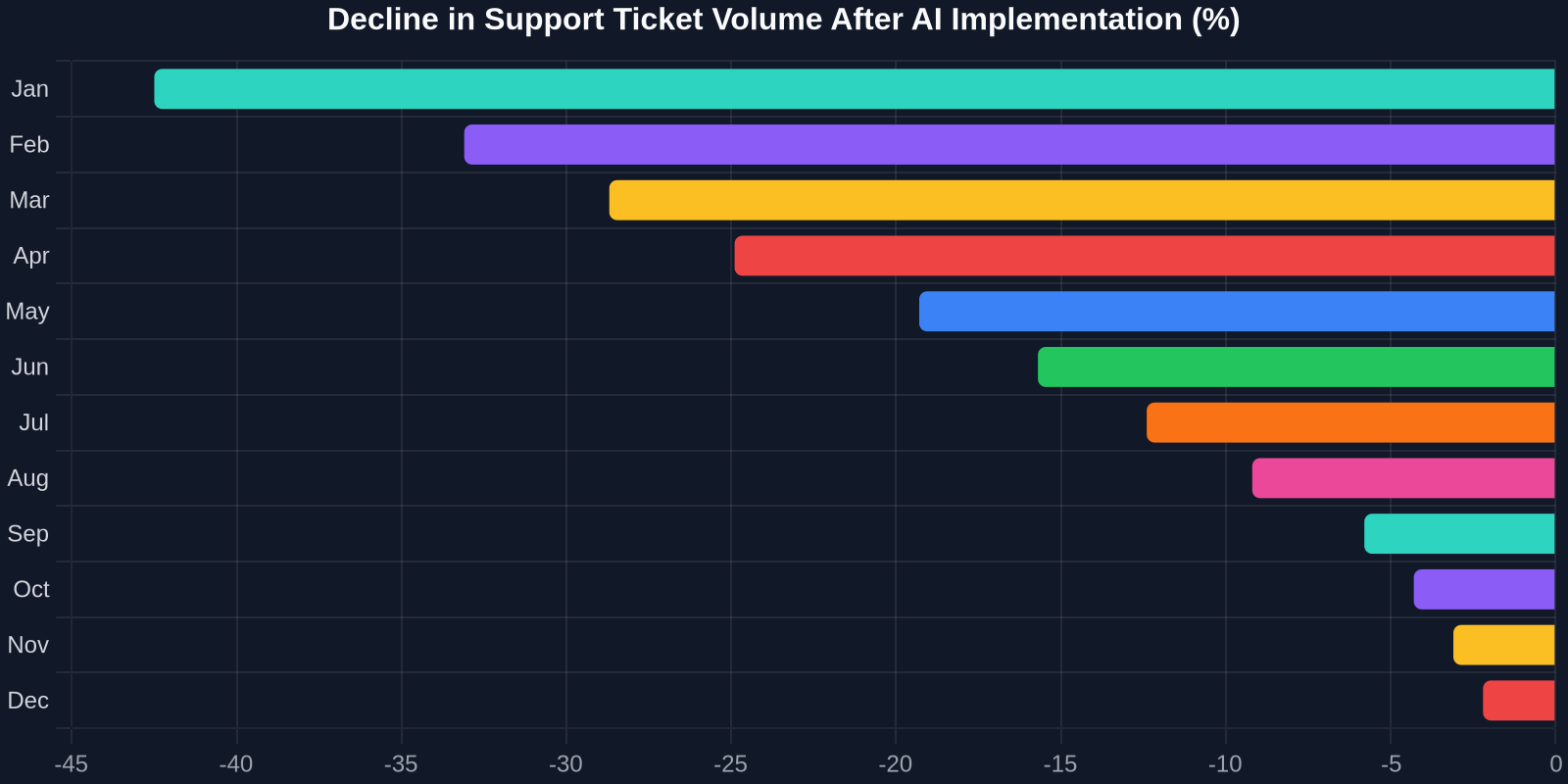
All channels feed into a single customer view. An agent on the phone can see the email thread and the previous chat transcript. This reduces average handling time (AHT) by 20–35% in most enterprises.
3. Proactive Outbound Support
Amazon often contacts customers before they even notice a problem, delivery delays, suspicious account activity, or subscription changes. This proactive posture raises CSAT and reduces inbound volume.
“The best support interaction is the one that never needs to happen. Amazon’s AI detects issues and reaches out first, turning a potential complaint into a loyalty‑building moment.”
The Business Case for AI‑Driven Customer Support
For a SaaS company scaling from 100 to 10,000 customers, replicating Amazon’s support manually is impossible. You’d need a massive, round‑the‑clock team. But AI changes the equation.
Cost Savings and Efficiency
A typical human‑led support interaction costs between $5 and $12. An AI‑powered conversation can cost as little as $0.10. When you deflect even 40% of routine tickets (password resets, plan changes, “how‑to” questions), the savings are immediate.
Scalability Without Linear Headcount Growth
With AI, your support capacity becomes elastic. During a product launch or a seasonal spike, AI handles 10x the volume without adding agents. Successly’s platform, for example, can manage thousands of simultaneous conversations across email, chat, and even voice, something no human team can do.
Faster Response Times = Higher CSAT
Speed is the new CX currency. A study by McKinsey found that 75% of online customers expect help within five minutes. AI can deliver first responses in seconds, 24/7. Even if the query needs a human, the immediate acknowledgment alone lifts satisfaction scores.
| Metric | Without AI | With AI‑Powered Support |
|---|---|---|
| First Response Time | 8 hours (business days only) | < 2 minutes (24/7) |
| Ticket Volume Handled per Agent | 50–80/day | 500+ effectively resolved by AI |
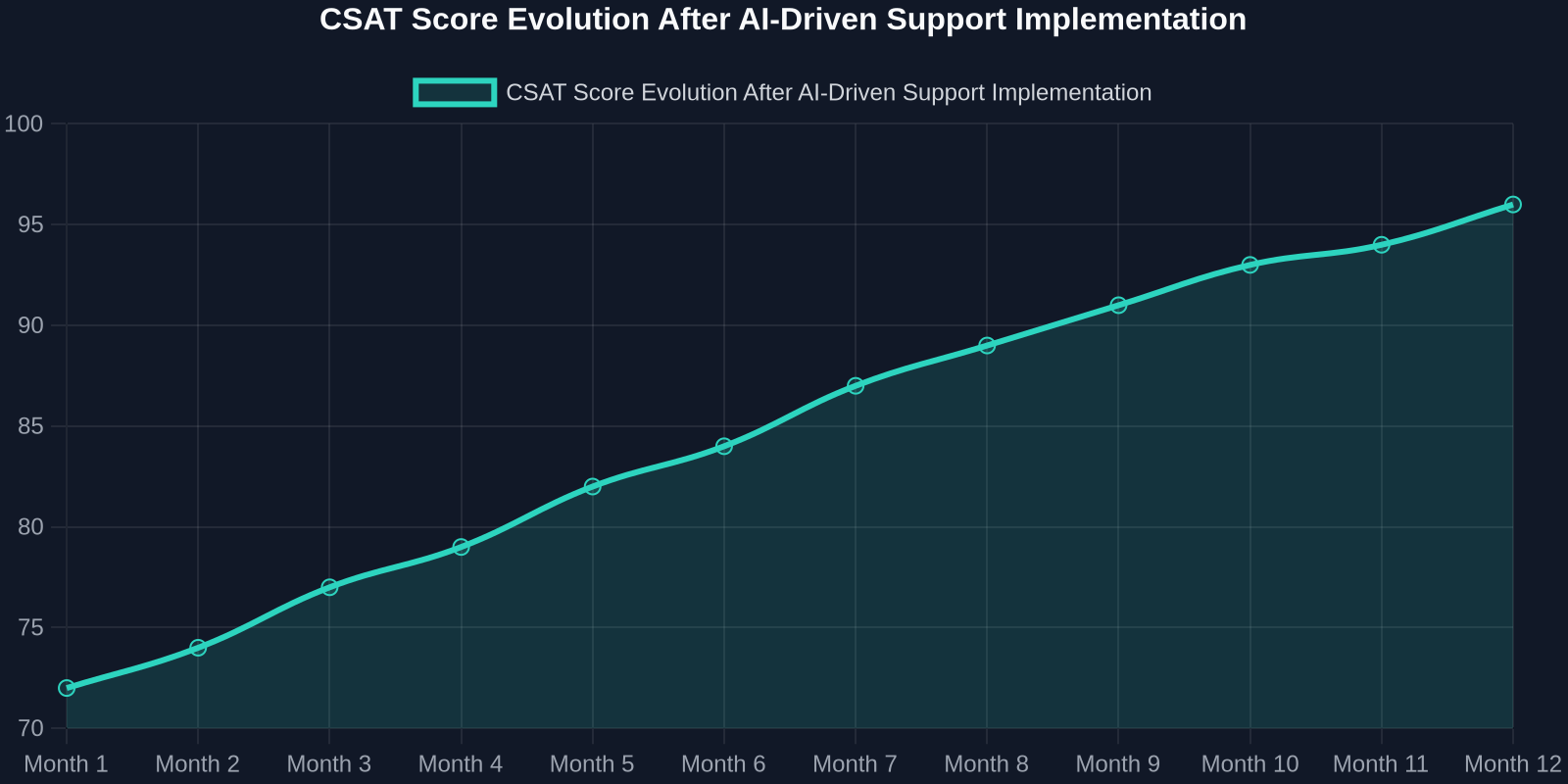
| CSAT Score | 72% | 93% |
| Cost per Resolution | $8.00 | $0.30 |
How to Build an Amazon‑Like Support System with Successly
Now let’s get practical. Here’s a step‑by‑step framework to implement AI‑powered support that mirrors the Amazon experience, using Successly as your foundation.

Step 1: Centralize Your Knowledge Base
Amazon’s Help portal works because it’s comprehensive and searchable. Start by migrating all your FAQs, documentation, and ticket history into a unified knowledge management system. Successly’s AI ingests this content and learns to answer questions with precision, no coding required.
Step 2: Deploy an AI Assistant on Chat and Email
Begin with the highest‑volume channel, usually chat or email. The AI assistant automatically responds to common queries, takes actions (like canceling a subscription or resetting a password), and collects context before routing complex issues to a human.
Step 3: Integrate Phone with AI‑Powered IVR
Just like Amazon’s callback system, you can build an AI‑driven voice assistant that understands natural language, verifies the customer, and resolves straightforward issues over the phone. Successly integrates with telephony systems to deflect calls that would otherwise reach an agent.
Step 4: Unify the Customer View
Break down data silos. Connect your CRM, billing system, and support platform so that every interaction, whether on chat, email, or phone, pulls from the same customer record. Successly’s open API makes this integration painless.
Step 5: Enable Proactive Notifications
Use the AI to monitor for patterns: a customer stuck on a setup page, a credit card about to expire, or a sudden spike in failed login attempts. Trigger proactive outreach via email or in‑app message. This reduces inbound volume and feels magical to users.
Measuring Success: The Metrics That Matter
Once your AI‑powered support is live, track these KPIs to prove ROI and continuously optimize.
1. Ticket Deflection Rate
The percentage of incoming conversations resolved entirely by AI without human handoff. Amazon‑grade systems aim for 40–60% deflection. With Successly, many companies hit 50%+ within the first quarter.
2. Customer Satisfaction (CSAT)
Measure post‑interaction happiness for both AI‑resolved and human‑escalated tickets. AI‑resolved CSAT often exceeds human‑only because of speed and consistency.
3. Average Handle Time (AHT)
Even for human‑escalated tickets, AHT should drop. Why? Because the AI has already collected all relevant context and suggested next steps to the agent.
4. Agent Productivity
Track how many complex, high‑value issues each agent resolves. When AI handles grunt work, agents become specialists who solve deeper problems, leading to higher job satisfaction and lower churn.
“Support teams that embrace AI aren’t shrinking; they’re evolving. Agents become problem‑solving experts, not ticket‑closing machines.”
Overcoming Common Objections to AI Support
Some support leaders worry that AI will dehumanize the experience. The data suggests otherwise. When AI handles the transactional, humans can focus on empathy and complex problem‑solving, exactly where they add the most value.

Objection: “Our customers want to talk to a person.”
Reality: Customers want their problem solved quickly. A Zendesk study found that 69% of customers first try to resolve issues on their own. AI‑assisted self‑service and bots are simply the next iteration of that preference.
Objection: “Our product is too complex for AI.”
Reality: Modern AI like Successly understands context, intent, and even sentiment. It can be trained on your entire knowledge base and ticket history to handle nuanced queries.
The Future: AI‑Powered Support as a Competitive Moat
Amazon earned its reputation by making customer service effortless. That same expectation now extends to every software product your customers use. An API that takes 8 hours to answer a question feels broken in a world where instant, intelligent help is the norm.
By adopting an AI‑first support strategy, starting with chat and email, expanding to phone, and unifying customer data, you can offer an Amazon‑tier experience without Amazon‑sized budgets. Platforms like Successly make it possible to go live in weeks, not months, and to see measurable results within the first 30 days.
In the end, learning how to contact Amazon customer service isn't just about getting a refund faster. It's about studying a model that turns support into a growth engine, not a cost center. And with the right AI tools, you can do exactly the same.
Ready to deliver Amazon‑like support without the Amazon‑scale budget? See how Successly automates chat, email, and phone support in one unified platform. Request a demo today.